
 Sign in to Mod The Sims
 elegant hair
SCREENSHOTS


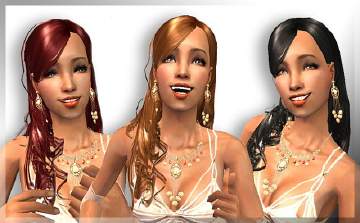
HairPic.JPG - width=434 height=544
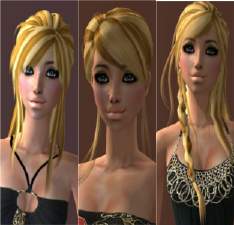
PlatHairPic1.JPG - width=314 height=444
Downloaded 5,924 times
595 Thanks
32 Favourited
57,431 Views
Say Thanks!
Thanked!
here are four colours of my elegant hairstyle. i no it's not perfect but i think it's ok...  I think elegancebrownhair is actually red but brown elegance should be brown.
 I think elegancebrownhair is actually red but brown elegance should be brown.
This is a Maxis Recolour which means that it is a recolour of an item that already exists in your game. Please check the Pack requirements to see which game pack it recolours.
|
AllHair.zip
Download
Uploaded: 9th Feb 2006, 3.29 MB.
17,255 downloads.
|
||||||||
|
platinumEleganceHair.zip
Download
Uploaded: 8th Feb 2006, 589.0 KB.
5,364 downloads.
|
||||||||
|
eleganceBrownHair.zip
Download
Uploaded: 6th Feb 2006, 768.2 KB.
5,669 downloads.
|
||||||||
|
eleganceBlackHair.zip
Download
Uploaded: 6th Feb 2006, 648.8 KB.
6,294 downloads.
|
||||||||
|
EleganceBlonde.Hair.zip
Download
Uploaded: 6th Feb 2006, 688.1 KB.
7,040 downloads.
|
||||||||
|
Brown Elegance.zip
Download
Uploaded: 6th Feb 2006, 674.2 KB.
7,552 downloads.
|
||||||||
| For a detailed look at individual files, see the Information tab. | ||||||||
Install Instructions
Basic Download and Install Instructions:
1. Download: Click the download link to save the .rar or .zip file(s) to your computer.
2. Extract the zip, rar, or 7z file.
3. Place in Downloads Folder: Cut and paste the .package file(s) into your Downloads folder:
1. Download: Click the download link to save the .rar or .zip file(s) to your computer.
2. Extract the zip, rar, or 7z file.
3. Place in Downloads Folder: Cut and paste the .package file(s) into your Downloads folder:
- Origin (Ultimate Collection): Users\(Current User Account)\Documents\EA Games\The Sims™ 2 Ultimate Collection\Downloads\
- Non-Origin, Windows Vista/7/8/10: Users\(Current User Account)\Documents\EA Games\The Sims 2\Downloads\
- Non-Origin, Windows XP: Documents and Settings\(Current User Account)\My Documents\EA Games\The Sims 2\Downloads\
- Mac: Users\(Current User Account)\Documents\EA Games\The Sims 2\Downloads
- Mac x64: /Library/Containers/com.aspyr.sims2.appstore/Data/Library/Application Support/Aspyr/The Sims 2/Downloads
- For a full, complete guide to downloading complete with pictures and more information, see: Game Help: Downloading for Fracking Idiots.
- Custom content not showing up in the game? See: Game Help: Getting Custom Content to Show Up.
- If you don't have a Downloads folder, just make one. See instructions at: Game Help: No Downloads Folder.
Loading comments, please wait...
Author

Download Details
Packs:
None, this is Sims 2 base game compatible!
Uploaded: 6th Feb 2006 at 8:53 AM
Updated: 9th Feb 2006 at 5:17 AM
Uploaded: 6th Feb 2006 at 8:53 AM
Updated: 9th Feb 2006 at 5:17 AM
Other Download Recommendations:
-
-
-
-
by Rayne00000 22nd Oct 2005 at 11:14pm
-
-
-
-
-
-

More downloads by kiwi_chicc:
See more
-

by kiwi_chicc 25th Feb 2006 at 10:19am
Here are four formal dresses for teens. I shall be uploading some better pictures as soon as i can. more...
-
by kiwi_chicc 4th Feb 2006 at 4:23am
Here are 4 funky Pjs. :) please ask if u want more patterns or colours! more...
