
 Sign in to Mod The Sims
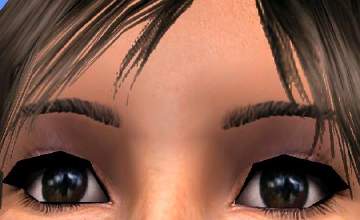
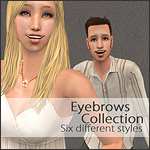
 XM Custom Colors Eyebrows
 XM Custom Colors Eyebrows


1.jpg - width=791 height=994
2.jpg - width=758 height=948
3.jpg - width=601 height=748
There are 9 colors
Light Blue Green (bgreenlt)
Blue
Green
Pink
Purple
Light Purple (purplelt)
Rose
Silver
If you want all 9 colors download the XM_CustomColors_Eyebrows file
Additional Credits:
Model Credits:
Eyes, Eyeshadow, and Lips by bruno
http://www.modthesims2.com/member/bruno
The Blush is by SussisSoGoodSims
http://www.modthesims2.com/showthread.php?t=210108
The Hair I used was XMsims hair #72
http://www.xmsims.com/sims2/ehtm/hair/hair72.htm
|
XM_silver.zip
Download
Uploaded: 22nd Dec 2007, 53.4 KB.
836 downloads.
|
||||||||
|
XM_rose.zip
Download
Uploaded: 22nd Dec 2007, 56.6 KB.
663 downloads.
|
||||||||
|
XM_purplelt.zip
Download
Uploaded: 22nd Dec 2007, 54.9 KB.
571 downloads.
|
||||||||
|
XM_purple.zip
Download
Uploaded: 22nd Dec 2007, 51.0 KB.
619 downloads.
|
||||||||
|
XM_pink.zip
Download
Uploaded: 22nd Dec 2007, 55.3 KB.
689 downloads.
|
||||||||
|
XM_green.zip
Download
Uploaded: 22nd Dec 2007, 50.3 KB.
636 downloads.
|
||||||||
|
XM_bluelt.zip
Download
Uploaded: 22nd Dec 2007, 50.7 KB.
595 downloads.
|
||||||||
|
XM_blue.zip
Download
Uploaded: 22nd Dec 2007, 49.3 KB.
750 downloads.
|
||||||||
|
XM_bgreenlt.zip
Download
Uploaded: 22nd Dec 2007, 54.3 KB.
603 downloads.
|
||||||||
|
XM_CustomColors_EyeBrows.zip
Download
Uploaded: 22nd Dec 2007, 478.2 KB.
2,765 downloads.
|
||||||||
| For a detailed look at individual files, see the Information tab. | ||||||||
Install Instructions
1. Download: Click the download link to save the .rar or .zip file(s) to your computer.
2. Extract the zip, rar, or 7z file.
3. Place in Downloads Folder: Cut and paste the .package file(s) into your Downloads folder:
- Origin (Ultimate Collection): Users\(Current User Account)\Documents\EA Games\The Sims™ 2 Ultimate Collection\Downloads\
- Non-Origin, Windows Vista/7/8/10: Users\(Current User Account)\Documents\EA Games\The Sims 2\Downloads\
- Non-Origin, Windows XP: Documents and Settings\(Current User Account)\My Documents\EA Games\The Sims 2\Downloads\
- Mac: Users\(Current User Account)\Documents\EA Games\The Sims 2\Downloads
- Mac x64: /Library/Containers/com.aspyr.sims2.appstore/Data/Library/Application Support/Aspyr/The Sims 2/Downloads
- For a full, complete guide to downloading complete with pictures and more information, see: Game Help: Downloading for Fracking Idiots.
- Custom content not showing up in the game? See: Game Help: Getting Custom Content to Show Up.
- If you don't have a Downloads folder, just make one. See instructions at: Game Help: No Downloads Folder.
Loading comments, please wait...
Uploaded: 22nd Dec 2007 at 7:54 AM
Updated: 24th Dec 2007 at 8:20 AM
-
-
by lidiqnata 20th Feb 2007 at 9:04pm
 16
29.4k
16
16
29.4k
16
-
by lidiqnata 25th Feb 2007 at 10:17am
11
29.7k
22
-
by ShojoAngel 19th Jun 2007 at 2:38pm
7
24.5k
21
-

by ShojoAngel 26th Jun 2007 at 3:14am
2
15.3k
12
-
by zoej 18th Sep 2007 at 10:32pm
33
121.2k
221
-
by geo-8 24th Sep 2007 at 8:10pm
5
30.9k
39
-
by -Shady- 14th Jun 2008 at 3:23pm
31
216k
215
-
by -Shady- 17th Jul 2008 at 8:17pm
24
100.8k
158
-



About Me
Favorite Movies- The mummy, team america world police, saw, sin city, kung fu hustle.
Favorite TV shows- Any thing on Adult swim, southpark, drawn together, infamous murders, dirty jobs, mythbusters, the X files