
 Sign in to Mod The Sims
 Winter Roads Fix
 Winter Roads Fix


WinterRoadsFixLogo.png - width=2336 height=2167
SnowComparisonVanilla.png - width=2461 height=3169
SnowComparisonMod.png - width=2560 height=2880
UnconnectedRoadBefore2.png - width=2560 height=1440
UnconnectedRoadAfter2.png - width=2560 height=1440
UnconnectedRoadBefore.png - width=2560 height=1440
UnconnectedRoadAfter.png - width=2560 height=1440
UnconnectedRoadBefore1.5.png - width=2560 height=1440
UnconnectedRoadAfter1.5.png - width=2560 height=1440
UnconnectedRoadBefore3.png - width=2560 height=1440
UnconnectedRoadAfter3.png - width=2560 height=1440
UnconnectedRoadBefore4.png - width=2560 height=1440
UnconnectedRoadAfter4.png - width=2560 height=1440
UnconnectedRoadBefore5.png - width=2560 height=1440
UnconnectedRoadAfter5.png - width=2560 height=1440
UnconnectedRoadBefore6.png - width=2560 height=1440
UnconnectedRoadAfter6.png - width=2560 height=1440
UnconnectedRoadBefore3.5.png - width=2560 height=1440
UnconnectedRoadAfter3.5.png - width=2560 height=1440
UnconnectedRoadBefore3.6.png - width=2560 height=1440
UnconnectedRoadAfter3.6.png - width=2560 height=1440
UnconnectedRoadBefore5.5.png - width=2560 height=1440
UnconnectedRoadAfter5.5.png - width=2560 height=1440
SnowBridgeportVanilla.png - width=2560 height=1440
SnowBridgeportMod.png - width=2560 height=1440
SnowBridgeportVanilla2.png - width=2560 height=1440
SnowBridgeportMod2.png - width=2560 height=1440
SnowBridgeportVanilla3.png - width=2560 height=1440
SnowBridgeportMod3.png - width=2560 height=1440


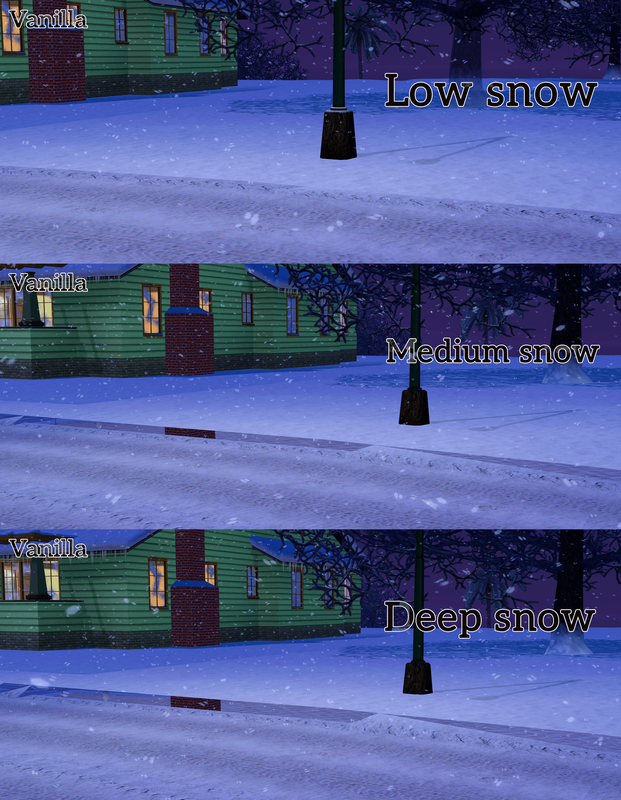
Why the holes appear
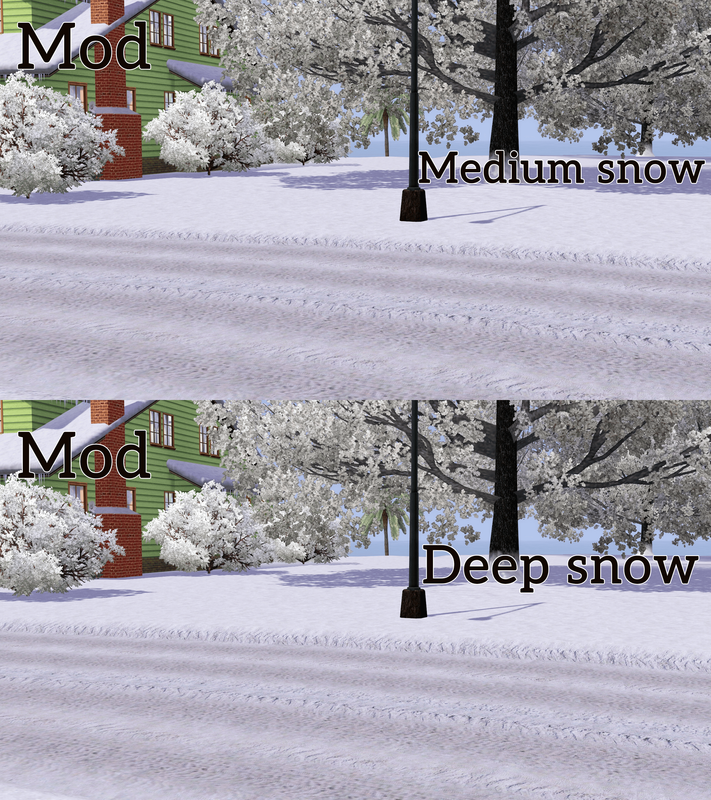
When snow gets deep, the ground rises, and the road edges are supposed to rise with it. But a bug often tells parts of the edge to stay put, so when the snow goes up, you get a hole. It happens at random, which is why some stretches of road look fine while others don't.
The mod fixes the bug and rebuilds the roads the first time you load a world:
Sidewalks across the road
The second problem comes from the worlds themselves: some roads go right up to an intersection but were never linked to it, so a strip of sidewalk ends up across the street. You can see it even in summer, but winter makes it worse: the strip rises with the snow while the road next to it doesn't, leaving a gap and a white band across the tire tracks.
Below is an example before and after the fix:
Doubled snowflakes in Snow But Better
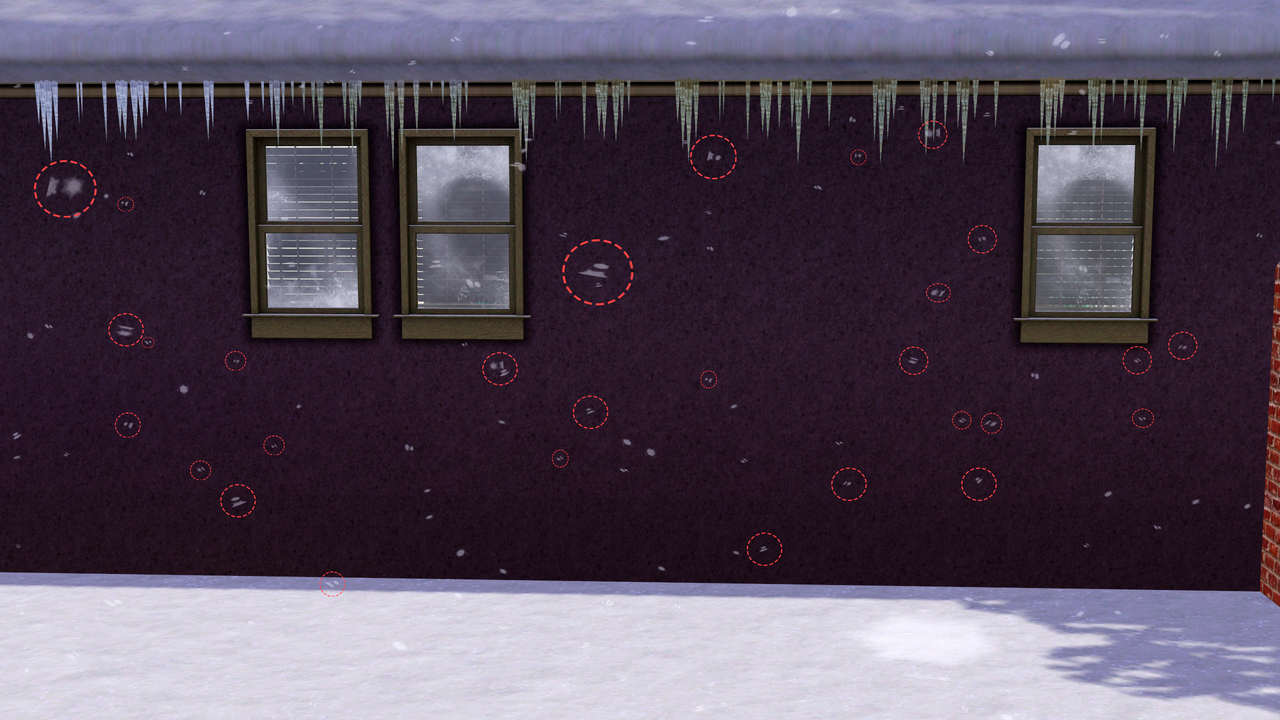
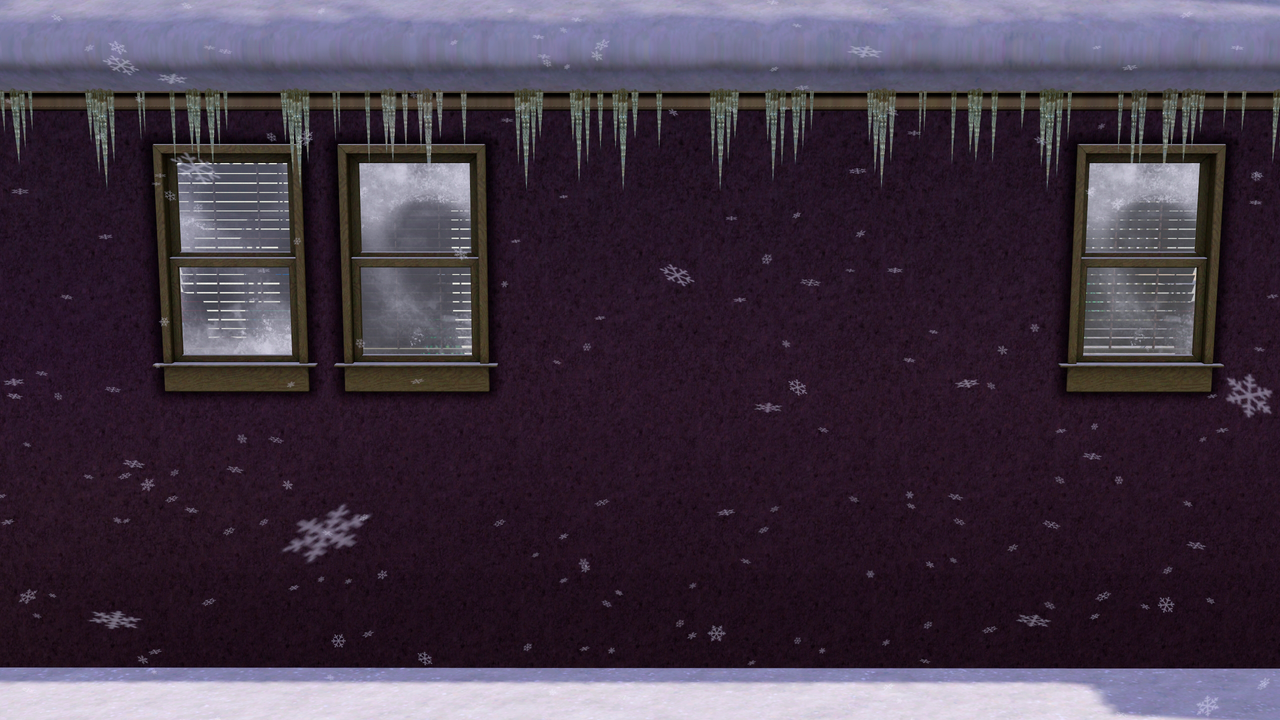
If you use Snow But Better by Lyralei, you may have noticed that falling snowflakes sometimes look doubled, with parts of the flakes awkwardly clipped at the edge. The optional file fixes that. It doesn't include any of Lyralei's files or textures, so you still need to download Snow But Better separately.
Requirements
- The Sims 3: Seasons
- An ASI Loader. I use Ultimate ASI Loader (the Win32 version of wininet.dll from the latest release). You probably already have one if you use mods like Sims3SettingsSetter by sims3fiend, Randomized Loading Screens by thesammy58, or the Sims 3 Performance Patch by Sonja92yu.
- (OPTIONAL) Snow But Better by Lyralei. The included 000_SnowButBetterDoubleSnowflakeFix.package was made for it, but it also works on its own and replaces the vanilla snowflakes.
Built and tested on game version 1.67, and it should work on 1.69 as well. If you run into any issues, please send me your WinterRoadsFix.log file (it appears in The Sims 3\Game\Bin after you launch the game).
Install
1. Put WinterRoadsFix.asi into your The Sims 3\Game\Bin folder.
1.1 (OPTIONAL) If you use Snow But Better, also put the 000_SnowButBetterDoubleSnowflakeFix.package into your Mods\Overrides folder.
| Filename | Type | Size |
|---|---|---|
| WinterRoadsFixByLORHANDAGOTH.rar | rar | |
| WinterRoadsFix.asi | asi | 9216 |
| 000_SnowButBetterDoubleSnowflakeFix.package | package | 66112 |
|
WinterRoadsFixByLORHANDAGOTH.rar
Download
Uploaded: Yesterday, 13.4 KB.
69 downloads.
|
||||||||
| For a detailed look at individual files, see the Information tab. | ||||||||
Install Instructions
Loading comments, please wait...

-
by Buzzler 10th Sep 2010 at 10:26am
 95
112.3k
192
-

by YolkSims updated 7th Jul 2022 at 11:28pm
29
79.1k
129
-
by phantom99 updated 10th Oct 2025 at 6:20am
48
78.4k
199
-
by echoweaver updated 11th Jun 2023 at 7:56pm
+1 packs
41 26.6k 93 Pets
-
by echoweaver updated 20th Aug 2023 at 9:03am
+1 packs
23 34.1k 138 Ambitions
-
by fantuanss12 updated 28th Jun 2025 at 2:10am
+1 packs
13 39.9k 127 Ambitions
-

by LORHANDAGOTH updated 31st Oct 2026 at 1:26am
55
21.1k
55
-

by LORHANDAGOTH updated 31st Oct 2026 at 1:15am
42
13.5k
37
-

by draylson Yesterday at 3:00pm
194
2
-

by draylson updated Today at 5:48am
1
380
2


-

by LORHANDAGOTH updated 31st Oct 2026 at 8:26am
No matter where your Sims are headed, be it a fun road trip, a lively party at a friend's house, more...
55
21k
55
-

by LORHANDAGOTH updated 17th Sep 2026 at 11:11am
This mod allows you to manually adjust your vehicle's speed while driving. more...
18
9k
19
-

by LORHANDAGOTH updated 31st Oct 2026 at 8:15am
42
13.4k
37
-


by LORHANDAGOTH updated 17th Sep 2026 at 11:14am
Brings fully functional radios to cars! more...
+1 packs
28 10.2k 38 Pets
-


by LORHANDAGOTH updated 19th Sep 2026 at 12:11pm
22
4.2k
17
-


by LORHANDAGOTH updated 31st Oct 2026 at 8:09am
[url]https://i.postimg.cc/6QHLcyjs/Motive-Click-Description2.png[/url] Features: - Click a need bar and your Sim takes care of it. more...
20
10k
18


Packs Needed
| Expansion Pack | |
|---|---|
 | Seasons |