Sign in to Mod The Sims
 New Mesh: "Oval Perfection" Paintings
 New Mesh: "Oval Perfection" Paintings


justmoi_Painting_OvalPerfection_3-Set.jpg - width=600 height=450
justmoi_Painting_OvalPerfection_Pinkie.jpg - width=450 height=368
justmoi_Painting_OvalPerfection_Recolours.jpg - width=600 height=450
justmoi_MESH_Painting_OvalPerfection.jpg - width=450 height=368
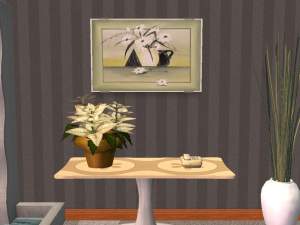
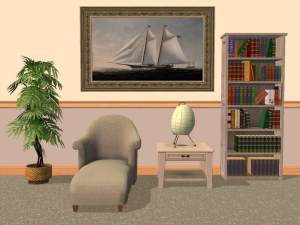
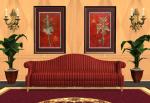
Since it was suggested to have the painting at different heights I've made meshes for 3 heights. I've kept the original height that sits nicely above a chair rail, another slightly higher to fit above a fireplace (it also fits above a piano), and a 3rd that's high enough to place above a tall houseplant.
I also noticed that the test version didn't have the correct uv mapping so I updated that too. Now the frame shows much better. I made the bitmap for the frame larger (512x512) - in case you had made recolours you'll have to remake them, sorry. But if you look at the screenshot of the mesh I think it was worth it.
And finally, I've made the original mesh a repository object (my first time and it only took 2 edits to work - YAY!) This means that you only need to make recolours for the one mesh and the other 2 meshes will get the same recolour options. For non-modders, this means "Mona Lisa", for example, will be available for all 3 meshes. For people who want to make recolours the justmoi_MESH_Painting26_OvalPerfectionLow mesh is the repository object.
Note: You do not have to keep all three meshes but you must keep justmoi_MESH_Painting26_OvalPerfectionLow in order for the other 2 meshes to appear in your game.
The meshes do not require any expansions. Each mesh has a face count of 1408 and a vertex count of 1105. The paintings cost $2100 each but have a room value of 10.
The mesh is colour enabled and you may recolour at will but please link back to this post for the original mesh. Feel free to post recolours on another site but please don't post the mesh - just link to this thread. And please do not post on pay sites.
Note: You must delete the previous file you downloaded (justmoi_MESH_Painting23_OvalPerfection) as it has the same GUID as the finished version.
I've included 6 painting recolours and 2 frame recolours with this post. These recolours will not work for the test mesh. You have to download the new mesh.
As always they work in my game but please let me know if you have a problem with them in your game especially since this is my first repository object.
I think I remembered everything. As I mentioned, let me know if you have any problems.
This is a new mesh, and means that it's a brand new self contained object that usually does not require a specific Pack (although this is possible depending on the type). It may have Recolours hosted on MTS - check below for more information.
|
justmoi_MESH_Painting_OvalPerfection.rar
Download
Uploaded: 25th Jan 2006, 154.7 KB.
5,296 downloads.
|
||||||||
|
justmoi_Painting_OvalPerfection_Recolours01.rar
Download
Uploaded: 25th Jan 2006, 398.7 KB.
5,100 downloads.
|
||||||||
| For a detailed look at individual files, see the Information tab. | ||||||||
Install Instructions
1. Download: Click the download link to save the .rar or .zip file(s) to your computer.
2. Extract the zip, rar, or 7z file.
3. Place in Downloads Folder: Cut and paste the .package file(s) into your Downloads folder:
- Origin (Ultimate Collection): Users\(Current User Account)\Documents\EA Games\The Sims™ 2 Ultimate Collection\Downloads\
- Non-Origin, Windows Vista/7/8/10: Users\(Current User Account)\Documents\EA Games\The Sims 2\Downloads\
- Non-Origin, Windows XP: Documents and Settings\(Current User Account)\My Documents\EA Games\The Sims 2\Downloads\
- Mac: Users\(Current User Account)\Documents\EA Games\The Sims 2\Downloads
- Mac x64: /Library/Containers/com.aspyr.sims2.appstore/Data/Library/Application Support/Aspyr/The Sims 2/Downloads
- For a full, complete guide to downloading complete with pictures and more information, see: Game Help: Downloading for Fracking Idiots.
- Custom content not showing up in the game? See: Game Help: Getting Custom Content to Show Up.
- If you don't have a Downloads folder, just make one. See instructions at: Game Help: No Downloads Folder.
Loading comments, please wait...



Uploaded: 20th Jan 2006 at 7:01 AM
Updated: 20th Dec 2007 at 4:08 PM - Updated with final version.
-
by justmoi 7th Feb 2005 at 6:50am
 7
4.1k
1
7
4.1k
1
-
by justmoi 7th Feb 2005 at 6:52am
10
5.2k
5
-
by cheekywench 24th Apr 2005 at 2:37am
6
6.6k
-
by mooser75 27th Jul 2005 at 10:20pm
4.6k
-

by maree464 3rd Oct 2005 at 6:41am
6
5.3k
1
-
-
-
by Mirjam 25th Jan 2006 at 9:31am
8
6.6k
1
-
by Sirella 20th Apr 2006 at 7:59pm
3
5.3k
1
-
by Sirella 11th May 2006 at 4:33pm
2
6.7k
4


-
More justmoi's "Majestic Elegance" Recolours
by justmoi 10th Jan 2006 at 2:25am
Here are 5 more paintings and 3 new frame recolours for my "Majestic Elegance" mesh. Hope you like them. more...
7
7.5k
6
-


New Mesh: "Three's Company" Painting
by justmoi 9th Jan 2006 at 3:45am
justmoi's "Three's Company" It seems that I forgot to post this mesh last week. more...
+1 packs
14 13.4k 12 Nightlife
-
New Mesh: "Majestic Grace" Painting
by justmoi 20th May 2006 at 9:18pm
justmoi's "Majestic Grace" Update 2006-05-21: By request, I've moved the mesh up a little on the wall so more...
8
19.7k
23
-
-
-
29 Craig Alan Modern Paintings
by justmoi 31st Jan 2005 at 12:09am
News 2005-02-18: Hi, I mistakenly included the wrong package file for "Indigo Oasis I" and have updated the zip more...
17
5.5k
2
-

-
justmoi's "Majestic Elegance" 1800's French Fashion Recolours
by justmoi 9th Jan 2006 at 1:09am
Here is the last installment to the request for 1800's French fashions that I've been working on. more...
3
11.1k
5
-
-