Sign in to Mod The Sims
 Prep 4 Pets With Paintings - 5 Assorted Recolors
 Prep 4 Pets With Paintings - 5 Assorted Recolors


all.JPG - width=700 height=275
allearsdog.JPG - width=354 height=424
bwdogs.JPG - width=386 height=320
catcollage.JPG - width=374 height=358
catsinsun.JPG - width=600 height=450
dogcollage.JPG - width=332 height=394

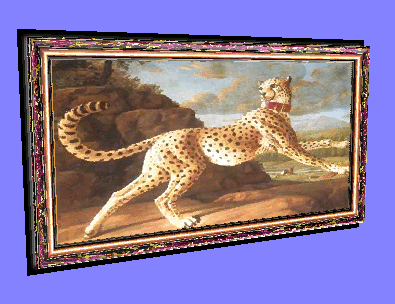
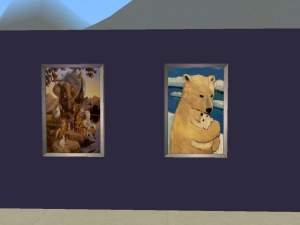
All Ears Dog is a recolor of "Bella Squared"

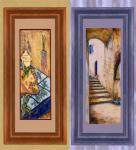
Black and White Dogs in a Boat is a recolor of "That Place Over There"

Cat Collage and Dog Collage are recolors of "Collage in Black and White"


Cats in the Sun 4pack is a recolor of "Four Vegetables in Repose"

*** You may need the CEP from Numenor to have these recolors work in your game.
Thanks to the creators of SimPE for making this possible

** This is my first "recolor" attempt, so please let me know if I did good
This custom content if it is not clothing, may require a seperate download to work properly. This is available at Colour Enable Package (CEP) by Numenor.
|
Cat Collage.rar
Download
Uploaded: 21st Aug 2006, 62.8 KB.
647 downloads.
|
||||||||
|
Dog Collage.rar
Download
Uploaded: 21st Aug 2006, 60.7 KB.
671 downloads.
|
||||||||
|
Black & White Dogs in Boat.rar
Download
Uploaded: 21st Aug 2006, 292.2 KB.
619 downloads.
|
||||||||
|
All Ears Dog.rar
Download
Uploaded: 21st Aug 2006, 203.8 KB.
703 downloads.
|
||||||||
|
4 Cats in the Sun.rar
Download
Uploaded: 21st Aug 2006, 315.0 KB.
629 downloads.
|
||||||||
|
PetsPicPack - All Recolors.rar
Download
Uploaded: 21st Aug 2006, 934.4 KB.
1,020 downloads.
|
||||||||
| For a detailed look at individual files, see the Information tab. | ||||||||
Install Instructions
1. Download: Click the download link to save the .rar or .zip file(s) to your computer.
2. Extract the zip, rar, or 7z file
3. Place in Downloads Folder: Cut and paste the .package file(s) into your Downloads folder:
- Origin (Ultimate Collection): Users\(Current User Account)\Documents\EA Games\The Sims™ 2 Ultimate Collection\Downloads\
- Non-Origin, Windows Vista/7/8/10: Users\(Current User Account)\Documents\EA Games\The Sims 2\Downloads\
- Non-Origin, Windows XP: Documents and Settings\(Current User Account)\My Documents\EA Games\The Sims 2\Downloads\
- Mac: Users\(Current User Account)\Documents\EA Games\The Sims 2\Downloads
- Mac x64:
/Library/Containers/com.aspyr.sims2.appstore/Data/Library/Application Support/Aspyr/The Sims 2/Downloads
Need more information?
- For a full, complete guide to downloading complete with pictures and more information, see: Game Help: Downloading for Fracking Idiots.
- Custom content not showing up in the game? See: Game Help: Getting Custom Content to Show Up.
- If you don't have a Downloads folder, just make one. See instructions at: Game Help: No Downloads Folder.
Loading comments, please wait...



Uploaded: 21st Aug 2006 at 6:09 AM
Updated: 17th Nov 2006 at 8:37 AM
-

by maree464 3rd Oct 2005 at 6:41am
 6
5.4k
1
6
5.4k
1
-
by Mirjam 25th Jan 2006 at 9:31am
8
6.7k
2
-
by OpenHouseJack 23rd Feb 2006 at 12:52pm
5
6.5k
3
-
by Sirella 20th Apr 2006 at 7:59pm
3
5.4k
1
-
-
by Sirella 11th May 2006 at 4:33pm
2
6.8k
4
-
by HogwartsFleur189 20th Oct 2006 at 9:16pm
-
by HogwartsFleur189 20th Oct 2006 at 10:14pm
-
by viskamiro 1st Nov 2006 at 6:49pm
6
10.4k
3
-
by nea200pl 30th Aug 2007 at 10:48am
5
7k
2


-
Spawn of Square Stair ---- Diagonal Stair New Meshes
by khakidoo 15th Feb 2007 at 3:15am
Changed it already, I went back and forth on it, but finally decided to make the three different stairs not more...
24
78.4k
72
-
-
-
-
The Green Club - Sci-Fi SPA for your Highrollers
by HighRollers 25th Jul 2009 at 11:27pm
People are always saying that you should live in the moment, enjoy the 'now'. more...
+4 packs
9 49.3k 31 Nightlife
 Open for Business
 Seasons
 Bon Voyage
-
-
-
-
-