Sign in to Mod The Sims
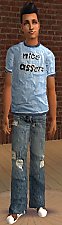
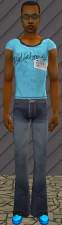
 AE Clothing, White T- W blue Jeans
 AE Clothing, White T- W blue Jeans
SCREENSHOTS


Back.jpg - width=302 height=504
Front copy.jpg - width=294 height=504
Downloaded 133 times
24 Thanks
1 Favourited
4,584 Views
Say Thanks!
Thanked!
Hey everyone, so this is the first one i have ever made and i am looking for more constructive help and thoughts of the users and i could really care less if anyone downloads this at all.
Also i dont know if this is even going to work so if somone could tell me if i uploaded the right file that would be awesome.
If there is anything that does not work just tell me and i will fix the problem asap.
I think it should be compatible with all but i am not sure i have all the big expansions up to pets
Also i dont know if this is even going to work so if somone could tell me if i uploaded the right file that would be awesome.
If there is anything that does not work just tell me and i will fix the problem asap.
I think it should be compatible with all but i am not sure i have all the big expansions up to pets
Advertisement:
This is a Maxis Recolour which means that it is a recolour of an item that already exists in your game. Please check the Pack requirements to see which game pack it recolours.
|
5f226ee4_AE-WhiteT-Jeans.rar
Download
Uploaded: 8th Dec 2006, 474.5 KB.
1,161 downloads.
|
||||||||
| For a detailed look at individual files, see the Information tab. | ||||||||
Install Instructions
Basic Download and Install Instructions:
1. Download: Click the download link to save the .rar or .zip file(s) to your computer.
2. Extract the zip, rar, or 7z file.
3. Place in Downloads Folder: Cut and paste the .package file(s) into your Downloads folder:
1. Download: Click the download link to save the .rar or .zip file(s) to your computer.
2. Extract the zip, rar, or 7z file.
3. Place in Downloads Folder: Cut and paste the .package file(s) into your Downloads folder:
- Origin (Ultimate Collection): Users\(Current User Account)\Documents\EA Games\The Sims™ 2 Ultimate Collection\Downloads\
- Non-Origin, Windows Vista/7/8/10: Users\(Current User Account)\Documents\EA Games\The Sims 2\Downloads\
- Non-Origin, Windows XP: Documents and Settings\(Current User Account)\My Documents\EA Games\The Sims 2\Downloads\
- Mac: Users\(Current User Account)\Documents\EA Games\The Sims 2\Downloads
- Mac x64: /Library/Containers/com.aspyr.sims2.appstore/Data/Library/Application Support/Aspyr/The Sims 2/Downloads
- For a full, complete guide to downloading complete with pictures and more information, see: Game Help: Downloading for Fracking Idiots.
- Custom content not showing up in the game? See: Game Help: Getting Custom Content to Show Up.
- If you don't have a Downloads folder, just make one. See instructions at: Game Help: No Downloads Folder.
Advertisement:
Loading comments, please wait...
Author
Download Details
Packs:
None, this is Sims 2 base game compatible!
Uploaded: 8th Dec 2006 at 4:58 AM
Updated: 8th Dec 2006 at 11:14 PM by fanseelamb - fixed thumbnail
Uploaded: 8th Dec 2006 at 4:58 AM
Updated: 8th Dec 2006 at 11:14 PM by fanseelamb - fixed thumbnail
Tags
Other Download Recommendations:
-
by JucIEJ1991 24th Mar 2005 at 6:50am
-
-
-
testers wanted young adult to adult clothing.
by supernova 15th Aug 2005 at 12:25am
-
-
-
-
-
-