
 Sign in to Mod The Sims
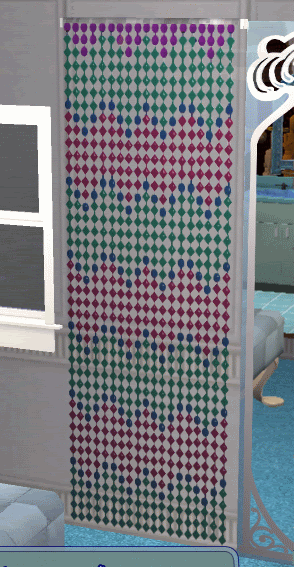
 Groovilicious Jewel Curtain Recolor of Simlogical Autoshade
 Groovilicious Jewel Curtain Recolor of Simlogical Autoshade


hwijautoshade1.jpg - width=210 height=548
hwijautoshade1close.jpg - width=284 height=347
hwijautoshade2.jpg - width=301 height=543
Requires Inge's Autoshade mesh
http://www.simlogical.com/sl/Sims2P...s2_Curtains.htm > bottom of the page > FUNCTIONING BLINDS (Autoshade1MMC.zip).
According to her compatibility table (Autoshade1MMC.zip)
= Can be used in a game whose latest EP is Open For Business
= Can be used in a game whose latest EP is Pets
= Can be used in a game whose latest EP is Seasons
= Can be used in a game whose latest EP is Bon Voyage
I created the package with all EPs and SPs up to K&B. I posted a picture for her to see at the Simlogical Forum, and someone requested that I offer it for download. You may share my recolor freely, but downloaders should be directed to Simlogical to get the mesh.
I hope you enjoy!
You can see my 'curtain' version at Sapphire Sims here:
http://www.sapphiresims2.com/showthread.php?t=31142
Additional Credits:
EA Games, the creators of SimPE, the creator of CEP, mike19 for the transparency tutorial, sweetswami77 and Pistachio for replying to my thread and offering advice, Delphy for this site, Easter01 at Sapphire Sims for the inspiration and Inge Jones for the Autoshade. Oh yeah! My own thread about altering alpha channels... :-P
|
hwijautoshadejewel2.zip
Download
Uploaded: 28th May 2008, 87.8 KB.
2,789 downloads.
|
||||||||
| For a detailed look at individual files, see the Information tab. | ||||||||
Install Instructions
1. Download: Click the download link to save the .rar or .zip file(s) to your computer.
2. Extract the zip, rar, or 7z file.
3. Place in Downloads Folder: Cut and paste the .package file(s) into your Downloads folder:
- Origin (Ultimate Collection): Users\(Current User Account)\Documents\EA Games\The Sims™ 2 Ultimate Collection\Downloads\
- Non-Origin, Windows Vista/7/8/10: Users\(Current User Account)\Documents\EA Games\The Sims 2\Downloads\
- Non-Origin, Windows XP: Documents and Settings\(Current User Account)\My Documents\EA Games\The Sims 2\Downloads\
- Mac: Users\(Current User Account)\Documents\EA Games\The Sims 2\Downloads
- Mac x64: /Library/Containers/com.aspyr.sims2.appstore/Data/Library/Application Support/Aspyr/The Sims 2/Downloads
- For a full, complete guide to downloading complete with pictures and more information, see: Game Help: Downloading for Fracking Idiots.
- Custom content not showing up in the game? See: Game Help: Getting Custom Content to Show Up.
- If you don't have a Downloads folder, just make one. See instructions at: Game Help: No Downloads Folder.
Meshes needed
This download requires one or more meshes to work properly. Please check the Description tab for information about the meshes needed, then download them below:| MTS cannot guarantee any off-site links will be available |
| simlogical.com/sl/Sims2Pages/Sims2_Curtains.htm (non-MTS link) |
Loading comments, please wait...
 View with Names
Uploaded: 28th May 2008 at 2:52 AM
Updated: 29th Sep 2008 at 12:28 AM - editing filters per Delphy's instruction
#bead, #bead curtain, #jewel, #hippie, #bohemian, #window covering, #window shade
-
by zedrik updated 5th Jul 2005 at 3:05am
 7
33k
30
7
33k
30
-
-
by SPOILEDROTTEN165 30th Mar 2007 at 11:02pm
3
15.7k
21
-
by kim-simpearls 30th Aug 2007 at 12:35pm
9
26.5k
59
-
by khakidoo 29th Sep 2007 at 2:11pm
11
29.7k
40
-
by mustluvcatz 13th Sep 2009 at 4:03am
37
91.1k
149
-
-
-
-
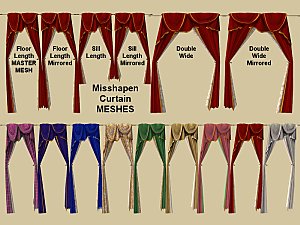
Misshapen Curtains 6 MESHES and 104 Recolours
by Michelle 8th Sep 2018 at 9:42am
+1 packs
2 27.1k 23 Free Time


-
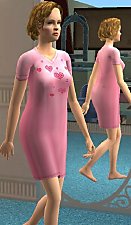
Maxis Teen to Adult Sleepshirt Mashup!
by groovilicious 14th Apr 2008 at 11:59pm
I wanted my self-sim to have a sleep shirt like the teens, because I have one in real life. more...
Packs Needed
| Expansion Pack | |
|---|---|
| Open for Business |