
 Sign in to Mod The Sims
 Wall Border (New mesh) - 2 Types with 4 Colours
 Wall Border (New mesh) - 2 Types with 4 Colours


1.JPG - width=759 height=539
2.JPG - width=742 height=486
3.JPG - width=498 height=334
4.JPG - width=483 height=335
5.JPG - width=966 height=688
7.JPG - width=359 height=410
8.JPG - width=475 height=234
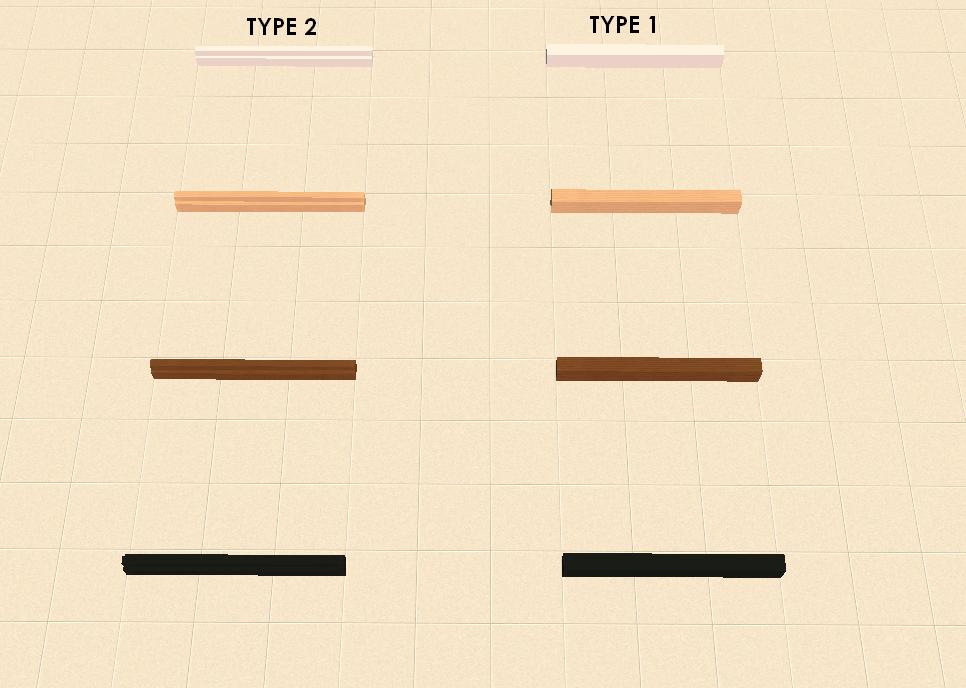
I thought that the edges of the wall to the floor was unpleasing to the eye. Therefore, I had to fix that with some sort of border. Since we know it is impossible to draw a fence where the walls, these fences are reversed and put as follows:
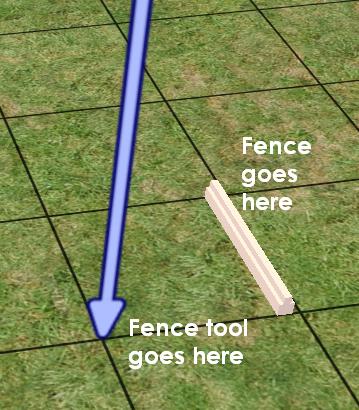
And a more descriptive guide:
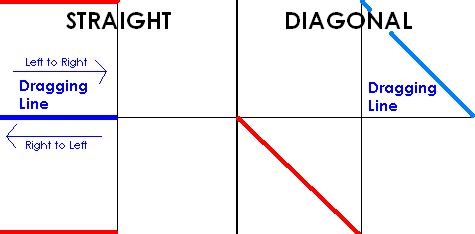
In the diagonal version:
Left = Top
Right = Bottom
Left and right dragging rules apply. To delete the fences, don't place the fence tool where the mesh is, but where you've dragged the mesh from.
Notes:
The move_objects on cheat is needed to place objects where the fences are behind, since Maxis thinks there's a wall there blocking them from being placed.
Edit: Really stupid of me and hopefully quickly enough fixed--I've forgotten the 'sims can walk through' property, so now they're reuploaded with that.
Polygon Counts:
Type 1 has 12.
Type 2 has 24.
Additional Credits:
Milkshape
This is a new mesh, and means that it's a brand new self contained object that usually does not require a specific Pack (although this is possible depending on the type). It may have Recolours hosted on MTS - check below for more information.
|
yey_wallborder_type2.rar
Download
Uploaded: 21st Jun 2008, 85.3 KB.
5,571 downloads.
|
||||||||
|
yey_wallborder_type1.rar
Download
Uploaded: 21st Jun 2008, 84.8 KB.
5,879 downloads.
|
||||||||
| For a detailed look at individual files, see the Information tab. | ||||||||
Install Instructions
1. Download: Click the download link to save the .rar or .zip file(s) to your computer.
2. Extract the zip, rar, or 7z file.
3. Place in Downloads Folder: Cut and paste the .package file(s) into your Downloads folder:
- Origin (Ultimate Collection): Users\(Current User Account)\Documents\EA Games\The Sims™ 2 Ultimate Collection\Downloads\
- Non-Origin, Windows Vista/7/8/10: Users\(Current User Account)\Documents\EA Games\The Sims 2\Downloads\
- Non-Origin, Windows XP: Documents and Settings\(Current User Account)\My Documents\EA Games\The Sims 2\Downloads\
- Mac: Users\(Current User Account)\Documents\EA Games\The Sims 2\Downloads
- Mac x64: /Library/Containers/com.aspyr.sims2.appstore/Data/Library/Application Support/Aspyr/The Sims 2/Downloads
- For a full, complete guide to downloading complete with pictures and more information, see: Game Help: Downloading for Fracking Idiots.
- Custom content not showing up in the game? See: Game Help: Getting Custom Content to Show Up.
- If you don't have a Downloads folder, just make one. See instructions at: Game Help: No Downloads Folder.
Loading comments, please wait...
Uploaded: 20th Jun 2008 at 4:31 AM
Updated: 20th Jun 2008 at 9:17 PM - forgot property
-
by Supertramp 12th Sep 2005 at 11:31pm
 13
14.5k
11
13
14.5k
11
-
by blondmermaid 18th Sep 2005 at 4:27pm
20
35.3k
13
-
-
-
by naschev 23rd Dec 2005 at 4:20am
61
55.1k
38
-
by Lezibeth 10th Jan 2006 at 2:39am
13
23.4k
19
-
by stepehnguy 17th Feb 2006 at 1:02am
6
28.7k
15
-
by JohnBrehaut1 19th Apr 2006 at 4:54pm
+1 packs
10 17.1k 2 Nightlife
-
-
by crocobaura 17th Jun 2007 at 12:47pm
18
17.6k
17


-

Unnaturally coloured Anime-ish eyes [edited]
by yeyavailability 14th Jan 2008 at 4:52pm
(I've uploaded this thing two times already, getting cut off first at the beginning then right before I finished, so more...
