
 Sign in to Mod The Sims
 Xenosaga Eyeset
 Xenosaga Eyeset
SCREENSHOTS


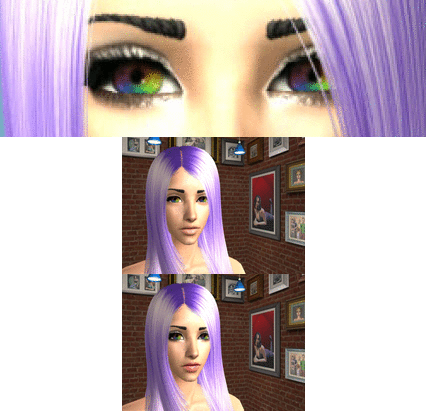
ShionEYESET.jpg - width=320 height=291
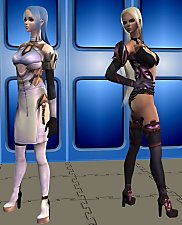
XenoREF.jpg - width=338 height=359
XenoREF2.jpg - width=520 height=470
Downloaded 695 times
146 Thanks
13 Favourited
19,414 Views
Say Thanks!
Thanked!
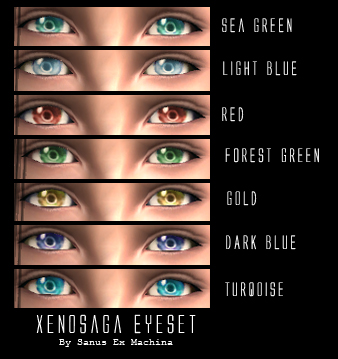
Hello again everyone.

Today I come bringing you eyes. These are modeled directly after the style used in the Xenosaga series, and I actually used pictures from the official art to make them. They come in 7 different colours, and if you don't want a certain colour the files are labeled for easy removal.
I was actually planning to release these when I finish meshing the hair and clothes for Jr. (A character in Xenosaga), but a friend convinced me to upload them early. I'm also working on adding more colours, so I may update this post in the near future.

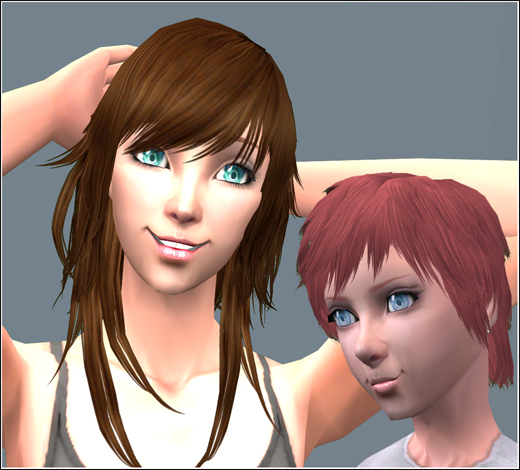
I hope you enjoy them, and happy simming!
EDIT 15/11/08: Since people have been asking for 'em, I added three more colours in another rar: grey, purple and brown. Points if you know which characters they're for! :D
EDIT 04/04/09: I finally got around to reuploading the rars. XD
These are now geneticized in case you decide to breed any of your sims with these eyes, but I didn't make them townie-friendly.
Additional Credits:
Skin by teru_k
Lipstick by Bruno
Eyeliner by Anva
Brows by gmo (Red haired model's recoloured by me)
Brown hair by MYOS
Red hair by MYOS, recoloured by me
Advertisement:
|
XenosagaEyesetBONUS.rar
Download
Uploaded: 4th Apr 2009, 38.8 KB.
637 downloads.
|
||||||||
|
XenosagaEyeset.rar
Download
Uploaded: 4th Apr 2009, 94.4 KB.
752 downloads.
|
||||||||
| For a detailed look at individual files, see the Information tab. | ||||||||
Install Instructions
Basic Download and Install Instructions:
1. Download: Click the download link to save the .rar or .zip file(s) to your computer.
2. Extract the zip, rar, or 7z file.
3. Place in Downloads Folder: Cut and paste the .package file(s) into your Downloads folder:
1. Download: Click the download link to save the .rar or .zip file(s) to your computer.
2. Extract the zip, rar, or 7z file.
3. Place in Downloads Folder: Cut and paste the .package file(s) into your Downloads folder:
- Origin (Ultimate Collection): Users\(Current User Account)\Documents\EA Games\The Sims™ 2 Ultimate Collection\Downloads\
- Non-Origin, Windows Vista/7/8/10: Users\(Current User Account)\Documents\EA Games\The Sims 2\Downloads\
- Non-Origin, Windows XP: Documents and Settings\(Current User Account)\My Documents\EA Games\The Sims 2\Downloads\
- Mac: Users\(Current User Account)\Documents\EA Games\The Sims 2\Downloads
- Mac x64: /Library/Containers/com.aspyr.sims2.appstore/Data/Library/Application Support/Aspyr/The Sims 2/Downloads
- For a full, complete guide to downloading complete with pictures and more information, see: Game Help: Downloading for Fracking Idiots.
- Custom content not showing up in the game? See: Game Help: Getting Custom Content to Show Up.
- If you don't have a Downloads folder, just make one. See instructions at: Game Help: No Downloads Folder.
Advertisement:
Loading comments, please wait...

Other Download Recommendations:
-
-

-
-
-
-
-
by JulieAlesha 8th Jun 2009 at 7:59pm
-
by JulieAlesha 27th Dec 2009 at 8:03pm
-
by JulieAlesha updated 30th Mar 2010 at 5:57pm
-


More downloads by Sanus Ex Machina:
See more
-
Colourful Patterned Swimsuit Recolours
by Sanus Ex Machina 11th Jul 2008 at 5:51am
Hello everyone. more...
