
 Sign in to Mod The Sims
 Red XIII - FFVII - Custom Coat
 Red XIII - FFVII - Custom Coat
SCREENSHOTS


red13.jpg - width=629 height=501
red6.jpg - width=454 height=334
ff7-5.jpg - width=729 height=455
Downloaded 4,067 times
418 Thanks
54 Favourited
51,851 Views
Say Thanks!
Thanked!
It was time for something experimental again, so here's Red XIII's coat, should people want it. Texturing animals is insanely hard, so I don't recommend it D: Naturally, I would have liked him to have his spikey hair but..yeah. Poor pets without CC.
He's a dog; it's the only way to get him at a large size.
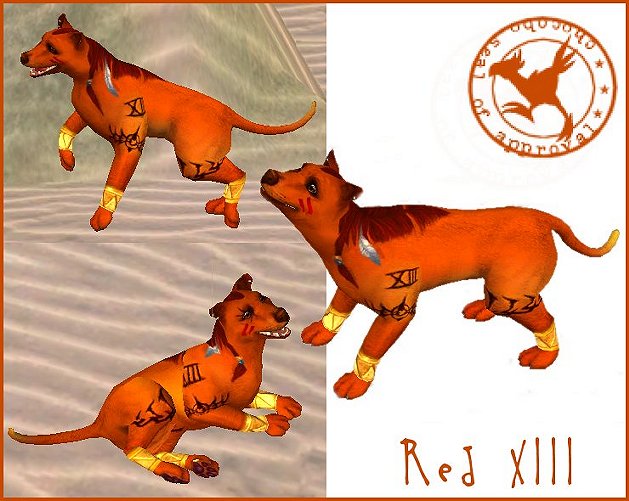
I used Ticks-Tocks' great tutorial on making custom pet coats, find it here:
http://clock-works.angelfire.com/si...tompetcoat.html
For this upload to show up, you need to unlock the Neon Green fur for dogs; at Ticks-Tocks' site you will find how to do so. If you just want the coat, you can find it under Neon Green SMOOTH. Sometimes you have to look hard for it, and have to hit the golden retriever standard coat first.
Please bear in mind that this file will OVERRIDE the Neon Green Smooth coat for dogs; it's a DEFAULT replacement.
If someone makes the ultimate Red XIII Sim with this..lemme know!
p.s. Should you really get stuck in finding him in the menu, you can always download the Sim you see in the pictures from my website; it will put him immediately in your custom folder.
He's a dog; it's the only way to get him at a large size.
I used Ticks-Tocks' great tutorial on making custom pet coats, find it here:
http://clock-works.angelfire.com/si...tompetcoat.html
For this upload to show up, you need to unlock the Neon Green fur for dogs; at Ticks-Tocks' site you will find how to do so. If you just want the coat, you can find it under Neon Green SMOOTH. Sometimes you have to look hard for it, and have to hit the golden retriever standard coat first.
Please bear in mind that this file will OVERRIDE the Neon Green Smooth coat for dogs; it's a DEFAULT replacement.
If someone makes the ultimate Red XIII Sim with this..lemme know!
p.s. Should you really get stuck in finding him in the menu, you can always download the Sim you see in the pictures from my website; it will put him immediately in your custom folder.
Advertisement:
This is a Maxis Recolour which means that it is a recolour of an item that already exists in your game. Please check the Pack requirements to see which game pack it recolours.
This custom content if it is not clothing, may require a seperate download to work properly. This is available at Colour Enable Package (CEP) by Numenor.
|
red13coat-sylvie.rar
Download
Uploaded: 17th May 2009, 181.5 KB.
9,159 downloads.
|
||||||||
| For a detailed look at individual files, see the Information tab. | ||||||||
Install Instructions
Basic Download and Install Instructions:
1. Download: Click the download link to save the .rar or .zip file(s) to your computer.
2. Extract the zip, rar, or 7z file
3. Place in Downloads Folder: Cut and paste the .package file(s) into your Downloads folder:
Need more information?
1. Download: Click the download link to save the .rar or .zip file(s) to your computer.
2. Extract the zip, rar, or 7z file
3. Place in Downloads Folder: Cut and paste the .package file(s) into your Downloads folder:
- Origin (Ultimate Collection): Users\(Current User Account)\Documents\EA Games\The Sims™ 2 Ultimate Collection\Downloads\
- Non-Origin, Windows Vista/7/8/10: Users\(Current User Account)\Documents\EA Games\The Sims 2\Downloads\
- Non-Origin, Windows XP: Documents and Settings\(Current User Account)\My Documents\EA Games\The Sims 2\Downloads\
- Mac: Users\(Current User Account)\Documents\EA Games\The Sims 2\Downloads
- Mac x64:
/Library/Containers/com.aspyr.sims2.appstore/Data/Library/Application Support/Aspyr/The Sims 2/Downloads
Need more information?
- For a full, complete guide to downloading complete with pictures and more information, see: Game Help: Downloading for Fracking Idiots.
- Custom content not showing up in the game? See: Game Help: Getting Custom Content to Show Up.
- If you don't have a Downloads folder, just make one. See instructions at: Game Help: No Downloads Folder.
Advertisement:
Loading comments, please wait...






Packs Needed
| Expansion Pack | |
|---|---|
 | Pets |
About Me
http://taure.unixdaemons.com/policy.png
I don't play Sims 2 anymore, I went back to creating for Sims 1 because it's so retro and a lot of fun. I don't own Sims 3, so please please stop asking me to convert/make things for that game. Hope you enjoy my old creations for Sims 2!
I don't play Sims 2 anymore, I went back to creating for Sims 1 because it's so retro and a lot of fun. I don't own Sims 3, so please please stop asking me to convert/make things for that game. Hope you enjoy my old creations for Sims 2!