Sign in to Mod The Sims
 Newsea J10F Retexture: 10 Colours *binned*
 Newsea J10F Retexture: 10 Colours *binned*


NewseaJ10F.jpg - width=700 height=494
Presented Picture
J10-2-1.jpg - width=800 height=588
Light Brown & Brown
J10-2-2.jpg - width=800 height=588
Fire & Black
J10-2-3.jpg - width=800 height=588
Chocolate & Dark Brown
J10-2-4.jpg - width=800 height=588
Mahogany & Fawn
J10-2-5.jpg - width=800 height=588
Caramel & Rosewood
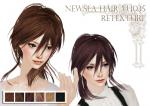
ARIELLA PRESENT
NEWSEA HAIR J10 RETEXTURE FOR FEMALE
:: All ages :: 10 Colours :: Binned ::
!!Mesh not included!!

!!!PLEASE DOWNLOAD THE MESH HERE!!!
http://newseasims.blog.163.com/blog...01002941518120/
As Newsea's site is down, I've upload the mesh for you!!
////////////////////////////////////////////////////////
Yay! I can finally binned the hair! >w<♥
Great thanks to Alraris!
I like this hair quite a lot, so I've done 10 recolour of them ^^
Only natural colours


You can see all the colour in the attched photo below
Hope you like it!
many thanks
Ariella
Additional Credits:
Eyes by Maynarakmak, Janita, and Tifa
Lips by me(Ariella), and Elissu
Necklace by MT Cakestore
|
NewSea SIMS2 Hair J010f_twiggy_mesh.rar
| Newsea's Mesh
Download
Uploaded: 10th Mar 2010, 424.2 KB.
9,194 downloads.
|
||||||||
|
Ariella_Newsea J10F Retexture(Binned).rar
| Don't forget to hit thanks! Please ^^
Download
Uploaded: 25th Feb 2010, 2.96 MB.
11,200 downloads.
|
||||||||
| For a detailed look at individual files, see the Information tab. | ||||||||
Install Instructions
1. Download: Click the download link to save the .rar or .zip file(s) to your computer.
2. Extract the zip, rar, or 7z file.
3. Place in Downloads Folder: Cut and paste the .package file(s) into your Downloads folder:
- Origin (Ultimate Collection): Users\(Current User Account)\Documents\EA Games\The Sims™ 2 Ultimate Collection\Downloads\
- Non-Origin, Windows Vista/7/8/10: Users\(Current User Account)\Documents\EA Games\The Sims 2\Downloads\
- Non-Origin, Windows XP: Documents and Settings\(Current User Account)\My Documents\EA Games\The Sims 2\Downloads\
- Mac: Users\(Current User Account)\Documents\EA Games\The Sims 2\Downloads
- Mac x64: /Library/Containers/com.aspyr.sims2.appstore/Data/Library/Application Support/Aspyr/The Sims 2/Downloads
- For a full, complete guide to downloading complete with pictures and more information, see: Game Help: Downloading for Fracking Idiots.
- Custom content not showing up in the game? See: Game Help: Getting Custom Content to Show Up.
- If you don't have a Downloads folder, just make one. See instructions at: Game Help: No Downloads Folder.
Meshes needed
This download requires one or more meshes to work properly. Please check the Description tab for information about the meshes needed, then download them below:| MTS cannot guarantee any off-site links will be available |
| newseasims.blog.163.com/blog/static/135191405201002941518120/ (non-MTS link) |
Loading comments, please wait...

Uploaded: 25th Feb 2010 at 7:17 PM
Updated: 10th Mar 2010 at 6:59 PM - Add MESH
-
XMSims hair 67, binned without bow
by fairywasteland 25th Nov 2007 at 12:54pm
-
-
-
-
-
~ CoolSims #55 Male ~ For The Guys ~ NV 9.0
by Sadi Kalen 23rd Feb 2012 at 10:13pm
-
-
~ CoolSims #68 ~ NV 9.0 ~ Sera ~
by Sadi Kalen 12th Apr 2012 at 9:32pm
-
~ Sweetness ~ NV 9.0 16 Recolours ~ Peggyzone #5358 ~
by Sadi Kalen 6th Aug 2012 at 2:41am
-