
 Sign in to Mod The Sims
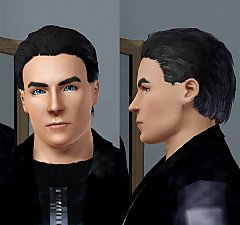
 Straight Hair for Men
 Straight Hair for Men


ScreenShot150.jpg - width=540 height=629
Screenshot-270.jpg - width=802 height=729
Screenshot-244.jpg - width=1024 height=768
Screenshot-261.jpg - width=1024 height=768
Screenshot-264.jpg - width=800 height=608

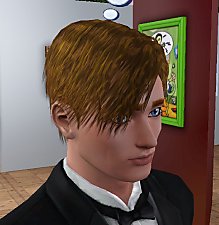
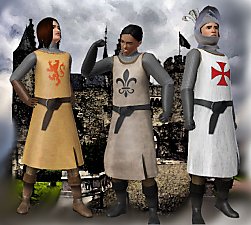
I really think there is not much variety of hair for men, so here is a new hair.
Is Available for male Teens, Young Adults and Adults.
I hope you enjoy!


Polygon Counts:
1671 polygons
Additional Credits:
Delphy and CTU Team for CTU Wes for the Milk Shape plugins
Skin replacement from Club Crimsyn
This is a new mesh, and means that it's a brand new self contained object that usually does not require a specific Pack (although this is possible depending on the type). It may have Recolours hosted on MTS - check below for more information.
|
StraightMenHair.rar
Download
Uploaded: 21st Apr 2010, 691.7 KB.
57,473 downloads.
|
||||||||
| For a detailed look at individual files, see the Information tab. | ||||||||
Install Instructions
1. Click the download button, or the filename, to download the file to your computer.
2. Extract the zip, rar, or 7z file. Now you will have either a .package or a .sims3pack file.
For Package files:
1. Cut and paste the file into your Documents\Electronic Arts\The Sims 3\Mods\Packages folder. If you do not already have this folder, you should read the full guide to Package files first: Sims 3:Installing Package Fileswiki, so you can make sure your game is fully patched and you have the correct Resource.cfg file.
2. Run the game, and find your content where the creator said it would be (build mode, buy mode, Create-a-Sim, etc.).
For Sims3Pack files:
1. Cut and paste it into your Documents\Electronic Arts\The Sims 3\Downloads folder. If you do not have this folder yet, it is recommended that you open the game and then close it again so that this folder will be automatically created. Then you can place the .sims3pack into your Downloads folder.
2. Load the game's Launcher, and click on the Downloads tab. Find the item in the list and tick the box beside it. Then press the Install button below the list.
3. Wait for the installer to load, and it will install the content to the game. You will get a message letting you know when it's done.
4. Run the game, and find your content where the creator said it would be (build mode, buy mode, Create-a-Sim, etc.).
Extracting from RAR, ZIP, or 7z: You will need a special program for this. For Windows, we recommend 7-Zip and for Mac OSX, we recommend Keka. Both are free and safe to use.
Need more help?
If you need more info, see:
- For package files: Sims 3:Installing Package Fileswiki
- For Sims3pack files: Game Help:Installing TS3 Packswiki
Loading comments, please wait...

Uploaded: 21st Apr 2010 at 11:07 PM
-
-
-
-
by Kiara24 17th May 2010 at 12:27am
 48
163.9k
255
48
163.9k
255
Hair » Male » Young Adult
-
by omegastarr82 6th Sep 2010 at 3:01am
-
4 base game female hairs for males
by Arisuka 21st Jan 2011 at 11:31pm
35
69k
182
Hair » Male » Young Adult
-
-
-
by ShojoAngel 16th Mar 2013 at 10:59am
+2 packs
21 92.2k 168 Pets
Pets
 Supernatural
Hair » Male » Young Adult
-
Shaggy Bob Hair for Men - *Fixed!*
by kuroineko05 updated 11th Aug 2015 at 12:56am


-
by Kiara24 4th Jul 2009 at 12:36am
I made three t-shirts for baby boys with Disney babies. more...
19
49.4k
118
Male » Mixed Sets » Toddler
-
-
-
by Kiara24 12th Oct 2014 at 6:59pm
Is available in casual, formal and party (teen to elder) more...
 10
13.3k
55
10
13.3k
55
Female » Mixed Sets » Adult
-
-
-
-
by Kiara24 9th Mar 2016 at 10:29pm
It is available in casual and party (teen to elder) 10 options more...
25
53.8k
256
Female » Mixed Sets » Adult
-
-

About Me
Subscribe to my channel.