
 Sign in to Mod The Sims
 Daenerys Targaryen - The Mother of Dragons
 Daenerys Targaryen - The Mother of Dragons
SCREENSHOTS


Daenerys Targaryen.jpg - width=973 height=718
Screenshot.jpg - width=1920 height=1080
Screenshot-2.jpg - width=1920 height=1080
Screenshot-5.jpg - width=1920 height=1080
Screenshot-6.jpg - width=1920 height=1080
Screenshot-7.jpg - width=1920 height=1080
Screenshot-3.jpg - width=1314 height=880
Screenshot-4.jpg - width=1344 height=1080
Downloaded 16,452 times
439 Thanks
189 Favourited
94,163 Views
Say Thanks!
Thanked!
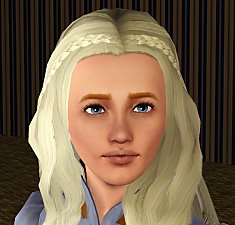
This sim is based on the Game of Thrones character Daenerys Targaryen, the Mother of Dragons.
Using few CC I've managed to recreate her as good as possible. She should come packaged with custom eyes and hair.
The clothes are mainly from Dragon Valley, except the swimwear which is from Island Paradise. They are not required for her to work.
Apart from the lipstick, she isn't wearing any makeup.
CC Used:
Hair:
Everything but sleepwear: Cazy's Northern Hairstyle
Sleepwear: Cazy's Aura Hairstyle
Eyes by ShojoAngel
Eyebrows by Ephemera
Lipstick by Pralinesims
Eyelashes by S-Club No. II You can use whatever lashes you believe are the prettiest, I used the ones with the red text.
Facial sliders by Ahmad/Bella3lek4
Clothes by The Sims Store (Dragon Valley). Of course there are ways to download the content for free, but that's illegal and I won't be sharing them!
NOTE: THE SIM IS PACKAGED WITH DEFAULT SKIN. TO MAKE HER LOOK LIKE THE PICTURES, YOU HAVE TO USE THIS SKINTONE: Skin 2.0 from S-Club
Using few CC I've managed to recreate her as good as possible. She should come packaged with custom eyes and hair.
The clothes are mainly from Dragon Valley, except the swimwear which is from Island Paradise. They are not required for her to work.
Apart from the lipstick, she isn't wearing any makeup.
CC Used:
Hair:
Everything but sleepwear: Cazy's Northern Hairstyle
Sleepwear: Cazy's Aura Hairstyle
Eyes by ShojoAngel
Eyebrows by Ephemera
Lipstick by Pralinesims
Eyelashes by S-Club No. II You can use whatever lashes you believe are the prettiest, I used the ones with the red text.
Facial sliders by Ahmad/Bella3lek4
Clothes by The Sims Store (Dragon Valley). Of course there are ways to download the content for free, but that's illegal and I won't be sharing them!
NOTE: THE SIM IS PACKAGED WITH DEFAULT SKIN. TO MAKE HER LOOK LIKE THE PICTURES, YOU HAVE TO USE THIS SKINTONE: Skin 2.0 from S-Club
Advertisement:
|
Daenerys_Targaryen.rar
| Daenerys Targaryen is a fictional character from the Song of Ice and Fire saga books. The sim is based on Emilia Clarke, who plays her in the Game of Thrones series.
Download
Uploaded: 1st Feb 2014, 472.7 KB.
16,454 downloads.
|
||||||||
| For a detailed look at individual files, see the Information tab. | ||||||||
Install Instructions
Quick Guide:
1. Click the filename or the download button to download the sim to your computer.
2. Extract the zip, rar, or 7z file.
2. Select the .sim file you got from extracting.
3. Cut and paste it into your Documents\Electronic Arts\The Sims 3\SavedSims folder. If you do not have this folder yet, it is recommended that you open the game, enter Create-a-Sim, and save a sim to the sim bin to create this folder, rather than doing so manually. After that you can close the game and put the .sim file in SavedSims
4. Once the .sim file is in SavedSims, you can load the game, and look for your sim in the premade sims bin in Create-a-Sim.
Extracting from RAR, ZIP, or 7z: You will need a special program for this. For Windows, we recommend 7-Zip and for Mac OSX, we recommend Keka. Both are free and safe to use.
Need more help?
If you need more info, see Game Help:Installing TS3 Simswiki for a full, detailed step-by-step guide! Special Installation Instructions
1. Click the filename or the download button to download the sim to your computer.
2. Extract the zip, rar, or 7z file.
2. Select the .sim file you got from extracting.
3. Cut and paste it into your Documents\Electronic Arts\The Sims 3\SavedSims folder. If you do not have this folder yet, it is recommended that you open the game, enter Create-a-Sim, and save a sim to the sim bin to create this folder, rather than doing so manually. After that you can close the game and put the .sim file in SavedSims
4. Once the .sim file is in SavedSims, you can load the game, and look for your sim in the premade sims bin in Create-a-Sim.
Extracting from RAR, ZIP, or 7z: You will need a special program for this. For Windows, we recommend 7-Zip and for Mac OSX, we recommend Keka. Both are free and safe to use.
Need more help?
If you need more info, see Game Help:Installing TS3 Simswiki for a full, detailed step-by-step guide! Special Installation Instructions
- If you get an error that says "This content requires expansion pack data that is not installed", please use Clean Installer to install this sim.
Advertisement:
Loading comments, please wait...
Other Download Recommendations:
-
by Syera 26th Jun 2009 at 1:14am
 44
52.1k
25
44
52.1k
25
-
by Audrey 6th Sep 2009 at 8:17pm
23
18.5k
5
-
-
-
-
-
-
by monca533 26th Feb 2010 at 3:52am
3
12k
-
-
by Mischief Managed 4th Jul 2021 at 12:07am
+1 packs
6 3.6k 9 World Adventures


