Sign in to Mod The Sims
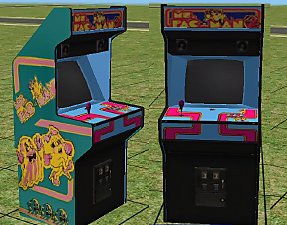
 New Painting Reclours - Coop style
 New Painting Reclours - Coop style
SCREENSHOTS


preview1.jpg - width=512 height=384
preview2.jpg - width=512 height=384
Downloaded 60 times
8 Thanks
0 Favourited
4,856 Views
Say Thanks!
Thanked!
I finally figured out how to do some recolour work.. hehe these are my first attempts.. Theyre were made with SimPE.. i used the Lady on Red and Suspense paintings as my base.. I love coop art so i thought i'd share in case anyone else does to 
the link to Coops website is http://www.coopstuff.com/ you can see all his cool artwork and more.

the link to Coops website is http://www.coopstuff.com/ you can see all his cool artwork and more.
Advertisement:
This is a Maxis Recolour which means that it is a recolour of an item that already exists in your game. Please check the Pack requirements to see which game pack it recolours.
This custom content if it is not clothing, may require a seperate download to work properly. This is available at Colour Enable Package (CEP) by Numenor.
|
coop paintings.rar
Download
Uploaded: 21st Aug 2005, 334.8 KB.
180 downloads.
|
||||||||
| For a detailed look at individual files, see the Information tab. | ||||||||
Install Instructions
Basic Download and Install Instructions:
1. Download: Click the download link to save the .rar or .zip file(s) to your computer.
2. Extract the zip, rar, or 7z file
3. Place in Downloads Folder: Cut and paste the .package file(s) into your Downloads folder:
Need more information?
1. Download: Click the download link to save the .rar or .zip file(s) to your computer.
2. Extract the zip, rar, or 7z file
3. Place in Downloads Folder: Cut and paste the .package file(s) into your Downloads folder:
- Origin (Ultimate Collection): Users\(Current User Account)\Documents\EA Games\The Sims™ 2 Ultimate Collection\Downloads\
- Non-Origin, Windows Vista/7/8/10: Users\(Current User Account)\Documents\EA Games\The Sims 2\Downloads\
- Non-Origin, Windows XP: Documents and Settings\(Current User Account)\My Documents\EA Games\The Sims 2\Downloads\
- Mac: Users\(Current User Account)\Documents\EA Games\The Sims 2\Downloads
- Mac x64:
/Library/Containers/com.aspyr.sims2.appstore/Data/Library/Application Support/Aspyr/The Sims 2/Downloads
Need more information?
- For a full, complete guide to downloading complete with pictures and more information, see: Game Help: Downloading for Fracking Idiots.
- Custom content not showing up in the game? See: Game Help: Getting Custom Content to Show Up.
- If you don't have a Downloads folder, just make one. See instructions at: Game Help: No Downloads Folder.
Advertisement:
Loading comments, please wait...
Author
Download Details
Packs:
None, this is Sims 2 base game compatible!
Uploaded: 21st Aug 2005 at 10:19 AM
Updated: 21st Aug 2005 at 10:23 AM
Uploaded: 21st Aug 2005 at 10:19 AM
Updated: 21st Aug 2005 at 10:23 AM
Other Download Recommendations:










More downloads by Corvistic:
See more