Sims 4 CC: In-Game Shading Issue I've Been Unable to Solve
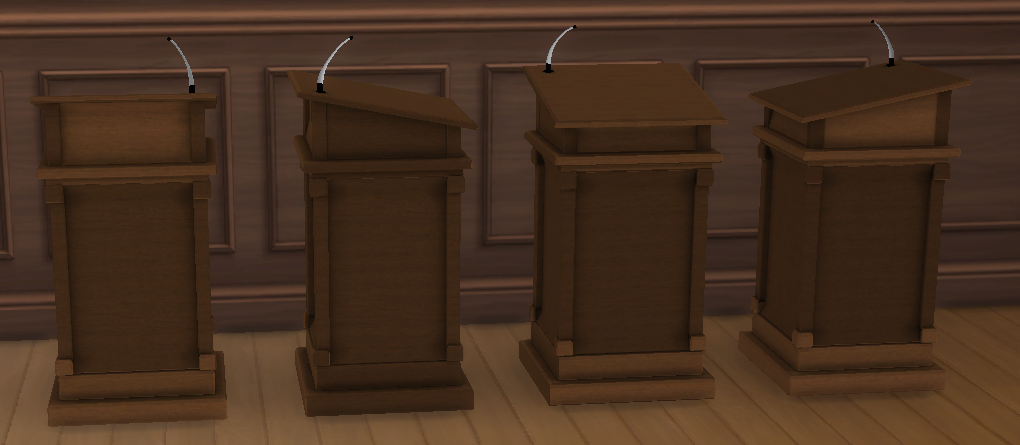
I'm working on a custom podium that looks correct in Blender and Sims 4 Studio but renders incorrectly in-game.
One physical side (the microphone side) renders the intended wood color, while the other three sides consistently render lighter. The pattern stays with the object—it does not move when the object is rotated.
I'll attach screenshots showing all four rotations to demonstrate that the same physical sides remain affected.
Already checked/tested:
Topology, UVs, normals, smoothing, tangents, bounds, materials, LODs, and texel density.
No vertex colors.
All four sides are structurally identical.
Conformed normals to match EA objects.
Swapped the LITE resource with an EA object.
Replaced inherited EA material/texture references.
Tested with only one package in Mods.
Cleared localthumbcache.package.
Fresh object placement and full game restart.
Compared original and patched packages under controlled conditions.
Compared against multiple EA wood objects.
None of those changed the issue.
Has anyone encountered a custom object where one physical side renders correctly while the other three consistently render lighter, even though the mesh and materials appear identical? If so, what was the cause and how did you fix it?

 Sign in to Mod The Sims
 27th Jul 2026 at 9:54 PM