Quick Reply
Search this Thread
Test Subject
Original Poster
#1 Old 19th Jun 2026 at 1:03 PM
Default Having both Legacy Collection and Disc Version on same PC
Hi guys.

After multiple attempts and a lot of headache last year, I got my original disc versions to work on Win 10 (Base + UNI, NL, OFB, SNS). It's glitchy (something in original game content Deco > Misc closes the game (though it didn't on my Win7). Plus it frequently makes my PC randomly reboot). But it works well enough for what I need it for, which is finishing off a Sims story I started 20 years ago (!!!) and never finished. So I want to get it done by the end of the year.

I got the Legacy collection yesterday since it's in the Steam sale.

From this link:
https://forums.ea.com/discussions/t...laptop/11862394
there shouldn't be any conflicts between my disc installation and this version. I'm assuming they're treated as completely different games.

I've heard Legacy is very buggy. I just really want this story done and I still have a couple of hundred screenshots to retake and I don't want to risk the Legacy install messing up my old installation and not being able to get my screenies finished. But having all the EPs (and not having to use a nocd) will give me more scope for screenies.

Are the Legacy bugs worse than what I'm already experiencing with the disc version?

Yes I am a very nervous person so I guess I'm just looking for either reassurance that this shouldn't mess things up or a warning that it's a very bad thing and don't do it. Assuming Legacy works out for me, uninstalling the disc version won't interfere with with the Legacy version? Registry files and the user folder are separate?

If I do install Legacy, I should let the game generate the user files, then move the Sims 2 Legacy folder out somewhere else and replace it with my old user folder changing the name to match? All my old CC, mods and neighbourhood files will work the same? I really do just want to get that story finished so I need my old characters and settings.


Thank you everyone! Sorry for being so nervous!

Mad Poster
#2 Old 19th Jun 2026 at 1:23 PM Last edited by simmer22 : 19th Jun 2026 at 1:33 PM.
I think the two versions are separate, so you should be able to use both on the same computer. The Legacy version is known to be buggy, but you can still report bugs, with the hopes it'll get patched. Haven't heard all that much lately, so it's possible the worst bugs have calmed down.

If you had IKEA and the Holiday stuff with your previous packs, you can add in the files (instructions/links here), or anything IKEA/Holiday-based will be missing if you try to use an old savegame.

Don't rename the Legacy folder (savegame location), but replace the folders inside instead (move out, then move in - don't overwrite!). Sometimes, the game is a bit iffy with renamed folders, especially if something is spelled wrong and it can't find the correct folder. If you find you need to reset the game, just delete the folders again and let the game run (this regenerates the folders).

Quote: Originally posted by SilverArrowsAgain
It's glitchy (something in original game content Deco > Misc closes the game (though it didn't on my Win7). Plus it frequently makes my PC randomly reboot).


If you use CC/mods/default replacements, it sounds like a CC item is causing this. It's a known issue, usually fixed by finding the item and removing it.
The rebooting issue might be something else, though (is it while you're playing, and do you also get a Windows bluescreen/error screen? Have you set up your game with GraphicRules, 4GB patch, and all that jazz? If your game is running on the integrated chip or on minimal RAM, this could be causing crashes, possibly even reboots, though that one is a bit more rare...)
Test Subject
Original Poster
#3 Old 19th Jun 2026 at 5:39 PM
Quote: Originally posted by simmer22
If you use CC/mods/default replacements, it sounds like a CC item is causing this. It's a known issue, usually fixed by finding the item and removing it.
The rebooting issue might be something else, though (is it while you're playing, and do you also get a Windows bluescreen/error screen? Have you set up your game with GraphicRules, 4GB patch, and all that jazz? If your game is running on the integrated chip or on minimal RAM, this could be causing crashes, possibly even reboots, though that one is a bit more rare...)


Thank you! No it's not CC as I had the same issue with the DL folder removed. I recategorised everything in my DL folder that was deco > misc as sculpture instead. They all show fine. Even with no CC under deco misc, it still crashes. I narrowed it down to an outdoor item by browsing by room. It's not a big deal though.

I didn't use the 4GB patch as it said its for M&G and the highest I have is Seasons. idk though. I had to manually change the graphics to enable antialiasing as the graphics adjuster did nothing.

Okay, I'll backup my folders and install the Legacy version and hope I don't mess up! Thanks again for the reply!
Test Subject
Original Poster
#4 Old 20th Jun 2026 at 11:12 AM
Sorry, one more question before I install the Steam version. When it comes to CC tools (I make a lot of character specific content for my stories), what do I need to know? I know there's a modded version of Bodyshop and Homecrafter, but will my disc versions continue to work with the disc installs? The warning on the modded bodyshop page is scaring me. What about Simpe? I only just got it to work for recolours.

Also, I don't get bluescreens, the game will hang for a second, then the PC will just reboot. I have a decent setup these days, I can run high end games no problem, so I'm assuming it's just a compatibility thing. The deco misc just gives an "application has crashed. application will now terminate" message once I get to a certain page of items even with the DL folder removed. But it didn't when I was running it (same DL folder) on Win7.


(Edit: aww your sim character has a little brother called Liam, just like mine!)
Mad Poster
#5 Old 20th Jun 2026 at 1:24 PM Last edited by simmer22 : 20th Jun 2026 at 1:46 PM.
I'm not sure about Bodyshop, homecrafter and SimPE.

I think you can have different SimPE versions, so as long as you can install in two different places and direct them to the two different games, I thin that could work. You'll want to keep in mind that objects made with all/most EPs might not work for a game with lower EPs, and the Package files will most likely be associated and opened with whichever SimPE version you installed last, so it could get a bit confusing if you double-click files to open SimPE (open correct SimPE version first).

For Bodyshop + Homecrafter I'm not sure, probaby best to ask the uploader of the Legacy version? Sometimes people have already asked in the comments, so check through there first.

---

It is possible the game hanging for a few seconds is a bluescreen in disguise (frozen screen). I've noticed the duration of some of the Windows bluescreens have gotten a lot shorter (5-10 seconds max).

---

Can you attach the "config-log" file (found in the Logs folder for the savegame location, usually has the computer name in front and "config-log" at the end)? It can tell some about how the game is reading the RAM, which source it's using (especially if you've got dual RAM) and a few other things.

Having a decent computer setup isn't always enough if the game isn't comprehending it. More often than not (especially with the older versions, I think this was mostly "fixed" with Legacy) the game automatically goes to the lowest settings if it can't properly read newer hardware, which causes a whole host of trouble.

(Had to think for a minute, because it's been nearly 20 years since I wrote that story - and I absolutely feel the whole "need to finish story", because I haven't finished a chapter for my current story in 10 years...)
Test Subject
Original Poster
#6 Old 21st Jun 2026 at 1:45 PM
Yes here is the first and last part. Do you need all of it?

Code:
Log generated on 6/20/2026, 15:38

=== Application info ===
Name:            The Sims 2 EP5
Version:         1.7.0.145
Build:           ReleaseSRT
=== Machine info ===
OS version:      Windows NT 5.1
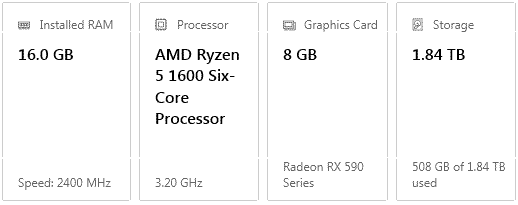
CPU:             4471.600097Mhz, Name:AuthenticAMD, FPU:1, MMX:1
Memory:          1024MB
Free memory:     1024MB
User:            del
Computer:        TAMAKI
=== Sound device info ===
Name:            Unknown
Driver:          Unknown
=== Graphics device info ===
Number:          0
Name (driver):   Radeon RX 590 Series
Name (database): Radeon RX 590 Series <<NOT FOUND IN DATABASE!>>
Vendor:          ATI
Chipset:         Vendor: 1002, Device: 67df, Board: 2391148c, Chipset: 00e1
Driver:          aticfx32.dll, Version: 31.0.21018.6011, GUID: D7B71EE2-249F-11CF-4760-8B514EC2D235
Driver version:  6011
Monitor:         \\.\DISPLAY1
Monitor aspect:  1.842307, <<UNRECOGNIZED>>
Screen mode:     1920x1080x32BPP,59Hz
Texture memory:  32MB
HW T&L:          Fixed function:1 Programmable:3.0
Pixel program:   3.0
Texture stages:  8
AppControlledAA: 1

Device properties
-----------------
boolProp   useRenderTextures true
uintProp   antialiasingSupport 1
boolProp   dontMergeNHFlora true
boolProp   enableDriverMemoryManager false
boolProp   vs2LoopsFunctional false
boolProp   presentWorkaround true
boolProp   enumerateMultisampleLevels true
boolProp   usePS30 false
uintProp   deviceLocalVideoMemorySizeDefault 33554432
boolProp   activeDeviceUseSoftwareRasterizer false
uintProp   configParserErrorCode 0
uintProp   hwMajorPSVersion 3


Do you need the full thing or is that enough? Is the memory registering as 1GB the problem?

Yeah I had to do a lot of searching to figure out how to get antialiasing back haha.

Haha we're story twins! I started this one 20 years ago too (this year is the 20th anniversary of her first chapter) so I do want to rewrite and finish her story.

I'm thinking I might just try to get this story finished first before trying Legacy.

I've had only one BSOD on this PC that I remember, when I left Cities: Skylines paused, came back, unpaused it and got a BSOD. With TS2, everything freezes, can't tab out then screen goes straight to black and boot screen.
Mad Poster
#7 Old 21st Jun 2026 at 2:07 PM
The frequent crashing (possibly also the restart issues?) could be caused by memory access issues.
The game is only accessing 1024mb + 32mb texture memory, which absolutely can cause problems with the game crashing, so you do need to fix that.

I think the 4GB patch should work regardless of which EP is your latest (except Legacy, which already has access to 4GB, so you shouldn't need to change that one).
The patch can be found here: https://ntcore.com/4gb-patch/
How to install (if you need that) here: https://www.youtube.com/watch?v=-0iwuLZyjMg
If you're having problems with the patch "sticking" (config-log still reads 1024mb after applying and running the game), and especially if your game is installed in Program Files - copy the EXE file for your latest EP to the desktop, apply the patch there, and replace the EXE file with the patched one. Also make a shortcut directly to the patched EXE file and run your game from that one - don't run the game from the Launcher EXE.

The Texture Memory line can be fixed like explained here
("3 -Setting the virtual memory size as the texture memory size")
https://episims.tumblr.com/post/190...-helped-me-with

(If you experience frequent crashing or pink-flashing, the other tips in Epi's topic are worth checking out, too).
Test Subject
Original Poster
#8 Old 22nd Jun 2026 at 12:25 PM
Thank you! Applied the patch, let's hope it works (I'm using a nocd as I don't have a built in disc drive).

https://modthesims.info/t/610641
Config still shows 1GB. Disabled compatibility mode and reapplied patch, but the log still shows 1GB.

Ah well.
Me? Sarcastic? Never.
staff: administrator
#9 Old 22nd Jun 2026 at 1:24 PM
Default MTS2 Staff Reply
  • Sims 2 - Do the Game Problem FAQ
    You appear to have not gone through our main Game Help:Game Problemwiki FAQ. Please go through and do the steps on this FAQ, including any others that it links to (for example the Game_Help:Finding_Problem_Custom_Contentwiki FAQ).

    Usually, in the vast majority of cases, actually going through and doing the steps (doing, not just reading) fixes issues - sometimes you may be asked to remove custom content, or to patch - please rest assured that all of our FAQs have been tested by our staff and volunteers and we wouldn't suggest you do something unless it's been known to fix particular issues.

Your previous log shows that the game is not recognizing your GPU.

Just because you don't have cc categorized for a specific category, doesn't mean it's not the cause of the crashing. It could be a GUID conflict, an item that requires an EP you don't have or incorrectly made/labeled cc.

Doing the 50/50 will help find the object causing the crashing.
Mad Poster
#10 Old 22nd Jun 2026 at 9:30 PM
Quote: Originally posted by SilverArrowsAgain
Thank you! Applied the patch, let's hope it works (I'm using a nocd as I don't have a built in disc drive).
Config still shows 1GB. Disabled compatibility mode and reapplied patch, but the log still shows 1GB.
Ah well.


Did you try this?

Quote:
If you're having problems with the patch "sticking" (config-log still reads 1024mb after applying and running the game), and especially if your game is installed in Program Files - copy the EXE file for your latest EP to the desktop, apply the patch there, and replace the EXE file with the patched one. Also make a shortcut directly to the patched EXE file and run your game from that one - don't run the game from the Launcher EXE.


You'll have to do it on the EXE file you're currently using, and start the game from that EXE.
You also need to restart the game before the config-log registers the change.
Back to top