Quick Reply
Search this Thread
Test Subject
#51 Old 23rd Nov 2019 at 4:11 PM
I'm getting this error with version 1.4.0
I guess it has something to do with CC? Like, HD textures not being resized (should there be any?)
Lab Assistant
#52 Old 23rd Nov 2019 at 4:17 PM
Quote: Originally posted by CmarNYC
This tells me nothing since most CC is working - please tell me which sims and which CC aren't showing up correctly, and post pictures and the exported meshes and textures.


Sure I can!
Lab Assistant
#53 Old 23rd Nov 2019 at 4:45 PM Last edited by SuperGal<3 : 24th Nov 2019 at 5:27 PM.
My Sim in named Mia Songs and she wears a Boho dress by mxfsims'. I placed all the textures, meshes, and images in a rar.

Update:

It won't let me upload attachments. Hold on.

Update 2:

Okay I figured out the problem. I must need my eyes checked. XD
Test Subject
#54 Old 23rd Nov 2019 at 6:44 PM
I think the ts4 ripper has a problem reading the custom skintones. They use to show up with the earlier version 1.0.1. I'm also getting this error here when trying to export to dae.

See the end of this message for details on invoking
just-in-time (JIT) debugging instead of this dialog box.

************** Exception Text **************
System.NullReferenceException: Object reference not set to an instance of an object.
at TS4SimRipper.DAE..ctor(GEOM[] geomArray, String[] meshNames, RIG rig, Boolean Y_Up)
at TS4SimRipper.Form1.SaveModelMorph(MeshFormat format)
at TS4SimRipper.Form1.SaveDAE_button_Click(Object sender, EventArgs e)
at System.Windows.Forms.Control.OnClick(EventArgs e)
at System.Windows.Forms.Button.OnClick(EventArgs e)
at System.Windows.Forms.Button.OnMouseUp(MouseEventArgs mevent)
at System.Windows.Forms.Control.WmMouseUp(Message& m, MouseButtons button, Int32 clicks)
at System.Windows.Forms.Control.WndProc(Message& m)
at System.Windows.Forms.ButtonBase.WndProc(Message& m)
at System.Windows.Forms.Button.WndProc(Message& m)
at System.Windows.Forms.NativeWindow.Callback(IntPtr hWnd, Int32 msg, IntPtr wparam, IntPtr lparam)

(It doesn't happen with all outfits, mainly the custom ones. The sim uses default replacements.)
Screenshots
Ms. Byte (Deceased)
Original Poster
#55 Old 23rd Nov 2019 at 8:13 PM
Quote: Originally posted by luvbunnyxx2
I think the ts4 ripper has a problem reading the custom skintones. They use to show up with the earlier version 1.0.1. I'm also getting this error here when trying to export to dae.

See the end of this message for details on invoking
just-in-time (JIT) debugging instead of this dialog box.

************** Exception Text **************
System.NullReferenceException: Object reference not set to an instance of an object.
at TS4SimRipper.DAE..ctor(GEOM[] geomArray, String[] meshNames, RIG rig, Boolean Y_Up)
at TS4SimRipper.Form1.SaveModelMorph(MeshFormat format)
at TS4SimRipper.Form1.SaveDAE_button_Click(Object sender, EventArgs e)
at System.Windows.Forms.Control.OnClick(EventArgs e)
at System.Windows.Forms.Button.OnClick(EventArgs e)
at System.Windows.Forms.Button.OnMouseUp(MouseEventArgs mevent)
at System.Windows.Forms.Control.WmMouseUp(Message& m, MouseButtons button, Int32 clicks)
at System.Windows.Forms.Control.WndProc(Message& m)
at System.Windows.Forms.ButtonBase.WndProc(Message& m)
at System.Windows.Forms.Button.WndProc(Message& m)
at System.Windows.Forms.NativeWindow.Callback(IntPtr hWnd, Int32 msg, IntPtr wparam, IntPtr lparam)

(It doesn't happen with all outfits, mainly the custom ones. The sim uses default replacements.)


Please upload or post a link to the custom skin tone that's not showing up, and one or two of the custom clothing items or default replacements that won't export correctly.

Please do not PM me with mod, tutorial, or general modding questions or problems; post them in the thread for the mod or tutorial or post them in the appropriate forum.

Visit my blogs for other Sims content:
Online Sims - general mods for Sims 3
Offline Sims - adult mods for Sims 3 and Sims 4
Ms. Byte (Deceased)
Original Poster
#56 Old 23rd Nov 2019 at 8:16 PM
Quote: Originally posted by Miljan
I'm getting this error with version 1.4.0
I guess it has something to do with CC? Like, HD textures not being resized (should there be any?)


No, that's a mesh problem. I've probably already fixed it, but please retest after a new version of SimRipper is up.

Please do not PM me with mod, tutorial, or general modding questions or problems; post them in the thread for the mod or tutorial or post them in the appropriate forum.

Visit my blogs for other Sims content:
Online Sims - general mods for Sims 3
Offline Sims - adult mods for Sims 3 and Sims 4
Ms. Byte (Deceased)
Original Poster
#57 Old 23rd Nov 2019 at 8:21 PM
Quote: Originally posted by SuperGal<3
My Sim in named Mia Songs and she wears a Boho dress by mxfsims'. I placed all the textures, meshes, and images in a rar.

Update:

It won't let me upload attachments. Hold on.

Update 2:

Okay I figured out the problem. I must need my eyes checked. XD


Thanks! Could you please upload or post a link to the package for the dress she's wearing?

Please do not PM me with mod, tutorial, or general modding questions or problems; post them in the thread for the mod or tutorial or post them in the appropriate forum.

Visit my blogs for other Sims content:
Online Sims - general mods for Sims 3
Offline Sims - adult mods for Sims 3 and Sims 4
Test Subject
#58 Old 23rd Nov 2019 at 9:02 PM
Quote: Originally posted by CmarNYC
Please upload or post a link to the custom skin tone that's not showing up, and one or two of the custom clothing items or default replacements that won't export correctly.


The skintone is from here: http://kijiko-catfood.com/non-defau...default-tuning/
Magic- Bot default feet v5 + Slider https://magic-bot.wixsite.com/magic...eet-replacement

The others are something adult related, created by Simdulgence, and Hiroki's male default top over at Loverslab.
Lab Assistant
#59 Old 23rd Nov 2019 at 9:24 PM
Quote: Originally posted by CmarNYC
Thanks! Could you please upload or post a link to the package for the dress she's wearing?


Oh you wanted the link or mesh? My bad XD I can give you the link

https://www.thesimsresource.com/dow...ess/id/1467976/
Ms. Byte (Deceased)
Original Poster
#60 Old 24th Nov 2019 at 2:38 PM Last edited by CmarNYC : 24th Nov 2019 at 3:29 PM.
Quote: Originally posted by SuperGal<3
Oh you wanted the link or mesh? My bad XD I can give you the link

https://www.thesimsresource.com/dow...ess/id/1467976/


Not at all - I didn't know the problem was the dress until I saw the pictures.

This dress has an incorrect layer of 0. The layer is how the game determines the order in which the textures are layered on each other. The right layer for a whole body clothing is 16000. I'm not sure yet why my tool seems to be layering the skin on top of the dress but the layer number may have something to do with it. There also may be something else going on with the bottom part of the dress, and I'll have to look into that.

Update: I take it back - turns out it was HQ textures on that dress. I've updated the tool to scale all textures to standard size and it's working correctly now.

Please do not PM me with mod, tutorial, or general modding questions or problems; post them in the thread for the mod or tutorial or post them in the appropriate forum.

Visit my blogs for other Sims content:
Online Sims - general mods for Sims 3
Offline Sims - adult mods for Sims 3 and Sims 4
Lab Assistant
#61 Old 24th Nov 2019 at 5:23 PM Last edited by SuperGal<3 : 24th Nov 2019 at 6:41 PM.
Quote: Originally posted by CmarNYC
Not at all - I didn't know the problem was the dress until I saw the pictures.

This dress has an incorrect layer of 0. The layer is how the game determines the order in which the textures are layered on each other. The right layer for a whole body clothing is 16000. I'm not sure yet why my tool seems to be layering the skin on top of the dress but the layer number may have something to do with it. There also may be something else going on with the bottom part of the dress, and I'll have to look into that.

Update: I take it back - turns out it was HQ textures on that dress. I've updated the tool to scale all textures to standard size and it's working correctly now.


Oh I'm glad you figured it out! I'm going to try it out know. Didnt work for me...maybe you havent uploaded the updated tool yet?
Ms. Byte (Deceased)
Original Poster
#62 Old 24th Nov 2019 at 11:58 PM
Quote: Originally posted by SuperGal<3
Oh I'm glad you figured it out! I'm going to try it out know. Didnt work for me...maybe you havent uploaded the updated tool yet?


Oh sorry, no I haven't uploaded it yet. Tomorrow!

Please do not PM me with mod, tutorial, or general modding questions or problems; post them in the thread for the mod or tutorial or post them in the appropriate forum.

Visit my blogs for other Sims content:
Online Sims - general mods for Sims 3
Offline Sims - adult mods for Sims 3 and Sims 4
Ms. Byte (Deceased)
Original Poster
#63 Old 25th Nov 2019 at 12:23 AM
Quote: Originally posted by luvbunnyxx2
The skintone is from here: http://kijiko-catfood.com/non-defau...default-tuning/
Magic- Bot default feet v5 + Slider https://magic-bot.wixsite.com/magic...eet-replacement

The others are something adult related, created by Simdulgence, and Hiroki's male default top over at Loverslab.


The skintone is definitely working but that's all I tested. I'll upload the new version tomorrow, there's a new problem with the speculars I have to fix first.

Please do not PM me with mod, tutorial, or general modding questions or problems; post them in the thread for the mod or tutorial or post them in the appropriate forum.

Visit my blogs for other Sims content:
Online Sims - general mods for Sims 3
Offline Sims - adult mods for Sims 3 and Sims 4
Ms. Byte (Deceased)
Original Poster
#64 Old 25th Nov 2019 at 1:36 AM
Got the speculars fixed so I went ahead and uploaded version 1.5.

Please do not PM me with mod, tutorial, or general modding questions or problems; post them in the thread for the mod or tutorial or post them in the appropriate forum.

Visit my blogs for other Sims content:
Online Sims - general mods for Sims 3
Offline Sims - adult mods for Sims 3 and Sims 4
Lab Assistant
#65 Old 25th Nov 2019 at 6:14 AM
Quote: Originally posted by CmarNYC
Oh sorry, no I haven't uploaded it yet. Tomorrow!


Oh okay. I'm using your hq converter for now
Lab Assistant
#66 Old 25th Nov 2019 at 6:15 AM
Quote: Originally posted by CmarNYC
Got the speculars fixed so I went ahead and uploaded version 1.5.


Oh nvm. You already uploaded. Different time zones I guess lol
Scholar
#67 Old 28th Nov 2019 at 8:17 AM
Just a feedback about the breast. In the game looks fine but ripping the file is very large. I have to sculpt to deflate them....


Anyway I'm very happy using your Sims4Ripper. I used Ninja Ripper and it was very complicated to weight the mesh and sculpt the mesh as in the game. Here is my render from last week.

Mad Poster
#68 Old 28th Nov 2019 at 11:37 AM
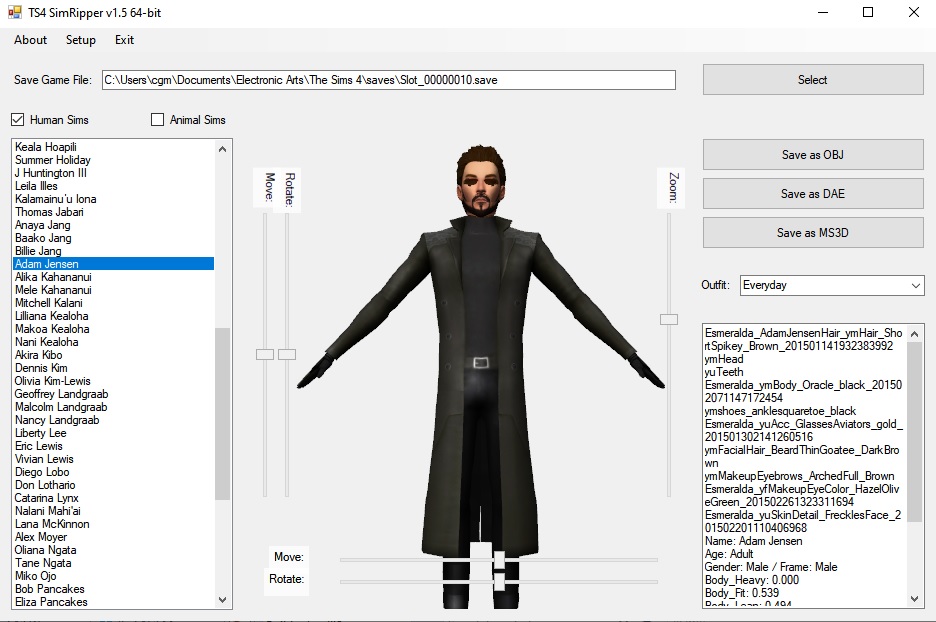
Thank you for the latest version! It still doesn't like Adam Jensen, so I've given up on him. Everyone else has been working well!

(PS: Am trying to PM you but got blocked because your Inbox is full - just to let you know!)

My Fallout 4 creations: Nexus
More of my Fallout 4 items and some of my unreleased-on-MTS TS4 stuff are at my site, Colourful Commonwealth
Ms. Byte (Deceased)
Original Poster
#69 Old 28th Nov 2019 at 2:32 PM
Quote: Originally posted by RomerJon17
Just a feedback about the breast. In the game looks fine but ripping the file is very large. I have to sculpt to deflate them....


Anyway I'm very happy using your Sims4Ripper. I used Ninja Ripper and it was very complicated to weight the mesh and sculpt the mesh as in the game. Here is my render from last week.


Thanks!

I'm not seeing overly large breasts when I use SimRipper. Are you using custom breast sliders? If so, please link me to where I can download them.

Please do not PM me with mod, tutorial, or general modding questions or problems; post them in the thread for the mod or tutorial or post them in the appropriate forum.

Visit my blogs for other Sims content:
Online Sims - general mods for Sims 3
Offline Sims - adult mods for Sims 3 and Sims 4
Ms. Byte (Deceased)
Original Poster
#70 Old 28th Nov 2019 at 3:01 PM
Quote: Originally posted by Esmeralda
Thank you for the latest version! It still doesn't like Adam Jensen, so I've given up on him. Everyone else has been working well!

(PS: Am trying to PM you but got blocked because your Inbox is full - just to let you know!)


Oh man! I wrote this lovely little routine to standardize all the meshes when they're read in and make sure none of the data structures that were added in later versions are missing, and forgot to actually CALL it in the tool. Argg! Plus I forgot to check for cases where the species is not defined because the CASP was made before pets. Another argg. Fixed for the next version.


Yeah, I had to spend some time cleaning out my inbox and outbox. I'll pm you later with the whole story plus my feeble excuses for not being in touch.
Screenshots

Please do not PM me with mod, tutorial, or general modding questions or problems; post them in the thread for the mod or tutorial or post them in the appropriate forum.

Visit my blogs for other Sims content:
Online Sims - general mods for Sims 3
Offline Sims - adult mods for Sims 3 and Sims 4
Mad Poster
#71 Old 28th Nov 2019 at 10:45 PM
Aha, we can see Adam now! That's great, looking forward to the new version.

My Fallout 4 creations: Nexus
More of my Fallout 4 items and some of my unreleased-on-MTS TS4 stuff are at my site, Colourful Commonwealth
Scholar
#72 Old 29th Nov 2019 at 1:09 PM
Quote: Originally posted by CmarNYC
Thanks!

I'm not seeing overly large breasts when I use SimRipper. Are you using custom breast sliders? If so, please link me to where I can download them.


Strange I have a look in the mod folder... Large breast doesn't happen in whole body except tops with jackets.
Ms. Byte (Deceased)
Original Poster
#73 Old 29th Nov 2019 at 3:52 PM
Quote: Originally posted by RomerJon17
Strange I have a look in the mod folder... Large breast doesn't happen in whole body except tops with jackets.


I'm not seeing it with an EA jacket so I assume it's happening with CC jackets. Could you identify one that's not working right and link me to where I can download it?

Please do not PM me with mod, tutorial, or general modding questions or problems; post them in the thread for the mod or tutorial or post them in the appropriate forum.

Visit my blogs for other Sims content:
Online Sims - general mods for Sims 3
Offline Sims - adult mods for Sims 3 and Sims 4
Test Subject
#74 Old 29th Nov 2019 at 5:35 PM
So it turned out to be a skin overlay that was causing the gray skin issue. Removing the overlay fixed it.
Screenshots
Ms. Byte (Deceased)
Original Poster
#75 Old 29th Nov 2019 at 7:09 PM
Quote: Originally posted by luvbunnyxx2
So it turned out to be a skin overlay that was causing the gray skin issue. Removing the overlay fixed it.


I see. What kind of overlay is it? The tool handles forehead and mouth creases correctly but I guess there's at least one other category that's a grayscale image.

Please do not PM me with mod, tutorial, or general modding questions or problems; post them in the thread for the mod or tutorial or post them in the appropriate forum.

Visit my blogs for other Sims content:
Online Sims - general mods for Sims 3
Offline Sims - adult mods for Sims 3 and Sims 4
Locked thread | Locked by: Tashiketh Reason: Closing on request
Page 3 of 4
Back to top