Quick Reply
Search this Thread
Test Subject
Original Poster
#1 Old 1st Jun 2013 at 12:54 PM
Default Counter corner piece on diagonal wall
I'm looking for a counter piece that would fit into a corner containing a diagonal.

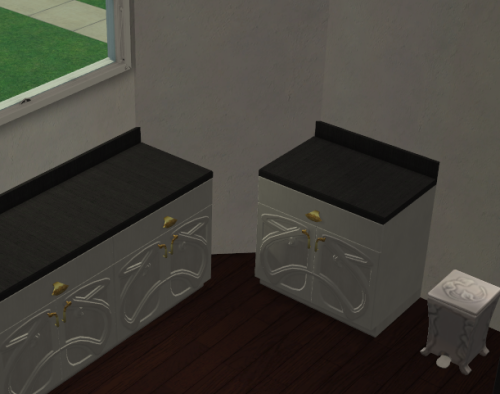
I'm finding it hard to describe what I'm looking for in words, so I'll illustrate. I would like a counter piece that would fit into the gap here:


I know there probably won't be one to match those exact counters - but if there is a similar object around that would be great.

Thanks in advance!
Scholar
#2 Old 1st Jun 2013 at 5:42 PM
it's not an object, but if you use move_objects on with boolprop 45degreeangleofrotation true you can place a normal counter in that space. The sides of the diagonal counter will sort of blend into the counters on either side. It won't look perfect, especially for pics, but it'll look ok for gameplay. I searched for an object as well a few years ago with no luck so I thought I'd suggest this in case there still isn't one out there.
Test Subject
Original Poster
#3 Old 2nd Jun 2013 at 1:36 AM
Thanks Katreina - I did try a combination of the 45 degree rotation and quarter tile placement cheats, but especially with that counter it looks a bit pants. Thanks for the advise nonetheless!

If I this thread doesn't turn up anything and I manage to hunt something out, I'll be sure to post it. (I'm starting to suspect I'll have to make my first foray into making my own objects, though ... Scary! I'm actually amazed no one has done this, though. It seems such an obvious object for a CC maker out there to have made, and yet - nothing.)
Lab Assistant
#4 Old 2nd Jun 2013 at 1:51 AM Last edited by AshleeCUP : 2nd Jun 2013 at 8:09 PM. Reason: wrong cheatcode wording

Along with the cheats that katreina suggested, use the cheat boolprop snapobjectstogrid false. this cheat will allow you to line the counter up with the two side counters more. you may end up have the diagonal counter cutting into the diagonal wall a little. its not much and shouldn't be a problem unless you are taking pics of that outside wall.
Former Hamster
retired moderator
#5 Old 2nd Jun 2013 at 2:19 AM
Quote: Originally posted by b_C_Draygon
... It seems such an obvious object for a CC maker out there to have made, and yet - nothing.


This is something I've thought of trying in the past and I always forget about it. I've made a note to myself to try it again. So I'm not promising anything, but there's a chance I might have something in a few days.

The biggest trick is getting something that could work with most of the counters. With all the recolors available (I'm thinking Michelle_111's Maxis woods recolors) just ONE mesh might work. (Or 2- one with a the back trim and one without.) IF you use her recolors. Otherwise, it might have to be a new mesh for each counter in the game.
Test Subject
#6 Old 2nd Jun 2013 at 2:35 AM
This would be wonderful t have! MLC, you've probably seen this, not that I know a darn thing about meshing, but hokadk47 at Sims2Artists has a corner piece for the Lousiana set that might help...or not...http://sims2artists.com/index.php?P...c8&topic=3438.0
Mad Poster
#7 Old 2nd Jun 2013 at 4:11 AM
Quote: Originally posted by sandierichardson
This would be wonderful t have! MLC, you've probably seen this, not that I know a darn thing about meshing, but hokadk47 at Sims2Artists has a corner piece for the Lousiana set that might help...or not...http://sims2artists.com/index.php?P...c8&topic=3438.0


I also want something to fill in corners. Right now, I just leave them empty.

sandierichardson, the diagonal corner pieces in the pics look great, but I It looks great, but I wish there was something that matches the original counters that come with the BG, ever EP and SP.
Needs Coffee
retired moderator
#8 Old 2nd Jun 2013 at 5:22 AM
That corner piece is nice, but doesn't address this issue. I've used counters on angles before but it often 'moves' as you play and doesn't look very nice, but is the best thing I have found. It looks okay in photos for decorating contests at least. If it's against a half wall which I did in one house that can look okay too.
I think if a corner piece were to be made; being blank without any bench moldings, no knob or anything, but in all maxis colours top and bottom would be a huge help. That should only require one mesh wouldn't it? That's the kind of thing I would try for if I had any meshing ability.

"I dream of a better tomorrow, where chickens can cross the road and not be questioned about their motives." - Unknown
~Call me Jo~
Former Hamster
retired moderator
#9 Old 2nd Jun 2013 at 5:50 AM
That's what I've been thinking, Jo. Something plain. Then that's where I get stuck- I'd rather slave it to a game mesh but which one? Which is why I mentioned Michelle's recolors. If someone were to use those, then the new mesh could be used for just about any counter. Since it's possible that not everyone uses her recolors, it's probably going to have to be more than 1 new mesh. (One for each counter.) I'd still make one generic, multi use one for those who use Michelle's recolors though- that way people could choose to have all or just the one mesh.

That said, I have my favorite counters and if it were up to me, I'd make something that matches just those.
Needs Coffee
retired moderator
#10 Old 2nd Jun 2013 at 6:18 AM
Base game mesh to to make it more available? I'm not sure if I know Michelle's colours. I tend to over use a couple of game counters myself. That plus buggybooz's Kitchen Basics.

"I dream of a better tomorrow, where chickens can cross the road and not be questioned about their motives." - Unknown
~Call me Jo~
Site Helper
#11 Old 2nd Jun 2013 at 2:34 PM
I don't use any kitchen recolors, but I'd love to have corner pieces slaved to the various EA counters. Sounds like it would have to be one object per counter type.
Test Subject
Original Poster
#12 Old 2nd Jun 2013 at 2:52 PM
I knew I couldn't be the only one looking for this! Thanks everyone for your input and suggestions!

MLC, if you do manage to do something with this, that would be AMAZING, seriously. <3 Thank you for even taking a look at this.

I don't use Michelle's recolours myself, but I can see the logic behind using that as a base. Something plain would be good - I'd also love the option of backboard trim/no trim if you can do it.

Would it be possible to have one basic mesh (just for a plain cornerpiece shape, no door/drawer/detailing on it, with trim) and then clone it and slave the clones to the various Maxis counters? Yes, that would mean a lot of extra objects, but maybe we could hide them in a collection folder so they only show up there?

Sorry if this is a dumb suggestion and/or tons of work - I haven't ever touched the object creation side of things! It just seems to me that making one 'simple' match-all mesh and then cloning/slaving would be less time consuming than making individual ones for all the counters.
Site Helper
#13 Old 2nd Jun 2013 at 6:59 PM
It might even be possible to reuse the mesh, rather than cloning it.
Former Hamster
retired moderator
#14 Old 3rd Jun 2013 at 7:35 AM
This is going to be interesting.

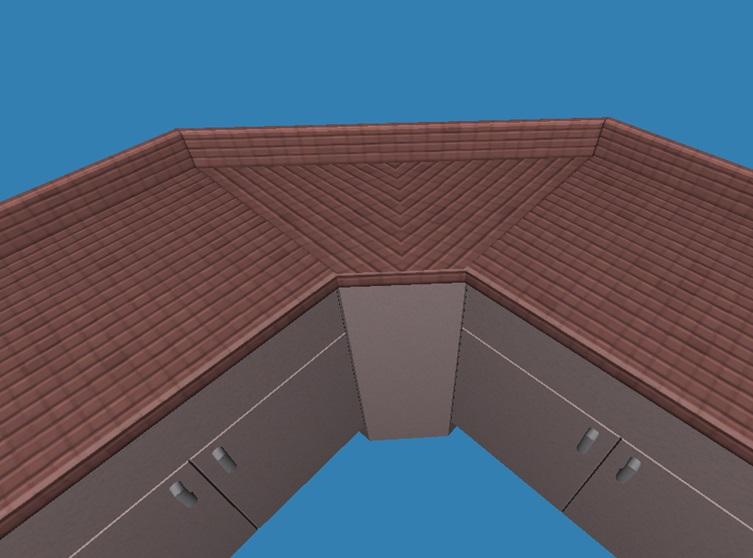
Here's what I've been playing around with. There are 2 versions of the top (the other one is hidden)- they're mapped differently, otherwise they're identical. Once I get a mesh the way it needs to be, I'll definitely be able to use it over and over again with just a little bit of remapping if needed. That's the cool part.


Edit: Since this is the WCIF thread, I'll start a thread in feedback once this mesh is 99.99% done.
Needs Coffee
retired moderator
#15 Old 3rd Jun 2013 at 8:34 AM
Looking good. :D

"I dream of a better tomorrow, where chickens can cross the road and not be questioned about their motives." - Unknown
~Call me Jo~
Constant Contestant
retired moderator
#16 Old 3rd Jun 2013 at 8:56 AM
Love it MLC
Mad Poster
#17 Old 3rd Jun 2013 at 12:58 PM
Former Hamster
retired moderator
#18 Old 3rd Jun 2013 at 2:43 PM
:D

Nobody minds the pattern (the solid colors look fine) the way it is? I'm trying to get the other version of the top mapped so it matches the counters better. But if I don't have to stare at all those little vertices and move them a tiny, tiny bit at a time? I wouldn't complain, lol. I've changed the base of it a bit- it matches the counter a lot better now.
Needs Coffee
retired moderator
#19 Old 3rd Jun 2013 at 2:54 PM
I can imagine that would be very tedious. Might be different if it was a favored counter, but that thing?... Only desperately dumpy places use it anyway, so an imperfect match kind of goes.

"I dream of a better tomorrow, where chickens can cross the road and not be questioned about their motives." - Unknown
~Call me Jo~
Site Helper
#20 Old 3rd Jun 2013 at 3:36 PM
This is wonderful. I rarely download CC, but this is an exception. Will it be usable by sims?
Former Hamster
retired moderator
#21 Old 3rd Jun 2013 at 5:31 PM
Usable? It could be, as far as I know. If I'm not mistaken all it would take is adding some BHAVs. I'll have to ask a couple people who know BHAVs better than I do about that. If not- there will be slots at least. (Slots I know. Oh boy, do I know slots. At least this wouldn't have 24 of them.)
Site Helper
#22 Old 3rd Jun 2013 at 7:13 PM
I believe that Numenor has a mod which makes corner counters usable. I was just wondering whether they'll be usable as is, whether they'll require Numenor's mod to be made usable, or whether you would have to write special code.
Test Subject
Original Poster
#23 Old 4th Jun 2013 at 9:17 PM
Ooo, oh, wow - that looks really great mustluvcats! Thank you so much for taking this on, you are awesome!

As pretty much everyone above has said, I could live with the mapping as it is (and save you a lot of work!). I tend to use mainly solid coloured (or marble) textured counter tops anyway - I assume anything with a less 'regular' pattern would also look OK? My one minor concern I have would be how that mapping would look with a wood texture? (I only ask because I tend to use the wood textured counter top options quite a bit in my game.)

I can completely understand if you don't want to painstakingly move all those vertices, though. I can imagine that gets boring fast!
Former Hamster
retired moderator
#24 Old 6th Jun 2013 at 4:18 AM
Thanks to UVMapperPro and the ability to use the arrow keys..I have moved them. The result? I've decided that the mapping shown in the picture above is the best looking. If a wood texture is used that has the grain going up and down, the texture will meet in a V like above, if the grain is going side to side it'll meet in an upside down V. It doesn't look as bad as it might sound, so I'm working on finishing up the test version to check it out in game. *crosses fingers*
Constant Contestant
retired moderator
#25 Old 6th Jun 2013 at 7:43 PM
Ooh can't wait, MLC
Page 1 of 2
Back to top