Quick Reply
Search this Thread
Lab Assistant
Original Poster
#1 Old 26th Mar 2015 at 2:09 AM
Default I can't start the game.
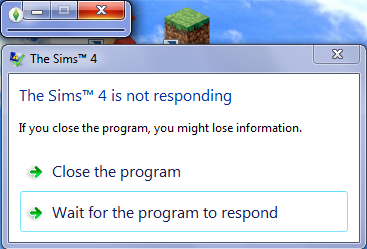
Is anyone having this issue after the latest Origin update?, just now I booted up The Sims 4 and this happened...

I've checked for updates, repaired it with Origin, removed my CC and done every trick in the book and none of it helped.
Inventor
#2 Old 26th Mar 2015 at 2:39 AM
You're in luck! I was scrolling through my tumblr dashboard and saw this.
From a quick skim it looks like that's your problem. I hope it helps!
Lab Assistant
#3 Old 26th Mar 2015 at 2:49 AM
Disabling Origin in-game is the way to go. However, you should take a look at this and see if it can give you a more permanent fix/you can give EA some feedback.

It seems to have been caused by the update released today.
Instructor
#4 Old 26th Mar 2015 at 3:06 AM
Same. I think I was the first person to post about it (I did it yesterday... my thread's still up). I thought I was alone, until today. Now EVERYONE is having this problem.
Instructor
#5 Old 26th Mar 2015 at 3:15 AM
Quote: Originally posted by kaspookaboo
Disabling Origin in-game is the way to go. However, you should take a look at this and see if it can give you a more permanent fix/you can give EA some feedback.

It seems to have been caused by the update released today.


Thanks. This worked for me!
Instructor
#6 Old 26th Mar 2015 at 4:52 PM
Here's EA's solution: http://answers.ea.com/t5/Origin/INF...hread-id/131815 FakeHousesRealAwesome put it on the other thread, but not this one.
Lab Assistant
Original Poster
#7 Old 26th Mar 2015 at 7:10 PM
Quote: Originally posted by xxsoulfire123
You're in luck! I was scrolling through my tumblr dashboard and saw this.
From a quick skim it looks like that's your problem. I hope it helps!

That looks to be the exact problem. Just now I got a patch for TS4 that might fix it anyway, but just in case I disabled Origin in-game.

Anyways, thanks for the help guys.
Forum Resident
#8 Old 26th Mar 2015 at 7:43 PM Last edited by veil : 26th Mar 2015 at 8:42 PM.
I downloaded today's patch, and now the game won't start at all.

Edit: Once I removed my whole Mods folder, it started.

I tried just removing my Game Mods folder, and putting the rest of the clothing, objects, etc., back in, and it wouldn't start again.

So I guess I have to do the 50% exercise.... *sigh*

Here at MTS since 2008; avid S2 player/blogger; didn't care for S3; bought and hated SimCity 2013; am choosing to remain upbeat about Sims 4....

My Sims 4 blog: Veil's Utopia House Challenge Blog
Test Subject
#9 Old 26th Mar 2015 at 8:44 PM Last edited by Hoggle : 26th Mar 2015 at 9:03 PM.
Quote: Originally posted by veil
I downloaded today's patch, and now the game won't start at all.

Edit: Once I removed my whole Mods folder, it started.

I tried just removing my Game Mods folder, and putting the rest of the clothing, objects, etc., back in, and it wouldn't start again.

So I guess I have to do the 50% exercise.... *sigh*


I tried the 50/50 but it's not working with ANY CC or Mods.

Edit: Started working with some CC, must start the aggravating process all over again, which is super frustrating because whatever conflict with CC/Mods didn't happen until after the update.
Lab Assistant
Original Poster
#10 Old 27th Mar 2015 at 1:01 AM
So they made a patch that conflicts with CC? How neat EA...
Test Subject
#11 Old 27th Mar 2015 at 1:44 AM
so what am I supposed to do? I've taken all of my CC out of the game folders but now I don't even want to play the damn game if I can't use it. Anyone know how to fix this problem?
Theorist
#12 Old 27th Mar 2015 at 2:28 AM
Quote: Originally posted by Fishynamedleo
so what am I supposed to do? I've taken all of my CC out of the game folders but now I don't even want to play the damn game if I can't use it. Anyone know how to fix this problem?


Fishy, there are several solutions to the issue:
1. Firstly, make sure your mods folder is removed from your game. You then need to see if your game starts up okay without the mods, and if it does then move on to step 3.
2. If it doesn't start up, then you need to click Origin>Application Settings>General> Scroll down to the bottom and tick the box to update to beta software.
3. Once your game is back to normal, you need to sort through your CC and find the culprit(s) we have an ongoing list here: http://www.modthesims.info/showthread.php?t=551495
The best sorting technique is, if you have folders, test each individually folder until you get the folder causing an error, create another folder somewhere else on your computer to put potential risks (the files in the folder causing corruption) as a holding place, and then another folder to put the culprits. Depending on how much CC you have you can do it one by one until you find the error, or by fours or even tens, the problem is though, the higher the amount you're sorting the more tedious the tracking becomes.

Hope this helps!
Top Secret Researcher
#13 Old 27th Mar 2015 at 2:49 AM
Take a look at this thread, guys. We're all having problems due to the recent patch (you can thank @TMBrandon above for the post and details in the thread):

http://www.modthesims.info/showthread.php?t=551495

Not-so-daily TS2 downloads @ my simblr.
Back to top