Quick Reply
Search this Thread
Instructor
Original Poster
#1 Old 31st Mar 2026 at 7:33 PM

This user has the following games installed:

Sims 3, World Adventures, Ambitions, Late Night, Generations, Pets, Showtime, Supernatural, Seasons, University Life, Island Paradise, Into the Future
Default Did Windows Update break my Game?
I've been trying to figure this out myself for a while, but I haven't found a solution. The last Windows update (I believe it was March 4th) there was an update and now my game won't load properly. I've tried several things including taking everything out, and playing it -- not working, only getting the black screen, then I put every single CC item and expansion in my game and then it worked, and then it stopped after loading TS3 twice -- black screen again. i've tried backing my computer up too and still won't work. I even saw some people talking about it on reddit , but seems like they don't have a solution either.

I was hoping there would be another update, and then maybe that would work, but it hasn't happened yet. I've tried to fix this myself, but I'm mentally exhausted trying everything I can. It works when it feels like it, I'm not sure what I'm doing. I feel a bit defeated because I haven't really launched TS3 this month.

If anyone has any advice or experienced the same thing, please let me know or tell me what worked for you!

Thanks
Instructor
#2 Old 1st Apr 2026 at 6:11 PM
Most likely the problem comes from OneDrive, in case you have it. Make sure you disable the app's access to game files or disable it completely if it's not in use.
Luckily you can uninstall some of installed updates if you think the issue comes from there.
If you use lots of core mods, some of them are not recommended to use together, so check if you have any mod conflict.


To support my work, donate small tip on my Ko-fi page
Lab Assistant
#3 Old 2nd Apr 2026 at 9:46 PM
yes, Windows Update has changed something in the way the game runs. What we're getting is a popup that stays in the background that says "unofficial game mod detected." You can ALT-TAB switch to that pop up, click CONTINUE and it will work again.
Instructor
#4 Old 3rd Apr 2026 at 7:53 AM Last edited by vesko_sims3 : 3rd Apr 2026 at 8:25 PM.
I haven’t encountered this yet - maybe because I put WU on pause and haven’t received this update yet, which causes the issue. But sooner or later I’ll get it, for sure.

https://thesims3help.tumblr.com


To support my work, donate small tip on my Ko-fi page
Instructor
Original Poster
#5 Old 5th Apr 2026 at 10:02 PM
Quote: Originally posted by vesko_sims3
Most likely the problem comes from OneDrive, in case you have it. Make sure you disable the app's access to game files or disable it completely if it's not in use.
Luckily you can uninstall some of installed updates if you think the issue comes from there.
If you use lots of core mods, some of them are not recommended to use together, so check if you have any mod conflict.


I think the only core mod I have it the overwatch and error trap. I'm not signed into one drive if that makes a difference? I never signed in since getting this new computer (I think I got it in February). Do you know where I would find out what it has access to?
Instructor
Original Poster
#6 Old 5th Apr 2026 at 10:04 PM
Quote: Originally posted by KevinL75
yes, Windows Update has changed something in the way the game runs. What we're getting is a popup that stays in the background that says "unofficial game mod detected." You can ALT-TAB switch to that pop up, click CONTINUE and it will work again.


I tried this too, and it won't allow me to click it, it's like it's there, but it won't pop up and won't give me enough time to click continue. I saw it on this post on tumblr and I thought there was hope, but yet again it didn't allow me to click it.
Instructor
#7 Old 6th Apr 2026 at 6:11 AM Last edited by vesko_sims3 : 6th Apr 2026 at 8:34 AM.
Quote: Originally posted by flloetryresident
I think the only core mod I have it the overwatch and error trap. I'm not signed into one drive if that makes a difference? I never signed in since getting this new computer (I think I got it in February). Do you know where I would find out what it has access to?


That's good that you haven't signed in - that makes using your computer somewhat safer according to me from Microsoft's slop.
Unfortunately I can't help you find out if OneDrive has access to game files because I don't use it. There should be tutorials in YT that are helpful in this situation.
But again, if you are not singed in there's nothing to worry about I guess.


To support my work, donate small tip on my Ko-fi page
Instructor
#8 Old 6th Apr 2026 at 6:15 AM Last edited by vesko_sims3 : 6th Apr 2026 at 8:52 AM.
Quote: Originally posted by flloetryresident
I tried this too, and it won't allow me to click it, it's like it's there, but it won't pop up and won't give me enough time to click continue. I saw it on this post on tumblr and I thought there was hope, but yet again it didn't allow me to click it.


I remember that there was a link in this post, from where you could download a fix for this issue - they are links to SFS update packages of the problematic mods.
Make sure ErrorTrap matches the type of game version you have. Personally I have the disk version of the game and my ErrorTrap is for disk vesion. Here is a link to the mod: https://www.nraas.net/community/ErrorTrap#tuning. The icons below the description are download links and they refer to the game version you have.
Also make sure you use the latest vesion of the other mods you have.


To support my work, donate small tip on my Ko-fi page
Instructor
#9 Old 9th Apr 2026 at 5:48 AM
@flloetryresident
Did you manage to fix this by updating your mods?


To support my work, donate small tip on my Ko-fi page
Lab Assistant
#10 Old 9th Apr 2026 at 7:21 AM
I found the error in my game. it was this mod: https://modthesims.info/d/678484/plumbot-fixes-mod.html

Its set to the disk version of 1.67. I used S3PE to edit it to the Steam version, and no more pop-up.
Instructor
Original Poster
#11 Old 22nd Apr 2026 at 1:14 AM
Quote: Originally posted by vesko_sims3
@flloetryresident
Did you manage to fix this by updating your mods?


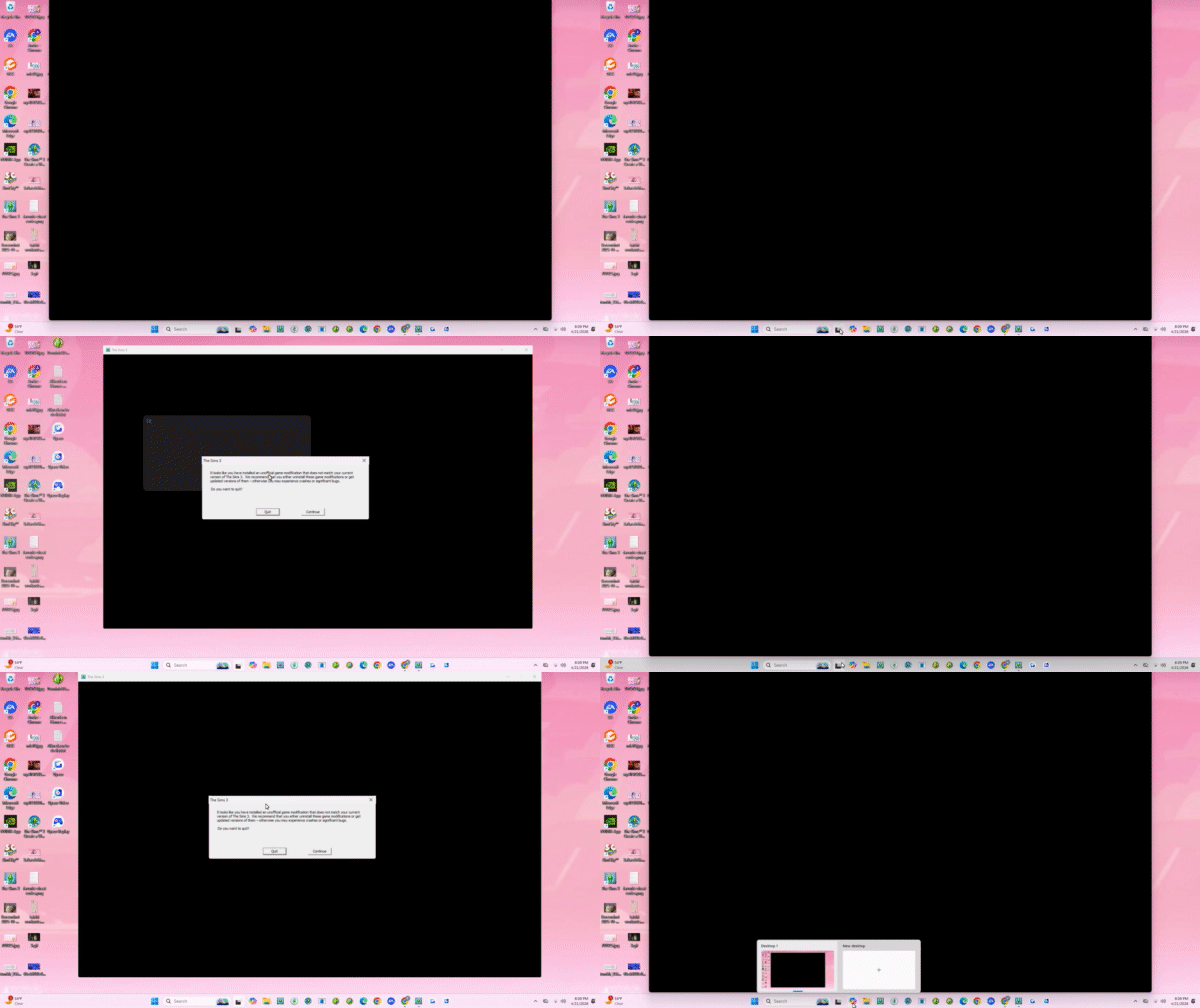
Unfortunately no. I hadn't been online in a while since it hadn't been working. Here's was I mean when it wasn't working (I used gyazo on my old computer to make screen recordings but since I had my new computer it took me a while to figure out what the name of the app was)

Everytime I try to bring the window up, it disappears. I can't make it stay long enough for me to click on it.


Quote:
Dear Sim Gods,
If you make this work for me, I promise I will play that sim family I've been neglecting for years!
Instructor
Original Poster
#12 Old 22nd Apr 2026 at 1:19 AM
Quote: Originally posted by KevinL75
I found the error in my game. it was this mod: https://modthesims.info/d/678484/plumbot-fixes-mod.html

Its set to the disk version of 1.67. I used S3PE to edit it to the Steam version, and no more pop-up.


I wish that was the case in my game, but unfortunately I don't have that mod. I'm so envious of you right now
Instructor
#13 Old 22nd Apr 2026 at 8:24 AM Last edited by vesko_sims3 : 22nd Apr 2026 at 1:14 PM.
@flloetryresident

I also hate this thing about Windows 11 when you're trying to open a certain window and the main one blocks you. (look at screenshots below)

Also check for other Sims 3 essentials:

1) Check .Net Framework 3.5 feature is enabled: Control Panel > Programs and Features > Turn Windows features on or of > .Net Framework 3.5

2) Check if you have the Visual C++ Redistributable packages from 2005 to the latest (both x86 and x64)

These components are usually missing from modern Windows machines and they must be installed or turned on in order to Sims 3 to run

Edit: I think there should be a proccess that runs together with the game on launch, which makes this message to pop up. If there is such process, you can try to block it from Task Manager and see if anything has changed.
Screenshots


To support my work, donate small tip on my Ko-fi page
Instructor
Original Poster
#14 Old 28th Apr 2026 at 5:58 PM
Ok! after testing this sevral times I found out the really weird thing on why my computer won't let me click continue...it's spoiled!

So right after I click play to launch the sims on the sim launcher, I have to make sure everything is minimized or at least not selected. otherwise, the notice won't appear for me. very very weird!

I'm happy i'm at least able to launch it now!

Thank you everyone that has helped me in this thread (I had given up for a little bit due to fustration, but I took everyone's advice and got back on the horse!)

I love all of you and thank you!
Lab Assistant
#15 Old 28th Apr 2026 at 10:55 PM
And this is why I play The Sims 3 exclusively on an old Win 7 machine with 8 gigs of RAM, as God and the devs intended. It can't use more than 4 Gigs anyway (It's a 32 Bit application) and I have no pesky windows updates to contend with. :D
Instructor
Original Poster
#16 Old 3rd May 2026 at 5:47 PM
Welp, I guess that was short lived....

My game now opens, but now it's crashing before it can even load the "The Sims 3 Into the Future" page

There was another windows update I had on Thursday, but it was working fine since then. Now today, it keeps crashing.


Idk if it's possible, but I added my nraas mods to update them...maybe I should put back the ones I replaced?
Lab Assistant
#17 Old 3rd May 2026 at 6:05 PM
Quote: Originally posted by flloetryresident
Welp, I guess that was short lived....

My game now opens, but now it's crashing before it can even load the "The Sims 3 Into the Future" page

There was another windows update I had on Thursday, but it was working fine since then. Now today, it keeps crashing.


Idk if it's possible, but I added my nraas mods to update them...maybe I should put back the ones I replaced?


Are you only running the game via the launcher or did you try starting it via the executable itself, as well (TS3W.EXE)?
You find it in the installation folder in \Game\Bin
Otherwise, yes, might totally be a mod issue. NRAAS mods go all very deep into the game engine and I avoid using them, except for 3 or 4 (MC with several addons, Relativity, Careers, and maybe Retuner. You do not really need any others, tbf. There are always alternatives).
Lab Assistant
#18 Old 3rd May 2026 at 6:21 PM
You can always do a modless test by cutting and pasting (not copy - pasting) your mod folder from the Sims 3 documents folder somewhere safe and starting the game up. Then see if it loads up. If it does, it is a mods issue. Just don't load a save then. It will break.
Instructor
Original Poster
#19 Old 3rd May 2026 at 6:23 PM
Quote: Originally posted by Thanathan
Are you only running the game via the launcher or did you try starting it via the executable itself, as well (TS3W.EXE)?
You find it in the installation folder in \Game\Bin
Otherwise, yes, might totally be a mod issue. NRAAS mods go all very deep into the game engine and I avoid using them, except for 3 or 4 (MC with several addons, Relativity, Careers, and maybe Retuner. You do not really need any others, tbf. There are always alternatives).


I just deleted all of them with the exception of the ones you mentioned. It's still crashing. I'm really trying to back track and think what did I change or add/take out for it to crash like this. It did crash last night but I thought "oh well I guess I was on it too long...I'm going to bed anyway" and now today, can't get past the intro...
Lab Assistant
#20 Old 3rd May 2026 at 6:24 PM Last edited by Thanathan : 3rd May 2026 at 6:53 PM.
Quote: Originally posted by flloetryresident
I just deleted all of them with the exception of the ones you mentioned. It's still crashing. I'm really trying to back track and think what did I change or add/take out for it to crash like this. It did crash last night but I thought "oh well I guess I was on it too long...I'm going to bed anyway" and now today, can't get past the intro...


Try my added suggestion above and let me know. It will let us know, if the issue is related to any minor mod, or not.

P.S.: Also, a thing you didn't answer: It is the same when starting the game via launcher and via executable directly?
If nothing helped so far, as a last resort, go to Documents\Electronic Arts\The Sims 3 and find and delete any .package file that has the part "cache"in its name. It's a bit of a sledgehammer, but sometimes helps.
Next step would be to tediously sort your mods and overrides folders by date and remove anything with a date that is around or after your crash date. Then testing, see if it runs, and then adding them back one by one, until you find the one that makes it fail.
If it still fails after removing the latest mods before things failed, it might be related to some .net issue included with the windows update. If you are lucky, you will have .log files in your Sims 3 documents folder from the times it crashed, written by the mod in question. If not, the only thing you have left, is the built in windows event viewer, and it will only tell us that the app crashed and for what rudimentary reason, but not point out the culprit mod, if there is any.
Instructor
Original Poster
#21 Old 3rd May 2026 at 7:11 PM
Quote: Originally posted by Thanathan
Try my added suggestion above and let me know. It will let us know, if the issue is related to any minor mod, or not.

P.S.: Also, a thing you didn't answer: It is the same when starting the game via launcher and via executable directly?
If nothing helped so far, as a last resort, go to Documents\Electronic Arts\The Sims 3 and find and delete any .package file that has the part "cache"in its name. It's a bit of a sledgehammer, but sometimes helps.
Next step would be to tediously sort your mods and overrides folders by date and remove anything with a date that is around or after your crash date. Then testing, see if it runs, and then adding them back one by one, until you find the one that makes it fail.
If it still fails after removing the latest mods before things failed, it might be related to some .net issue included with the windows update. If you are lucky, you will have .log files in your Sims 3 documents folder from the times it crashed, written by the mod in question. If not, the only thing you have left, is the built in windows event viewer, and it will only tell us that the app crashed and for what rudimentary reason, but not point out the culprit mod, if there is any.


Oh yeah, sorry about that. I tried that and it did the same thing. I took everything out and it's definitely a mod. I'm not sure which one though. I updated mods from Nraas, so I'm not sure if that's it or not because I still had the same issue even after only have the mods you suggested.

I think I might have to do a full clean out and keep my important cc
Lab Assistant
#22 Old 3rd May 2026 at 7:19 PM
Quote: Originally posted by flloetryresident
Oh yeah, sorry about that. I tried that and it did the same thing. I took everything out and it's definitely a mod. I'm not sure which one though. I updated mods from Nraas, so I'm not sure if that's it or not because I still had the same issue even after only have the mods you suggested.

I think I might have to do a full clean out and keep my important cc


In that case, since I am not running this game on Win 10 or Win 11, I won't be able to assist you much further. You can still try and remove all mod package files with a date after it was still working fine and see what happens, then add them back one by one until you find the culprit. But it might be a sneaky issue that doesn't always trigger, hence you being able to play it without issues yesterday.
Instructor
Original Poster
#23 Old 3rd May 2026 at 9:42 PM
Quote: Originally posted by Thanathan
In that case, since I am not running this game on Win 10 or Win 11, I won't be able to assist you much further. You can still try and remove all mod package files with a date after it was still working fine and see what happens, then add them back one by one until you find the culprit. But it might be a sneaky issue that doesn't always trigger, hence you being able to play it without issues yesterday.


Thanks so much for your help, I will respond once I find the villian!
Back to top