Quick Reply
Search this Thread
Forum Resident
Original Poster
#1 Old Yesterday at 11:30 AM Last edited by didyouevenmakeasound : Yesterday at 5:06 PM.
Default Bodyshop textures blurry even when importing via SimPE (somehow solved, no idea how)
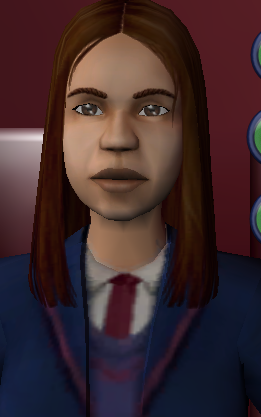
I'm replacing the textures of tfbodyblazerpleats because I want it to pick up on LetoMills's fatTF repository, but it's so blurry on both the TFfat and regular texture. Nothing else, no other recolours, have had this issue. Settings are all set pretty high.


I'm replacing the texture via SimPE - I know BodyShop can be funny like that. The texture itself is fairly crisp. It's of an appropriate size (1024x1024). I don't understand whats going on. I am replacing the textures of an existing default so I know it's nothing to do with that.


Excuse the blown out lighting, but as you can see, it's even blurry ingame. I wondered at first if it was just a BodyShop thing.


Does anyone have any advice?

My Simblr is simping-simmer. Come and join me there for a chat!
You can also find me on the MTS or PBK Discord servers under the name 'Evenfall'.
Want to know the latest news in Carregffynon? Click here!
Mad Poster
#2 Old Yesterday at 2:34 PM
Use the Nvidia DDS/DXT import. Much better quality than the Import button. For DXT you need to use at least DXT3, possibly DXT5.

Also make sure your ingame settings show the proper sizes (Texture/detail and sim/object on high)

https://pforestsims.tumblr.com/post...dyshop-vs-simpe (comparing, doesn't show import, but it's significantly worse)
https://poppet-sims.tumblr.com/post/54039893647 (objects, but shows DXT in the last steps, it's the same method for clothes)
If the DDS link doesn't work, osab has it here: https://osab.tumblr.com/post/634706...load-recently-i
Forum Resident
Original Poster
#3 Old Yesterday at 5:05 PM
Quote: Originally posted by simmer22
Use the Nvidia DDS/DXT import. Much better quality than the Import button. For DXT you need to use at least DXT3, possibly DXT5.

Also make sure your ingame settings show the proper sizes (Texture/detail and sim/object on high)

https://pforestsims.tumblr.com/post...dyshop-vs-simpe (comparing, doesn't show import, but it's significantly worse)
https://poppet-sims.tumblr.com/post/54039893647 (objects, but shows DXT in the last steps, it's the same method for clothes)
If the DDS link doesn't work, osab has it here: https://osab.tumblr.com/post/634706...load-recently-i


Yes, I always use Nvidia DDS/DXT Sorted it myself, anyway. Don't know how but I did it. And my ingame settings were as high as possible lol

My Simblr is simping-simmer. Come and join me there for a chat!
You can also find me on the MTS or PBK Discord servers under the name 'Evenfall'.
Want to know the latest news in Carregffynon? Click here!
Mad Poster
#4 Old Yesterday at 5:23 PM
Did you perhaps use any of the sharpen options in the DXT settings?
I've always preferred using "none" for sharpen. The others can apparently cause some issues.
Forum Resident
Original Poster
#5 Old Yesterday at 7:02 PM
Quote: Originally posted by simmer22
Did you perhaps use any of the sharpen options in the DXT settings?
I've always preferred using "none" for sharpen. The others can apparently cause some issues.


Nope, I always use "none" lol.

My Simblr is simping-simmer. Come and join me there for a chat!
You can also find me on the MTS or PBK Discord servers under the name 'Evenfall'.
Want to know the latest news in Carregffynon? Click here!
Back to top