Quick Reply
Search this Thread
Field Researcher
#26 Old 12th Mar 2025 at 11:20 PM
Quote: Originally posted by Eve_D85
Thanks for your response . Yes, I´m using T-mog. And no, I don´t have a magic cookie, because when I first started using T-mog I got the info that magic cookies don´t work anymore.


Magic cookies definitely work if you put one into the program. The main problem is that the part of the T-mog website that used to grant them was taken down... and even if it was still up, it overflowed--that is, looped around to numbers that mean the same thing to T-mog--a long time ago.

(Case in point: My magic cookie was gotten from the website sometime between 2007 and 2013. It's 185042. Because of how T-mog utilizes magic cookies (turning it into hexadecimal and using its lower two bytes in the middle of GUIDs), this cookie is functionally identical to 53970 (53970 is D2D2 in hex. 185042 is 2D2D2 in hex. T-mog takes up to the "thousands place" in that hex (well. the 4096s place because hex is base-16 but that doesn't roll off the tongue as well) and uses it as the middle 4 characters in the GUID. that means 2D2D2 becomes the same as D2D2 when T-mog actually uses it. I could start using 53970 if I wanted to and nothing about my objects would change, but I use 185042 because I'm sentimental. XD). The highest number a magic cookie can be before it starts looping around is 65535. My cookie is pretty far past that, which means so are a lot of other people's, assuming all of them were in use!)

That's part of why the spreadsheet started existing; it started as a Yahoo Group back when both T-mog's website AND Yahoo Groups were still active. (I am sure of this because my cookie was already on it when I first came across it and I only ever added it to the Yahoo database. XD) Because every possible number was in theory granted to SOMEone it doesn't prevent conflicts entirely (though it's likely many numbers went largely unused or were not used by someone who was sharing objects online). But knowing that a person who publishes their objects uses a certain magic cookie can let you know not to use one that is the same as that person (or that means the same thing to T-mog).
Test Subject
Original Poster
#27 Old 16th Mar 2025 at 9:52 PM
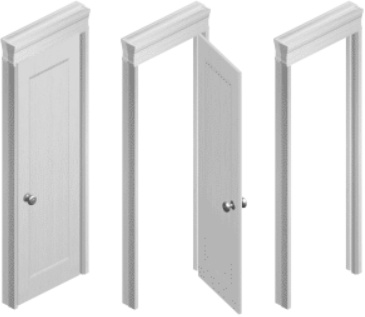
I currently don't have the time to work on more recolors . Sorry in advance. But I'll collect suggestions (if there are any) and upload more content as soon as possible. Until then, two timeless door recolors for you guys. Thanks to all the people who downloaded something so far. It really makes me happy . Take care, everyone!


White Doors - DOWNLOAD
Test Subject
Original Poster
#28 Old 25th Mar 2025 at 9:49 PM
Test Subject
Original Poster
#29 Old 1st Apr 2025 at 9:56 PM
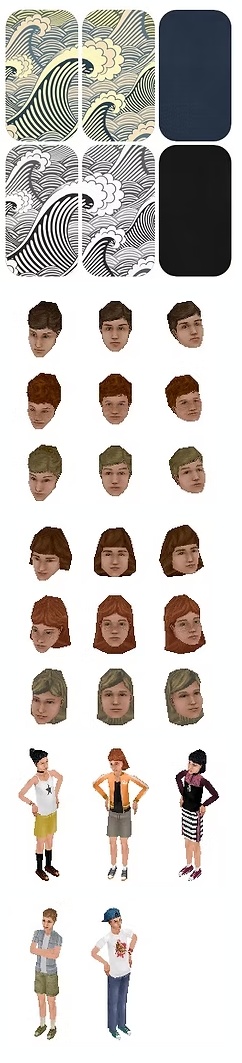
My last creations because I'm done with completing my personal game collection. Thanks to everyone who has downloaded something, and take care !


Wallpaper Waves - DOWNLOAD
Heads Boys - DOWNLOAD
Heads Girls - DOWNLOAD
Streetwear Girls - DOWNLOAD
Streetwear Boys - DOWNLOAD
Test Subject
#30 Old 2nd Apr 2025 at 12:17 AM
Thank you for sharing your beautiful creations! I love them and downloaded them all.
But all your skins and heads are white in my game for some reason. Could you please help me with this? I have a Complete Collection.
Test Subject
Original Poster
#31 Old 2nd Apr 2025 at 5:05 PM
Quote: Originally posted by Lea18
Thank you for sharing your beautiful creations! I love them and downloaded them all.
But all your skins and heads are white in my game for some reason. Could you please help me with this? I have a Complete Collection.


Thank you so much ! Did you put the head and skin files into the correct folder? Because those are .far files they go into EA Games > The Sims Legacy > Game Data > Textures. Not in the skin folder where we usually place that kind of content.

I´ve used pretty common skins and heads for my recolors, so they should show up, even if only the basegame is installed. They work for me, so I hope it´s just an issue with chosing the wrong folder ^^. Hope it helps.
Test Subject
#32 Old 2nd Apr 2025 at 7:19 PM
Quote: Originally posted by Eve_D85
Thank you so much ! Did you put the head and skin files into the correct folder? Because those are .far files they go into EA Games > The Sims Legacy > Game Data > Textures. Not in the skin folder where we usually place that kind of content.

I´ve used pretty common skins and heads for my recolors, so they should show up, even if only the basegame is installed. They work for me, so I hope it´s just an issue with chosing the wrong folder ^^. Hope it helps.


Thank you for your reply. Yes, I put the files in the Textures folder. But the problem (for my game, at least) was in the BMP files.
I checked the skins with the old program Skin Doctor. They were displayed white because the number of colors in each BMP file was not 256 colors (it should be exactly that number, as I understood). This is only for the old game, not for the legal collection, maybe. I don't know.
I used the Irfanview program and reduced the color depth on one of the images, and saved the file in the skins folder. And it worked! The image quality has probably decreased a little, but the skin looks great in the game in my opinion.
P.S. Sorry for my English
Field Researcher
#33 Old 4th Apr 2025 at 12:18 AM
Whilst its great that Sims-Lambda changed the GUIDs of their items so they no longer conflict. I am still coming across conflicts with these unfortunately. It seems like lots of CC items are given GUIDs in the same way. Specifically I have found conflicts with Classic Sims and Sim Lane and I'm not even going for a lot of CC in my game. Could anyone tell me how I can change GUIDs if Eve is unable to change them for her set? Thanks
Attached files:
File Type: txt  EveGUIDConflicts.txt (3.4 KB, 15 downloads)
Field Researcher
#34 Old 4th Apr 2025 at 8:12 AM Last edited by purplewowies : 4th Apr 2025 at 8:29 AM.
The cleanest way is you could get Transmogrifier (and potentially also a magic cookie which is not used by someone else in this database, especially if you ever want to publish or share objects cloned with T-mog--it's not as important if you're not planning on doing that) and clone them. T-mog can maintain a list of known used GUIDs (which you can manually update if needed) that will at least (as far as I understand) prevent conflicts locally on your device if you clone an object using T-mog (presumably even if you keep the magic cookie 0 it'd not generate conflicts locally as long as it knows what GUIDs are in use, but a 0 cookie is not great practice for sharing objects with others). You'd then use the clone in your game (which is a new file) and remove the original object.

Alternatively, you can change GUIDs by using IffPencil. If you open the iff with a GUID you want to change, you can find the OBJD inside of it. In the OBJD, you will find the global unique ID and can change it manually there. This has a higher chance of causing a different conflict unless you opened every object in the entire game and have an eidetic memory such that you remembered every GUID on your device that it could conflict with.

Worth noting: I think SimLaneCC has a magic cookie (they're in the database) but it ALSO looks like it's possible some of their objects are up that were made before the cookie and haven't been updated--their cookied objects will have GUIDs with 7CF7 in the middle. (I'm not TOTALLY sure if the other person has a cookie--there's someone with the same name in the list but part of me is concerned it could be a case of different people same name... After all, SimLane itself is not a new creator name!)
Test Subject
#35 Old 14th Apr 2025 at 3:28 AM
When I tried downloading these it said it had a virus or malware. But it seems like everyone else is downloading them fine. Is there a conflict with my computer, perhaps? Like it's mistaking something for virus/malware when it's not?
Test Subject
#36 Old 15th Apr 2025 at 5:42 PM Last edited by Sims-Lambda : 17th Jul 2025 at 1:59 AM.
Quote: Originally posted by Hanroz1117
When I tried downloading these it said it had a virus or malware. But it seems like everyone else is downloading them fine. Is there a conflict with my computer, perhaps? Like it's mistaking something for virus/malware when it's not?

It appears that some SimFileShare accounts have been compromised within the last few days.
That might be the reason why your antivirus detected something and why no one has complained about this until now?

Do NOT run a Batch file (.bat) or an Executable file (.exe) downloaded from SFS.
And if you have a SFS account to host your downloads, check that:
1) you can access it normally.
2) none of your files were updated in the past week or so unless you updated them yourself.
Field Researcher
#37 Old 15th Apr 2025 at 6:13 PM
Something it is worth noting: EVERY SINGLE file Eve has linked in this thread has an identical upload and update date (or at least substantially similar, like same-day-as-upload but a few minutes later).

The ONLY one I could not confirm this was the case was Pet Stuff (which is currently a 404), so IF Eve's Sim File Share account was compromised then it seems as if it may have ONLY affected that one download? Still definitely double check...

However, if it's down because of this and not because Eve herself removed it, it makes me wonder if someone wouldn't know if any of their files were compromised (if they have enough files to lose track of what they've uploaded) because they're simply not in the account anymore.

I'm personally lucky that most of my files on SFS specifically have been standalone iffs. It'd be REALLY HARD to upload over those in a way that evades detection because it'd have to change the entire file type...
Page 2 of 2
Back to top