
 Sign in to Mod The Sims
 Final Fantasy XIII - l'Cie Brand
 Final Fantasy XIII - l'Cie Brand


serahbrand1.jpg - width=960 height=600
fangbrand.jpg - width=960 height=600
A brand's rate of progression depends partly on the difficulty of the l'Cie's Focus. It is also linked closely to the individual's mental state, with severe psychological trauma sometimes spurring rapid advancement. In the most extreme cases, severe fear and shock at being made a l'Cie has turned newly made l'Cie to Cie'th at the instant of their branding." - Final Fantasy XIII Data Log
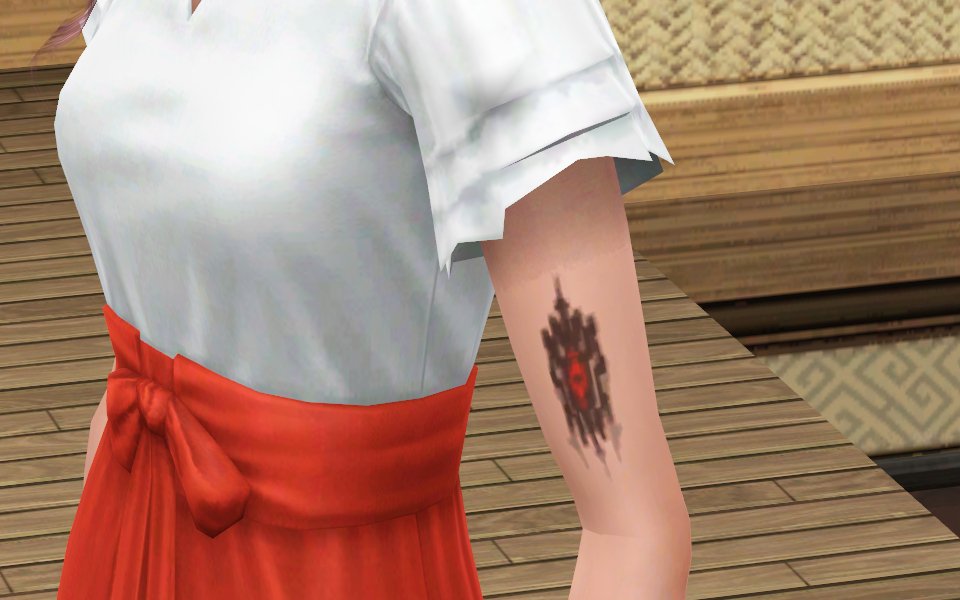
I started on a group of Final Fantasy XIII sims and while creating them and playing around with tattoos I figured "Hey why not?"
The tattoo has four recolorable channels. The "eye" the black arrows, the gray arrows, and an outline around the black arrows if you need more definition. If kept at original size it looks good but going a lot bigger can make it a little blurry.
You can make it one of the burned out brands too by changing the colors:
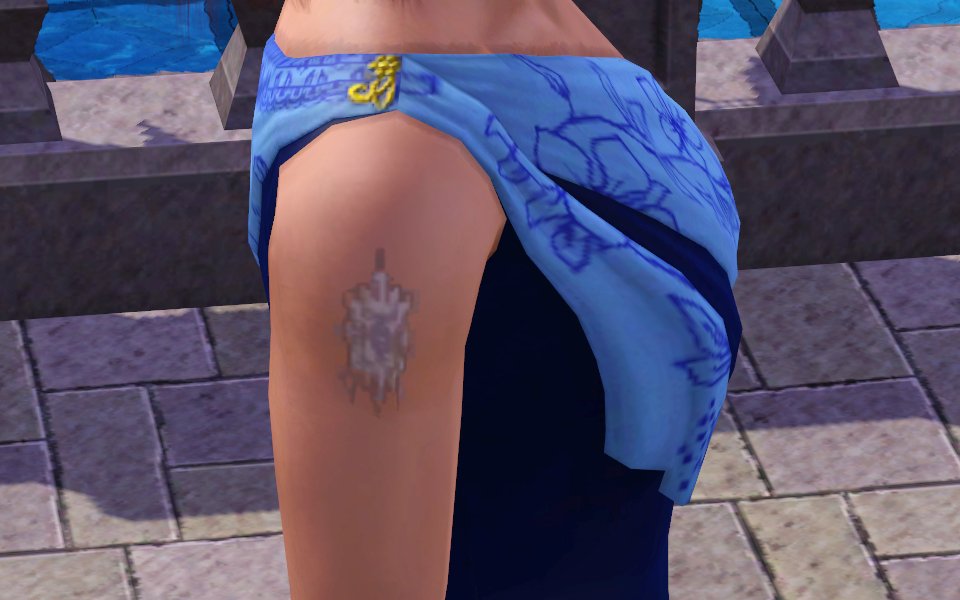
I may make more versions of the brand in different stages at a later time.
Additional Credits:
CmarNYC's Tattooinator
|
l'cie brand.zip
Download
Uploaded: 16th Feb 2011, 96.0 KB.
3,667 downloads.
|
||||||||
| For a detailed look at individual files, see the Information tab. | ||||||||
Install Instructions
1. Click the download button, or the filename, to download the file to your computer.
2. Extract the zip, rar, or 7z file. Now you will have either a .package or a .sims3pack file.
For Package files:
1. Cut and paste the file into your Documents\Electronic Arts\The Sims 3\Mods\Packages folder. If you do not already have this folder, you should read the full guide to Package files first: Sims 3:Installing Package Fileswiki, so you can make sure your game is fully patched and you have the correct Resource.cfg file.
2. Run the game, and find your content where the creator said it would be (build mode, buy mode, Create-a-Sim, etc.).
For Sims3Pack files:
1. Cut and paste it into your Documents\Electronic Arts\The Sims 3\Downloads folder. If you do not have this folder yet, it is recommended that you open the game and then close it again so that this folder will be automatically created. Then you can place the .sims3pack into your Downloads folder.
2. Load the game's Launcher, and click on the Downloads tab. Find the item in the list and tick the box beside it. Then press the Install button below the list.
3. Wait for the installer to load, and it will install the content to the game. You will get a message letting you know when it's done.
4. Run the game, and find your content where the creator said it would be (build mode, buy mode, Create-a-Sim, etc.).
Extracting from RAR, ZIP, or 7z: You will need a special program for this. For Windows, we recommend 7-Zip and for Mac OSX, we recommend Keka. Both are free and safe to use.
Need more help?
If you need more info, see:
- For package files: Sims 3:Installing Package Fileswiki
- For Sims3pack files: Game Help:Installing TS3 Packswiki
Loading comments, please wait...

 View with Names
Uploaded: 16th Feb 2011 at 4:17 PM
-
-
-
Metal Bands Tattoo Set - 10 tattoos for your sims
by des-demmonia 24th Aug 2010 at 6:56pm
-
The Atheistic Sims Tattoo Pack
by srmacpherson 4th Aug 2011 at 12:49pm
-
by devilishoblivion 10th Nov 2011 at 5:48pm
-
-

"Looks Good Anywhere" Floral Tattoo by GemsTattoos
by DrBoomstick 18th Jan 2014 at 9:01pm
-
by PinkPlumbbob 19th Jul 2014 at 2:15pm
-
Final Fantasy 7 Tifa's 7th Heaven
by esouths 6th Oct 2014 at 10:00pm
 +13 packs
4 14.5k 39
+13 packs
4 14.5k 39 World Adventures
 High-End Loft Stuff
 Ambitions
 Fast Lane Stuff
 Late Night
 Generations
 Pets
Pets
 Showtime
 Supernatural
 70s, 80s and 90s Stuff
 Seasons
 University Life
 Island Paradise
-





Packs Needed
| Expansion Pack | |
|---|---|
| Late Night |