Sign in to Mod The Sims
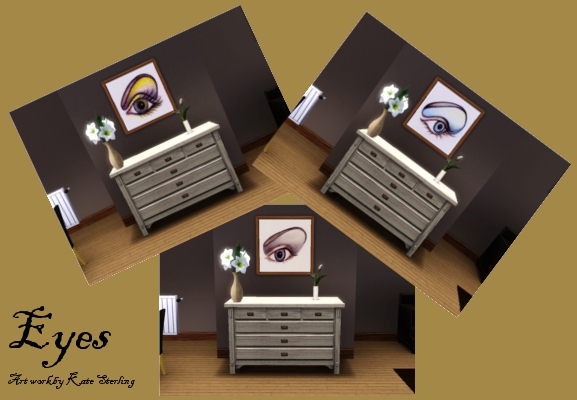
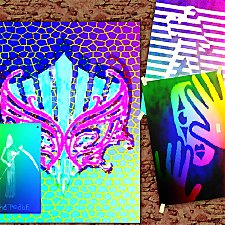
 Eyes art work
 Eyes art work
SCREENSHOTS

Eyes.jpg - width=577 height=400
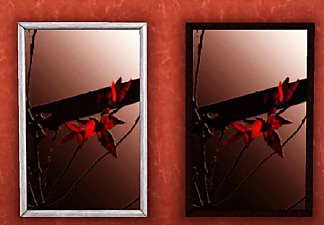
Kate Sterling, from simsbykate.com, kindly allowed me to use her fantastic art work for the game.
Downloaded 3,376 times
149 Thanks
28 Favourited
22,386 Views
Say Thanks!
Thanked!
Kate Sterling of simsbykate.com kindly allowed me to use her fantastic art work for the game.
I hope you like it!!
Additional Credits:
Kate Sterling
TSR Workshop
I hope you like it!!
Additional Credits:
Kate Sterling
TSR Workshop
Advertisement:
This is a Maxis Recolour which means that it is a recolour of an item that already exists in your game. Please check the Pack requirements to see which game pack it recolours.
|
Kate's eyes art work.rar
| Eyes art work by Kate Sterling
Download
Uploaded: 24th Jul 2011, 123.8 KB.
3,376 downloads.
|
||||||||
| For a detailed look at individual files, see the Information tab. | ||||||||
Install Instructions
Quick Guide:
1. Click the download button, or the filename, to download the file to your computer.
2. Extract the zip, rar, or 7z file. Now you will have either a .package or a .sims3pack file.
For Package files:
1. Cut and paste the file into your Documents\Electronic Arts\The Sims 3\Mods\Packages folder. If you do not already have this folder, you should read the full guide to Package files first: Sims 3:Installing Package Fileswiki, so you can make sure your game is fully patched and you have the correct Resource.cfg file.
2. Run the game, and find your content where the creator said it would be (build mode, buy mode, Create-a-Sim, etc.).
For Sims3Pack files:
1. Cut and paste it into your Documents\Electronic Arts\The Sims 3\Downloads folder. If you do not have this folder yet, it is recommended that you open the game and then close it again so that this folder will be automatically created. Then you can place the .sims3pack into your Downloads folder.
2. Load the game's Launcher, and click on the Downloads tab. Find the item in the list and tick the box beside it. Then press the Install button below the list.
3. Wait for the installer to load, and it will install the content to the game. You will get a message letting you know when it's done.
4. Run the game, and find your content where the creator said it would be (build mode, buy mode, Create-a-Sim, etc.).
Extracting from RAR, ZIP, or 7z: You will need a special program for this. For Windows, we recommend 7-Zip and for Mac OSX, we recommend Keka. Both are free and safe to use.
Need more help?
If you need more info, see:
1. Click the download button, or the filename, to download the file to your computer.
2. Extract the zip, rar, or 7z file. Now you will have either a .package or a .sims3pack file.
For Package files:
1. Cut and paste the file into your Documents\Electronic Arts\The Sims 3\Mods\Packages folder. If you do not already have this folder, you should read the full guide to Package files first: Sims 3:Installing Package Fileswiki, so you can make sure your game is fully patched and you have the correct Resource.cfg file.
2. Run the game, and find your content where the creator said it would be (build mode, buy mode, Create-a-Sim, etc.).
For Sims3Pack files:
1. Cut and paste it into your Documents\Electronic Arts\The Sims 3\Downloads folder. If you do not have this folder yet, it is recommended that you open the game and then close it again so that this folder will be automatically created. Then you can place the .sims3pack into your Downloads folder.
2. Load the game's Launcher, and click on the Downloads tab. Find the item in the list and tick the box beside it. Then press the Install button below the list.
3. Wait for the installer to load, and it will install the content to the game. You will get a message letting you know when it's done.
4. Run the game, and find your content where the creator said it would be (build mode, buy mode, Create-a-Sim, etc.).
Extracting from RAR, ZIP, or 7z: You will need a special program for this. For Windows, we recommend 7-Zip and for Mac OSX, we recommend Keka. Both are free and safe to use.
Need more help?
If you need more info, see:
- For package files: Sims 3:Installing Package Fileswiki
- For Sims3pack files: Game Help:Installing TS3 Packswiki
Advertisement:
Loading comments, please wait...

Other Download Recommendations:
-
by pinketamine 24th Oct 2009 at 9:59pm
 9
22.5k
25
9
22.5k
25
-
-
-
by yk1980 10th Apr 2010 at 2:37pm
9
22.2k
40
-
-
-
by kithri 13th Sep 2012 at 3:42pm
10
19.9k
19
-
Watercolor and Ink Cat Picture Pack
by Freya5 3rd Mar 2018 at 12:50pm
+2 packs
18 14k 67 Late Night
 Pets
Pets
-
by sweetdevil 4th Nov 2018 at 10:23am
6
24.8k
28
-
by MurderPrincessK 29th Oct 2019 at 2:30pm
2
6.4k
27