
 Sign in to Mod The Sims
 Parrot for the Right Shoulder - Pirate pt. 3
 Parrot for the Right Shoulder - Pirate pt. 3


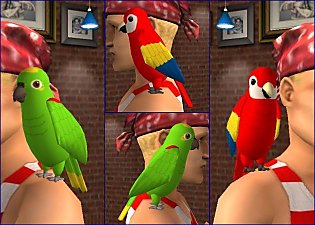
greenmacaw1.jpg - width=600 height=450
redmacaw1.jpg - width=600 height=450
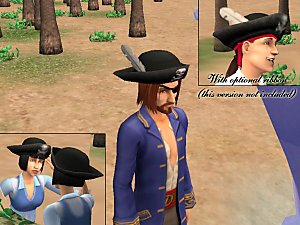
eyepatchboth1.jpg - width=600 height=450
Speaking of Syn, he made me these really wonderful photorealistic textures for my parrots, and he said I could upload them for all of y'all! I really like the colors and feathers. I considered doing something like that when I first started the parrots, but I quickly balked. But now you can have the realistic looked birds or my cartoony versions. I've really been looking into photorealistic skins lately, not because I want to use them, more just to go, "Dang..." It's really cool that people can do that, but I think it would freak me out to see such real looking people running around on my monitor. Then again I do tend to favor comic book characters over real actors and whatnot. But I love Syn's parrots. So be sure to give him shout-out too!
I also included another right eyepatch. It doesn't look any different, but you can wear it with the left eyepatch if you want. It uses the same mesh, so no need to download another one. I just thought it'd be funny. Who is it that has the animated avatar with the character from Full Metal Alchemist or whatever that makes a joke about two eyepatches?
You need the MESH and at least one of the colors for the parrot to show up. All content is by Maxis, me, or SynapticSim. Recolor at will, and no paysites.
Check out the original parrot, and get the MESH for the eyepatch (required), here: http://www.modthesims2.com/showthread.php?t=109951
Someone said something in the other thread about a crow. I didn't think they meant with this mesh, because that'd be a kinda funny looking crow, but I'll put it on my list.
I'm growing rather fond of that pirate model I keep using. Nothing spectacular about him or anything, he's just so reliable
 .
.
This is a new mesh, and means that it's a brand new self contained object that usually does not require a specific Pack (although this is possible depending on the type). It may have Recolours hosted on MTS - check below for more information.
|
RightEyepatch - Both eyes.rar
Download
Uploaded: 19th Dec 2005, 4.1 KB.
2,909 downloads.
|
||||||||
|
MESH_ShoulderParrotRight.rar
Download
Uploaded: 19th Dec 2005, 183.8 KB.
5,155 downloads.
|
||||||||
|
RealisticRedMacaw.rar
Download
Uploaded: 19th Dec 2005, 46.8 KB.
4,478 downloads.
|
||||||||
|
RealisticGreenMacaw.rar
Download
Uploaded: 19th Dec 2005, 49.6 KB.
4,537 downloads.
|
||||||||
|
RedMacawRight.rar
Download
Uploaded: 19th Dec 2005, 8.2 KB.
3,900 downloads.
|
||||||||
|
GreenParrotRight.rar
Download
Uploaded: 19th Dec 2005, 8.3 KB.
4,388 downloads.
|
||||||||
| For a detailed look at individual files, see the Information tab. | ||||||||
Install Instructions
1. Download: Click the download link to save the .rar or .zip file(s) to your computer.
2. Extract the zip, rar, or 7z file.
3. Place in Downloads Folder: Cut and paste the .package file(s) into your Downloads folder:
- Origin (Ultimate Collection): Users\(Current User Account)\Documents\EA Games\The Sims™ 2 Ultimate Collection\Downloads\
- Non-Origin, Windows Vista/7/8/10: Users\(Current User Account)\Documents\EA Games\The Sims 2\Downloads\
- Non-Origin, Windows XP: Documents and Settings\(Current User Account)\My Documents\EA Games\The Sims 2\Downloads\
- Mac: Users\(Current User Account)\Documents\EA Games\The Sims 2\Downloads
- Mac x64: /Library/Containers/com.aspyr.sims2.appstore/Data/Library/Application Support/Aspyr/The Sims 2/Downloads
- For a full, complete guide to downloading complete with pictures and more information, see: Game Help: Downloading for Fracking Idiots.
- Custom content not showing up in the game? See: Game Help: Getting Custom Content to Show Up.
- If you don't have a Downloads folder, just make one. See instructions at: Game Help: No Downloads Folder.
Loading comments, please wait...


Uploaded: 19th Dec 2005 at 4:43 AM
Updated: 15th May 2010 at 12:01 AM by CatOfEvilGenius
-
by saracentner 12th May 2005 at 1:30am
 83
93k
33
83
93k
33
-
by funnyycats 12th Nov 2005 at 11:51pm
80
106.8k
127
-
by generalzoi 19th Nov 2005 at 5:09am
10
34k
26
-
-
by generalzoi 8th Jan 2006 at 7:54am
28
68.3k
26
-
by generalzoi 11th Jan 2006 at 8:35pm
22
66.4k
30
-
-
by generalzoi 21st Jan 2006 at 12:53am
25
84.4k
51
-
by SynapticSim 22nd Jan 2006 at 12:34pm
19
62.1k
43
-
by generalzoi 23rd Jan 2006 at 12:48am
26
57.6k
45

-
by generalzoi 8th Jan 2006 at 7:54am
As per request, here's a long loincloth for SynapticSim. more...
28
68.3k
26
-
by generalzoi 22nd Mar 2006 at 9:07pm
EDIT 9/9/08: Fanseelamb updated the mesh for the messenger bag so that it'll no longer flash blue for Pets more...
98
292.1k
345
-
-
Trenchcoat - Wearable with anything! (Kinda)
by generalzoi 29th May 2006 at 1:15am
First of all, a big thanks to boblishman for telling me how to make accessories non-deforming. more...
130
216.6k
213
-
-
Eyepatch and Shoulder Parrot - Pirate pt. 1
by generalzoi 9th Dec 2005 at 6:37am
Hello. It's been a while. more...
38
77.3k
57
-
Forked Tail based on Atreya's Cat Tail
by generalzoi 14th Nov 2005 at 4:50am
It's a forked tail! Yay! I think I'm delirious! more...
39
65k
28
-
Catwoman Whip and Wonder Woman Lasso
by generalzoi 8th Nov 2005 at 6:18am
Okay, so this is probably closer to two hours than to one, but here it is. It's a lasso! more...
+1 packs
22 30.9k 3 University
-
by generalzoi 3rd Jun 2006 at 4:56am
Behold my army! Fear the power that is General Zoi! more...
11
29.7k
7
-
The Flash's Bolts and Capt. America's Wings
by generalzoi 15th Jan 2006 at 2:31am
Edit: I just realized that when I made these, I cloned them from an accessory that stays on all more...
19
27k
12

