Sign in to Mod The Sims
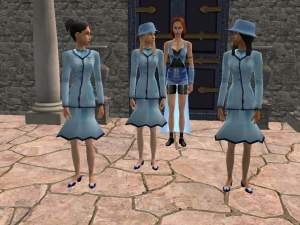
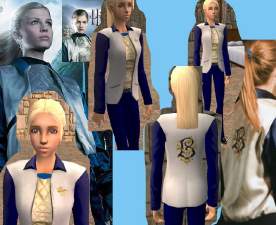
 Bipsouille Beauxbatons Hat recolor+6 hair colors.
 Bipsouille Beauxbatons Hat recolor+6 hair colors.
SCREENSHOTS


Black.jpg - width=718 height=536
Blond.JPG - width=718 height=536
Brown.jpg - width=718 height=536
F2.jpg - width=600 height=450
Ginger.jpg - width=718 height=536
Pink.jpg - width=718 height=536
Red.jpg - width=718 height=536
Downloaded 534 times
57 Thanks
5 Favourited
14,578 Views
Say Thanks!
Thanked!
Hey =]
I recolored the beauxbatons hat that made by bipsouille with 6 hair colors for the hat,
I think the color of the hat now more same like in the movie and I hope you like it =]
Please rate and thanks.
The hat mesh you can find here:
http://modthesims2.com/showthread.p...highlight=Beaux
I recolored the beauxbatons hat that made by bipsouille with 6 hair colors for the hat,
I think the color of the hat now more same like in the movie and I hope you like it =]
Please rate and thanks.
The hat mesh you can find here:
http://modthesims2.com/showthread.p...highlight=Beaux
Advertisement:
This is a new mesh recolour, and means that you will need to download the particular mesh itself in order for this to show up in your game. See the Meshes Needed section or read the text for more information.
|
BeauxbatonsHatRecolors.rar
Download
Uploaded: 9th May 2006, 3.49 MB.
1,727 downloads.
|
||||||||
| For a detailed look at individual files, see the Information tab. | ||||||||
Install Instructions
Basic Download and Install Instructions:
1. Download: Click the download link to save the .rar or .zip file(s) to your computer.
2. Extract the zip, rar, or 7z file.
3. Place in Downloads Folder: Cut and paste the .package file(s) into your Downloads folder:
1. Download: Click the download link to save the .rar or .zip file(s) to your computer.
2. Extract the zip, rar, or 7z file.
3. Place in Downloads Folder: Cut and paste the .package file(s) into your Downloads folder:
- Origin (Ultimate Collection): Users\(Current User Account)\Documents\EA Games\The Sims™ 2 Ultimate Collection\Downloads\
- Non-Origin, Windows Vista/7/8/10: Users\(Current User Account)\Documents\EA Games\The Sims 2\Downloads\
- Non-Origin, Windows XP: Documents and Settings\(Current User Account)\My Documents\EA Games\The Sims 2\Downloads\
- Mac: Users\(Current User Account)\Documents\EA Games\The Sims 2\Downloads
- Mac x64: /Library/Containers/com.aspyr.sims2.appstore/Data/Library/Application Support/Aspyr/The Sims 2/Downloads
- For a full, complete guide to downloading complete with pictures and more information, see: Game Help: Downloading for Fracking Idiots.
- Custom content not showing up in the game? See: Game Help: Getting Custom Content to Show Up.
- If you don't have a Downloads folder, just make one. See instructions at: Game Help: No Downloads Folder.
Advertisement:
Loading comments, please wait...
Author

Download Details
Packs:
None, this is Sims 2 base game compatible!
Uploaded: 9th May 2006 at 9:17 PM
Uploaded: 9th May 2006 at 9:17 PM
Other Download Recommendations:
-
-
-
-
-
-
-
-
-
-
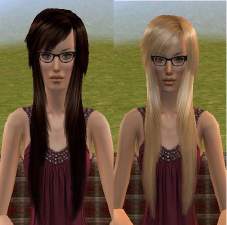
Peggysims2 Natural Hair Colors!
by hunterfitz97 11th Apr 2009 at 7:36pm


More downloads by Omri645:
See more