Sign in to Mod The Sims
 Clear Realistic Eyes by *icedmango*
 Clear Realistic Eyes by *icedmango*


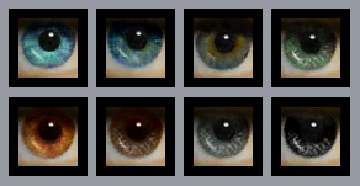
clearreal1.jpg - width=198 height=196
clearreal.jpg - width=500 height=323
clearreal2.jpg - width=303 height=311
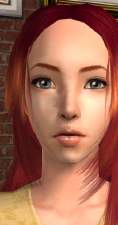
MScreens 4.07.06 19.54.08.jpg - width=337 height=560
clearrealistic2.jpg - width=400 height=400
maskclear.jpg - width=349 height=407
defaultclear.jpg - width=318 height=423
ryanclear.jpg - width=274 height=387


I've made a new set of realistic eyes -clear style, comes in 10 shades, if you wish more recolors, just tell me
hope you like them
Greets to all
Mango
Edit:
Okay, I have created now
+ more blue shades
+ more brown shades
+ a purple shade
+ default replacements
+ Face Masks
Here are the preview pix and the files, hope you are all satisfied now.
ad face mask (I didn't know how many and which colors, so I made just 4, each color)
someone asked me to make a screenshot with a male sim, here it is:

greets
Edit: You may redistribute my eyes, just give me credit. Please don't use my eyeball to make your own eyes.
thx
|
clearrealisticFACEMASKbyIcedmango.rar
Download
Uploaded: 12th Jul 2006, 137.1 KB.
38,818 downloads.
|
||||||||
|
DefaultClearRealisticbyICEDMANGO.rar
Download
Uploaded: 12th Jul 2006, 113.1 KB.
38,378 downloads.
|
||||||||
|
clearrealisticbyIcedmango2.rar
Download
Uploaded: 12th Jul 2006, 236.2 KB.
43,675 downloads.
|
||||||||
|
mango-clearRealisticEyes.rar
Download
Uploaded: 6th Jul 2006, 197.2 KB.
63,682 downloads.
|
||||||||
| For a detailed look at individual files, see the Information tab. | ||||||||
Install Instructions
1. Download: Click the download link to save the .rar or .zip file(s) to your computer.
2. Extract the zip, rar, or 7z file.
3. Place in Downloads Folder: Cut and paste the .package file(s) into your Downloads folder:
- Origin (Ultimate Collection): Users\(Current User Account)\Documents\EA Games\The Sims™ 2 Ultimate Collection\Downloads\
- Non-Origin, Windows Vista/7/8/10: Users\(Current User Account)\Documents\EA Games\The Sims 2\Downloads\
- Non-Origin, Windows XP: Documents and Settings\(Current User Account)\My Documents\EA Games\The Sims 2\Downloads\
- Mac: Users\(Current User Account)\Documents\EA Games\The Sims 2\Downloads
- Mac x64: /Library/Containers/com.aspyr.sims2.appstore/Data/Library/Application Support/Aspyr/The Sims 2/Downloads
- For a full, complete guide to downloading complete with pictures and more information, see: Game Help: Downloading for Fracking Idiots.
- Custom content not showing up in the game? See: Game Help: Getting Custom Content to Show Up.
- If you don't have a Downloads folder, just make one. See instructions at: Game Help: No Downloads Folder.
Loading comments, please wait...



Uploaded: 6th Jul 2006 at 11:54 AM
Updated: 23rd Sep 2008 at 7:18 PM - adding more colors and default replacements
-
-

-

-
-
Realistic Eyes by MissSimGameFan
by MissSimGameFan 30th Oct 2006 at 5:10am
-

-
-
-
-


-
-


Embrace of Crystals - crystalized Earring Set
by icedmango 20th May 2009 at 10:48pm
hi, here is a set of 10 earrings, mostly crystalized! more...
 9
47.2k
48
9
47.2k
48
-
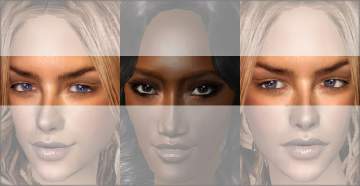
Lateral Eye Contacts "dexter, sinister et superior" by *icedmango*
by icedmango 1st Feb 2007 at 7:00pm
Hi again, I thought of this already before uploading them as Eyes. more...
19
28.9k
26
-
-
Steel Eyez ~set of 16 real sclera eyes~
by icedmango 13th Nov 2007 at 4:02pm
New painted eye set with more realistic sclera! more...
-


-


-
-


-