
 Sign in to Mod The Sims
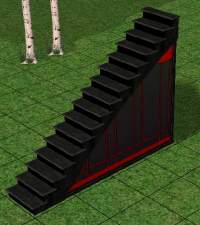
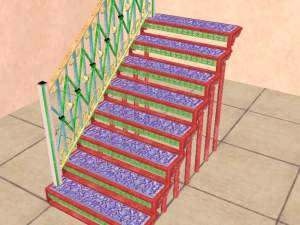
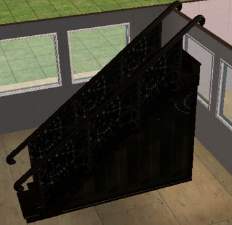
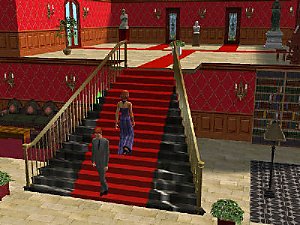
 Open underneath Maxis stairs
 Open underneath Maxis stairs


snapshot_0000000d_33661ff7.jpg - width=600 height=450
snapshot_0000000d_13662328.jpg - width=600 height=450
snapshot_0000000d_93662116.jpg - width=600 height=450


Base game compatible, were tested with Basegame Starter Pro by Numenor.
!!! In order to make the stairs work in your game, you need to put the files 2008_CrocobauraChicModularStairs.txt; 2009_CrocobauraWoodenModularStairs.txt; 2010_CrocobauraSteadfastModularStairs.txt in your Scriptorium_ModularStairs folder if you're using the Scriptorium or you need to copy the text inside each at the bottom of the modularstairs.txt file from this path:
C:\Program Files\EA GAMES\The Sims 2\TSData\Res\Catalog\Scripts
Polygon Counts:
Less than Maxis'
Additional Credits:
Maxis for the meshes and textures
Made with Wings3D, SimPE, UVMapper
This is a new mesh, and means that it's a brand new self contained object that usually does not require a specific Pack (although this is possible depending on the type). It may have Recolours hosted on MTS - check below for more information.
|
Crocobaura_Wooden Modular Stairs.rar
Download
Uploaded: 27th May 2007, 45.2 KB.
57,405 downloads.
|
||||||||
|
Crocobaura_Steadfast Modular Stairs.rar
Download
Uploaded: 27th May 2007, 105.4 KB.
53,487 downloads.
|
||||||||
|
Crocobaura_Chic Modular Stairs.rar
Download
Uploaded: 27th May 2007, 106.4 KB.
57,659 downloads.
|
||||||||
| For a detailed look at individual files, see the Information tab. | ||||||||
Install Instructions
1. Download: Click the download link to save the .rar or .zip file(s) to your computer.
2. Extract the zip, rar, or 7z file.
3. Place in Downloads Folder: Cut and paste the .package file(s) into your Downloads folder:
- Origin (Ultimate Collection): Users\(Current User Account)\Documents\EA Games\The Sims™ 2 Ultimate Collection\Downloads\
- Non-Origin, Windows Vista/7/8/10: Users\(Current User Account)\Documents\EA Games\The Sims 2\Downloads\
- Non-Origin, Windows XP: Documents and Settings\(Current User Account)\My Documents\EA Games\The Sims 2\Downloads\
- Mac: Users\(Current User Account)\Documents\EA Games\The Sims 2\Downloads
- Mac x64: /Library/Containers/com.aspyr.sims2.appstore/Data/Library/Application Support/Aspyr/The Sims 2/Downloads
- For a full, complete guide to downloading complete with pictures and more information, see: Game Help: Downloading for Fracking Idiots.
- Custom content not showing up in the game? See: Game Help: Getting Custom Content to Show Up.
- If you don't have a Downloads folder, just make one. See instructions at: Game Help: No Downloads Folder.
Loading comments, please wait...


Uploaded: 27th May 2007 at 9:06 PM
-
-
-
-
-
-
-
-
-
Maxis Modular Stairs Recolored, Part the Second
by iCad 5th Oct 2010 at 1:58am
 +1 packs
13 42.4k 77
+1 packs
13 42.4k 77 Open for Business
-


-

-

by crocobaura 10th Feb 2007 at 7:29pm
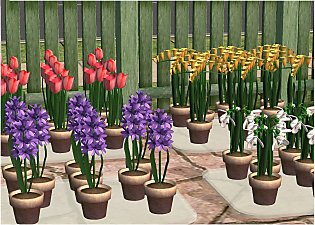
Hi everyone. Tonight I bring you an assortment of potted spring flowers, tulips, freesias, hyacinths, snowdrops and daffodils. more...
28
49.6k
54
-


by crocobaura 24th Jun 2006 at 2:42pm
Hi everyone. Have you heard the news?! more...
+3 packs
39 66.3k 24 University
 Nightlife
Open for Business
Nightlife
Open for Business
-
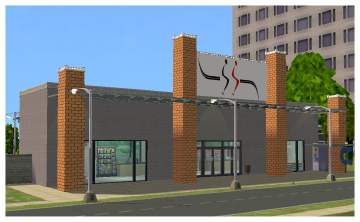
by crocobaura 4th Oct 2007 at 9:43pm
Hello everyone! more...
+10 packs
3 24.9k 25 Family Fun
University
Family Fun
University
 Glamour Life
Nightlife
Glamour Life
Nightlife
 Celebration
Open for Business
Celebration
Open for Business
 Pets
Pets
 H&M Fashion
 Seasons
 Bon Voyage
-
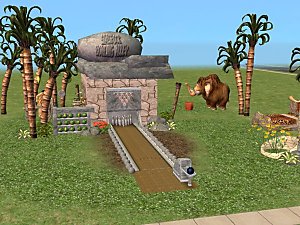
by crocobaura 29th Jul 2006 at 4:30am
Welcome to Simrock Bowling!!! more...
+1 packs
28 56k 20 Open for Business
-

-


by crocobaura 1st Apr 2007 at 12:07am
Hi everyone! Tonight I bring you a new food, this time is seafood specialty, namely Octopus! more...
+1 packs
25 47.7k 33 Open for Business
-
by crocobaura 2nd Jul 2006 at 11:46pm
Hi. more...
+3 packs
13 10.4k 5 University
Nightlife
Open for Business
-


Airplanes - Updated 19.04.2007
by crocobaura 13th Apr 2007 at 9:20am
Hi everyone! more...
33
66.5k
39
-
by crocobaura 15th Jul 2007 at 9:17pm
Hello everyone. I bring you tonight a door and arch with stone border and one recolour for each. more...
15
61k
84


About Me
If you want to convert any of my Sims2 objects to be used in Sims3, please feel free to do it yourself. Thank you!