Sign in to Mod The Sims
 Seven Ground Covers
 Seven Ground Covers
SCREENSHOTS


Ground Covers.jpg - width=800 height=670
snapshot_00000004_74263402.jpg - width=600 height=450
Downloaded 1,998 times
88 Thanks
7 Favourited
9,282 Views
Say Thanks!
Thanked!
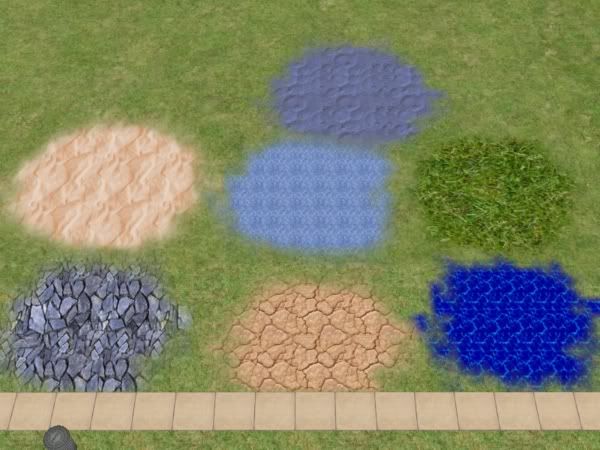
Hi everyone. Well I made a few of these ground coverings that were made using The GIMP. There are seven coverings that include:
- Pool Water
- Stone
- Deep Water
- Desert Sand
- Dry Ground
- Grass
- Blue Sand
Here is a picture of all of the ground coverings:
I hope you enjoy these.
Additional Credits:
Maxis and The GIMP
- Pool Water
- Stone
- Deep Water
- Desert Sand
- Dry Ground
- Grass
- Blue Sand
Here is a picture of all of the ground coverings:
I hope you enjoy these.

Additional Credits:
Maxis and The GIMP
Advertisement:
|
Stone.rar
Download
Uploaded: 20th Oct 2007, 14.9 KB.
871 downloads.
|
||||||||
|
Pool Water.rar
Download
Uploaded: 20th Oct 2007, 15.6 KB.
914 downloads.
|
||||||||
|
Grass.rar
Download
Uploaded: 20th Oct 2007, 37.2 KB.
827 downloads.
|
||||||||
|
Dry Ground.rar
Download
Uploaded: 20th Oct 2007, 6.7 KB.
843 downloads.
|
||||||||
|
Desert Sand.rar
Download
Uploaded: 20th Oct 2007, 8.9 KB.
920 downloads.
|
||||||||
|
Deep Water.rar
Download
Uploaded: 20th Oct 2007, 2.8 KB.
944 downloads.
|
||||||||
|
Blue Sand.rar
Download
Uploaded: 20th Oct 2007, 30.6 KB.
773 downloads.
|
||||||||
| For a detailed look at individual files, see the Information tab. | ||||||||
Install Instructions
Basic Download and Install Instructions:
1. Download: Click the download link to save the .rar or .zip file(s) to your computer.
2. Extract the zip, rar, or 7z file.
3. Place in Downloads Folder: Cut and paste the .package file(s) into your Downloads folder:
1. Download: Click the download link to save the .rar or .zip file(s) to your computer.
2. Extract the zip, rar, or 7z file.
3. Place in Downloads Folder: Cut and paste the .package file(s) into your Downloads folder:
- Origin (Ultimate Collection): Users\(Current User Account)\Documents\EA Games\The Sims™ 2 Ultimate Collection\Downloads\
- Non-Origin, Windows Vista/7/8/10: Users\(Current User Account)\Documents\EA Games\The Sims 2\Downloads\
- Non-Origin, Windows XP: Documents and Settings\(Current User Account)\My Documents\EA Games\The Sims 2\Downloads\
- Mac: Users\(Current User Account)\Documents\EA Games\The Sims 2\Downloads
- Mac x64: /Library/Containers/com.aspyr.sims2.appstore/Data/Library/Application Support/Aspyr/The Sims 2/Downloads
- For a full, complete guide to downloading complete with pictures and more information, see: Game Help: Downloading for Fracking Idiots.
- Custom content not showing up in the game? See: Game Help: Getting Custom Content to Show Up.
- If you don't have a Downloads folder, just make one. See instructions at: Game Help: No Downloads Folder.
Advertisement:
Loading comments, please wait...

Other Download Recommendations:
-
by Hawdgeal 22nd Dec 2004 at 4:59am
 10
18.6k
13
10
18.6k
13
-
by sims2guy 23rd Dec 2005 at 11:13pm
5
5.5k
3
-
-
by Pyromaniac44 22nd May 2006 at 6:57am
9
9.4k
6
-
by Betontod 17th Sep 2007 at 2:16pm
2
7.7k
7
-
by Betontod 21st Sep 2007 at 5:18pm
3
9.4k
9
-
by Betontod 5th Oct 2007 at 5:26pm
5
11.5k
8
-
-
-
by Liz 18th Nov 2017 at 7:25am
19
8.2k
46

More downloads by VshApple:
See more