Sign in to Mod The Sims
 Soul Eater: Tsubaki [outfit]
 Soul Eater: Tsubaki [outfit]
SCREENSHOTS


Tsubaki 01.JPG - width=165 height=450
Tsubaki 02.JPG - width=173 height=450
Tsubaki 03.JPG - width=186 height=450
Tsubaki 04.JPG - width=183 height=450
Tsubaki 07.JPG - width=151 height=437
Tsubaki 05.JPG - width=191 height=450
Tsubaki 06.JPG - width=283 height=450
Tsubaki Nakatsukasa.jpg - width=300 height=450
Downloaded 1,826 times
158 Thanks
18 Favourited
32,123 Views
Say Thanks!
Thanked!
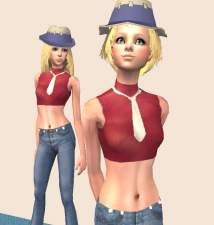
Here is Tsubaki Nakatsukasa from the anime/manga Soul Eater.
I made a recolour of Sango_91's Sakura outfit from Naruto part I with her permission. You'll need the mesh for this download to work. You can find it here.
This download includes only Tsubaki's outfit.
Custom Content shown in the pictures:
- skin by oepu: http://www.oepu.de/
- hair by rose: http://www.rosesims2.net/ [Download - Hair - page 7]
I made a recolour of Sango_91's Sakura outfit from Naruto part I with her permission. You'll need the mesh for this download to work. You can find it here.
This download includes only Tsubaki's outfit.
Custom Content shown in the pictures:
- skin by oepu: http://www.oepu.de/
- hair by rose: http://www.rosesims2.net/ [Download - Hair - page 7]
Advertisement:
This is a new mesh recolour, and means that you will need to download the particular mesh itself in order for this to show up in your game. See the Meshes Needed section or read the text for more information.
|
Tsubaki.rar
Download
Uploaded: 9th Apr 2009, 438.0 KB.
3,755 downloads.
|
||||||||
| For a detailed look at individual files, see the Information tab. | ||||||||
Install Instructions
Basic Download and Install Instructions:
1. Download: Click the download link to save the .rar or .zip file(s) to your computer.
2. Extract the zip, rar, or 7z file.
3. Place in Downloads Folder: Cut and paste the .package file(s) into your Downloads folder:
1. Download: Click the download link to save the .rar or .zip file(s) to your computer.
2. Extract the zip, rar, or 7z file.
3. Place in Downloads Folder: Cut and paste the .package file(s) into your Downloads folder:
- Origin (Ultimate Collection): Users\(Current User Account)\Documents\EA Games\The Sims™ 2 Ultimate Collection\Downloads\
- Non-Origin, Windows Vista/7/8/10: Users\(Current User Account)\Documents\EA Games\The Sims 2\Downloads\
- Non-Origin, Windows XP: Documents and Settings\(Current User Account)\My Documents\EA Games\The Sims 2\Downloads\
- Mac: Users\(Current User Account)\Documents\EA Games\The Sims 2\Downloads
- Mac x64: /Library/Containers/com.aspyr.sims2.appstore/Data/Library/Application Support/Aspyr/The Sims 2/Downloads
- For a full, complete guide to downloading complete with pictures and more information, see: Game Help: Downloading for Fracking Idiots.
- Custom content not showing up in the game? See: Game Help: Getting Custom Content to Show Up.
- If you don't have a Downloads folder, just make one. See instructions at: Game Help: No Downloads Folder.
Meshes needed
This download requires one or more meshes to work properly. Please check the Description tab for information about the meshes needed, then download them below:| MTS cannot guarantee any off-site links will be available |
| Haruno Sakura and Yamanaka Ino from Naruto Part I & Part II by Sango_91 |
Advertisement:
Loading comments, please wait...
Author

Download Details
Packs:
None, this is Sims 2 base game compatible!
Uploaded: 9th Apr 2009 at 7:24 PM
Uploaded: 9th Apr 2009 at 7:24 PM
Age:
– Teen
Gender:
– Female
Clothing Type:
– Everyday
Clothing Style:
– No Style
: None of the below styles
Other Type:
– Not Applicable
Maxis Flags:
– Not Applicable
Outfit Type:
– Full Outfit
Tags
Other Download Recommendations:
-
-

-
-
-
-
-
by nichellerj 16th Jan 2007 at 2:56am
-
by lemonbutter 25th Jun 2007 at 2:49pm
-
-


More downloads by Neko-Neko:
See more