Sign in to Mod The Sims
 Realistic Recolor of Medical Dummy career rewards (not default)
 Realistic Recolor of Medical Dummy career rewards (not default)
SCREENSHOTS


dummy alone.jpg - width=600 height=450
dummy + heart.jpg - width=340 height=333
The heart (liver according to Maxis)
dummy + inside.jpg - width=288 height=375
Preview of the insides.
Downloaded 7,844 times
641 Thanks
65 Favourited
48,206 Views
Say Thanks!
Thanked!
This is a realistic recolor of the medical career reward.
Instead of blueish green, its skin is flesh-coloured (caucasian), although the drawings of organs and the numbers still appear.
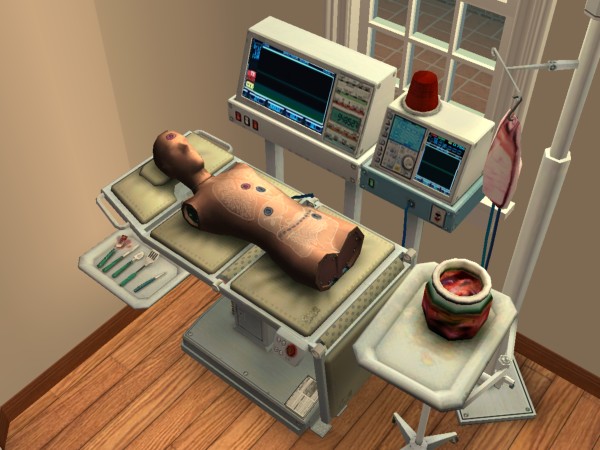
The blood in the IV, the (viscers?) in the jar, the inside of the dummy, the blood on the tools and the two organs you can pull out are also blood red.
It does not override the original colour, but is accessible through the recolour tool.
May be useful for filmmakers who want to show surgery ; if you really frame it well it can look like your sim's operating on a real patient.
Instead of blueish green, its skin is flesh-coloured (caucasian), although the drawings of organs and the numbers still appear.
The blood in the IV, the (viscers?) in the jar, the inside of the dummy, the blood on the tools and the two organs you can pull out are also blood red.
It does not override the original colour, but is accessible through the recolour tool.
May be useful for filmmakers who want to show surgery ; if you really frame it well it can look like your sim's operating on a real patient.
Advertisement:
|
RealisticRecolor of the medical dummy.zip
Download
Uploaded: 21st Sep 2009, 523.4 KB.
12,373 downloads.
|
||||||||
| For a detailed look at individual files, see the Information tab. | ||||||||
Install Instructions
Basic Download and Install Instructions:
1. Download: Click the download link to save the .rar or .zip file(s) to your computer.
2. Extract the zip, rar, or 7z file.
3. Place in Downloads Folder: Cut and paste the .package file(s) into your Downloads folder:
1. Download: Click the download link to save the .rar or .zip file(s) to your computer.
2. Extract the zip, rar, or 7z file.
3. Place in Downloads Folder: Cut and paste the .package file(s) into your Downloads folder:
- Origin (Ultimate Collection): Users\(Current User Account)\Documents\EA Games\The Sims™ 2 Ultimate Collection\Downloads\
- Non-Origin, Windows Vista/7/8/10: Users\(Current User Account)\Documents\EA Games\The Sims 2\Downloads\
- Non-Origin, Windows XP: Documents and Settings\(Current User Account)\My Documents\EA Games\The Sims 2\Downloads\
- Mac: Users\(Current User Account)\Documents\EA Games\The Sims 2\Downloads
- Mac x64: /Library/Containers/com.aspyr.sims2.appstore/Data/Library/Application Support/Aspyr/The Sims 2/Downloads
- For a full, complete guide to downloading complete with pictures and more information, see: Game Help: Downloading for Fracking Idiots.
- Custom content not showing up in the game? See: Game Help: Getting Custom Content to Show Up.
- If you don't have a Downloads folder, just make one. See instructions at: Game Help: No Downloads Folder.
Advertisement:
Loading comments, please wait...
Author

Download Details
Packs:
None, this is Sims 2 base game compatible!
Uploaded: 21st Sep 2009 at 1:09 AM
Uploaded: 21st Sep 2009 at 1:09 AM
Type:
– Object Mods
: Object Interaction Mods (things that change how sims interact with objects or their environment, like "Multi-owner door" or "sunbathe anywhere")
Tags
Other Download Recommendations:
-
by christianlov 14th Jun 2008 at 5:24am
 82
221.4k
237
82
221.4k
237
-
by christianlov 19th Jul 2008 at 3:08am
35
108k
110
-
by MogHughson 5th Mar 2010 at 12:08am
18
38.3k
51
-
-
by kestrellyn updated 28th Feb 2026 at 7:08am
23
9.4k
38
-
-
by Nullsuke updated 28th Feb 2025 at 12:57pm
8
5.5k
17
-