
 Sign in to Mod The Sims
 The Aristocratic Alphabet
 The Aristocratic Alphabet
SCREENSHOTS


LetterSet.jpg - width=800 height=1024
Screenshot-120.jpg - width=1280 height=800
Screenshot-118.jpg - width=815 height=800
Screenshot-58.jpg - width=1280 height=800
Screenshot-57.jpg - width=1280 height=800
Downloaded 6,819 times
133 Thanks
28 Favourited
20,351 Views
Say Thanks!
Thanked!
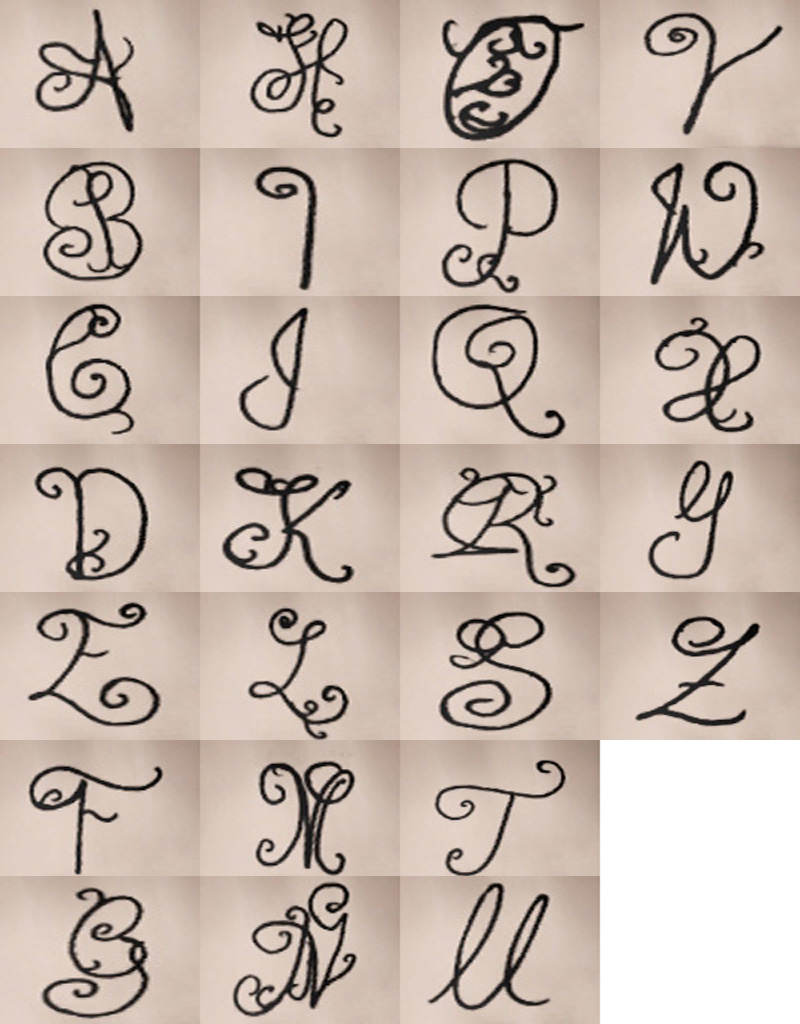
It has always been a dream of my mine to create actual name tattoos for your sims.. but obviously that dream is not possible due to the millions of names out there. So then I decided I would just do the top 10 popular names for boys and girls instead...then I realized the odds of your sims actually having one of those names were few. From then emerged "The Aristocratic Alphabet"! Using a lovely brush I found online, I began to work on creating these different letters and turning them into cute little tattoos for your sims.
Personally, I prefer the tattoos in black because it adds a nice crisp and classy effect. But if you love misc colors like red, blue, and yellow, then you are in luck because these tattoos are colorable!
Advertisement:
|
A-G.rar
Download
Uploaded: 14th Jun 2013, 147.7 KB.
629 downloads.
|
||||||||
|
H-N.rar
Download
Uploaded: 14th Jun 2013, 167.7 KB.
546 downloads.
|
||||||||
|
O-U.rar
Download
Uploaded: 14th Jun 2013, 188.6 KB.
501 downloads.
|
||||||||
|
V-Z.rar
Download
Uploaded: 14th Jun 2013, 127.7 KB.
495 downloads.
|
||||||||
|
ALL.rar
Download
Uploaded: 14th Jun 2013, 631.3 KB.
4,658 downloads.
|
||||||||
| For a detailed look at individual files, see the Information tab. | ||||||||
Install Instructions
Quick Guide:
1. Click the download button, or the filename, to download the file to your computer.
2. Extract the zip, rar, or 7z file. Now you will have either a .package or a .sims3pack file.
For Package files:
1. Cut and paste the file into your Documents\Electronic Arts\The Sims 3\Mods\Packages folder. If you do not already have this folder, you should read the full guide to Package files first: Sims 3:Installing Package Fileswiki, so you can make sure your game is fully patched and you have the correct Resource.cfg file.
2. Run the game, and find your content where the creator said it would be (build mode, buy mode, Create-a-Sim, etc.).
For Sims3Pack files:
1. Cut and paste it into your Documents\Electronic Arts\The Sims 3\Downloads folder. If you do not have this folder yet, it is recommended that you open the game and then close it again so that this folder will be automatically created. Then you can place the .sims3pack into your Downloads folder.
2. Load the game's Launcher, and click on the Downloads tab. Find the item in the list and tick the box beside it. Then press the Install button below the list.
3. Wait for the installer to load, and it will install the content to the game. You will get a message letting you know when it's done.
4. Run the game, and find your content where the creator said it would be (build mode, buy mode, Create-a-Sim, etc.).
Extracting from RAR, ZIP, or 7z: You will need a special program for this. For Windows, we recommend 7-Zip and for Mac OSX, we recommend Keka. Both are free and safe to use.
Need more help?
If you need more info, see:
1. Click the download button, or the filename, to download the file to your computer.
2. Extract the zip, rar, or 7z file. Now you will have either a .package or a .sims3pack file.
For Package files:
1. Cut and paste the file into your Documents\Electronic Arts\The Sims 3\Mods\Packages folder. If you do not already have this folder, you should read the full guide to Package files first: Sims 3:Installing Package Fileswiki, so you can make sure your game is fully patched and you have the correct Resource.cfg file.
2. Run the game, and find your content where the creator said it would be (build mode, buy mode, Create-a-Sim, etc.).
For Sims3Pack files:
1. Cut and paste it into your Documents\Electronic Arts\The Sims 3\Downloads folder. If you do not have this folder yet, it is recommended that you open the game and then close it again so that this folder will be automatically created. Then you can place the .sims3pack into your Downloads folder.
2. Load the game's Launcher, and click on the Downloads tab. Find the item in the list and tick the box beside it. Then press the Install button below the list.
3. Wait for the installer to load, and it will install the content to the game. You will get a message letting you know when it's done.
4. Run the game, and find your content where the creator said it would be (build mode, buy mode, Create-a-Sim, etc.).
Extracting from RAR, ZIP, or 7z: You will need a special program for this. For Windows, we recommend 7-Zip and for Mac OSX, we recommend Keka. Both are free and safe to use.
Need more help?
If you need more info, see:
- For package files: Sims 3:Installing Package Fileswiki
- For Sims3pack files: Game Help:Installing TS3 Packswiki
Advertisement:
Loading comments, please wait...
Author

Download Details
Packs:
 View with Names
Uploaded: 14th Jun 2013 at 9:35 PM
Updated: 15th Jun 2013 at 2:29 AM
 View with Names
Uploaded: 14th Jun 2013 at 9:35 PM
Updated: 15th Jun 2013 at 2:29 AM
Maxis Flags:
– AmbTattoo
: Ambitions Tattoos
Gender:
– Unisex
Tags
Other Download Recommendations:
-
-
by The Path Of Nevermore 20th Jul 2010 at 11:55pm
-
by des-demmonia 27th Jul 2010 at 12:35am
-
-
-
-
-
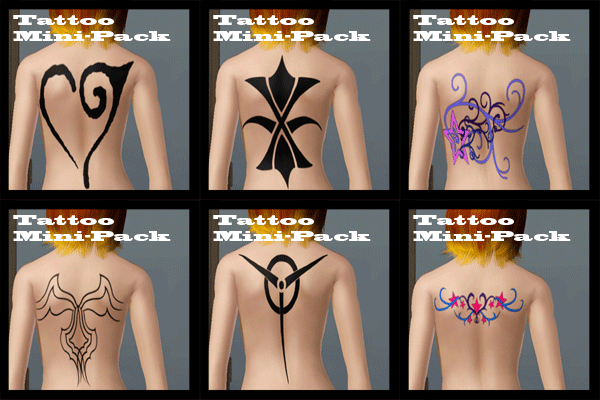
Tattoo Mini-Pack (6 Tattoos, 1 Variation)
by CrimsonRaeden 30th Jul 2012 at 2:12pm
-
-


More downloads by ihearttea:
See more
Packs Needed
| Expansion Pack | |
|---|---|
| Ambitions |