
 Sign in to Mod The Sims
 Clam and Conch Eyeshadow with Eyeshadow Enhancers overlays
 Clam and Conch Eyeshadow with Eyeshadow Enhancers overlays


Eyeshadow sampler.JPG - width=919 height=605
Eyeshadow sampler
1e&clam2.JPG - width=1231 height=705
shadow progression clam
2e&conch2.JPG - width=1220 height=625
shadow progression conch
Eyeshadow overlays.JPG - width=828 height=1014
Eyeshadow Enhancers set of 4
ClamEyeshadow.JPG - width=715 height=1268
Clam Eyeshadow sampler
each eyeshine clam4.JPG - width=695 height=975
Clam Eyeshadow #4 with each eyeshadow enhancer overlay
Conch Eyeshadow.JPG - width=1076 height=1134
Conch Eyeshadow sampler
each eyeshine conch1.JPG - width=695 height=1012
Conch Eyeshadow #1 with each eyeshadow enhancer overlay
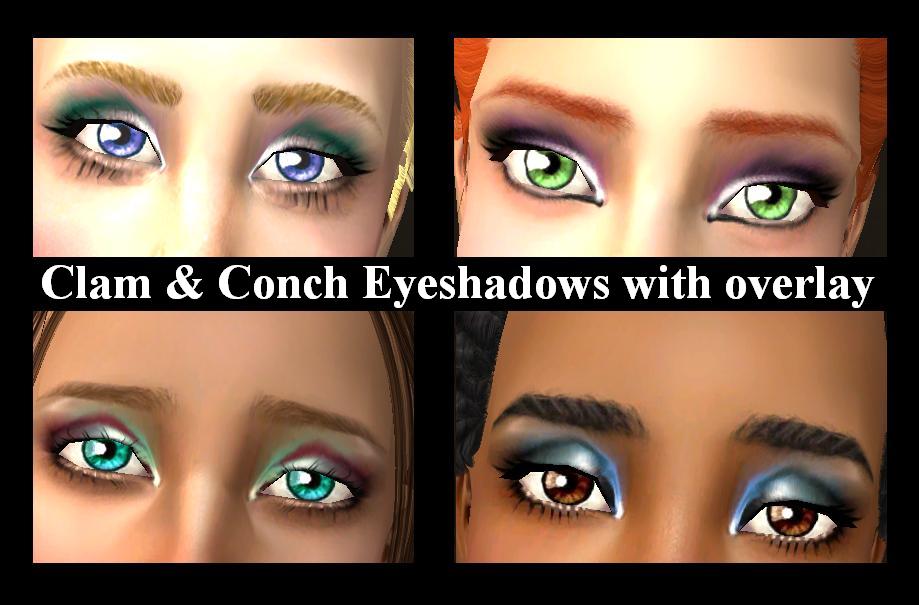
I offer you two small sets of eyeshadows. "Clam" has four color combos and "Conch" has five. Plus there are 4 Eyeshadow Enhancers overlays.
The overlays are really useful. Basically you can get 5 looks from a single shadow. In other words, you get the four different overlays and of course whatever the original eyeshadow color happens to be. Plus they work well with ANY eyeshadow!!!

Eyeshadow Enhancer #1 The highlights are at the center of the eyelid & at the inner corner of the eye with some slight shine and shading at the brow line.
Eyeshadow Enhancer #2 The highlights are at the inner corner of the eye, about 1/2 way toward the center of the eyelid and at the brow line. Plus black eyeliner is carried from the outer edge of the eye tapering off toward the center.
Eyeshadow Enhancer #3 The highlights begin at the inner corner of the eye. They fade, then lighten once again near the center of the eyelid and near the brow. Dark brown eyeliner is carried across the entire lower lid.
Eyeshadow Enhancer #4 The highlights begin at the inner corner of the eye and taper off toward the center with a little dark shading in the crease of the eyelid.


Just a couple of pointers on eyeshadow:
Browns tend to look really good on blue eyes.
Purples and violets make green eyes stand out. Plus they look good on gray eyes.
Blues look good on golden brown eyes and greens look good on ashy brown eyes.
|
Lionspau_EyEnhancers.rar
| 4 different Eyeshadow Enhancers
Download
Uploaded: 6th Nov 2013, 106.9 KB.
6,161 downloads.
|
||||||||
|
Lionspau_Conch Eyeshadow.rar
| Conch Eyeshadow...5 colors
Download
Uploaded: 6th Nov 2013, 186.0 KB.
6,652 downloads.
|
||||||||
|
Lionspau_Clam Eyeshadow.rar
| Clam Eyeshadow...4 colors
Download
Uploaded: 6th Nov 2013, 167.5 KB.
6,394 downloads.
|
||||||||
| For a detailed look at individual files, see the Information tab. | ||||||||
Install Instructions
1. Download: Click the download link to save the .rar or .zip file(s) to your computer.
2. Extract the zip, rar, or 7z file.
3. Place in Downloads Folder: Cut and paste the .package file(s) into your Downloads folder:
- Origin (Ultimate Collection): Users\(Current User Account)\Documents\EA Games\The Sims™ 2 Ultimate Collection\Downloads\
- Non-Origin, Windows Vista/7/8/10: Users\(Current User Account)\Documents\EA Games\The Sims 2\Downloads\
- Non-Origin, Windows XP: Documents and Settings\(Current User Account)\My Documents\EA Games\The Sims 2\Downloads\
- Mac: Users\(Current User Account)\Documents\EA Games\The Sims 2\Downloads
- Mac x64: /Library/Containers/com.aspyr.sims2.appstore/Data/Library/Application Support/Aspyr/The Sims 2/Downloads
- For a full, complete guide to downloading complete with pictures and more information, see: Game Help: Downloading for Fracking Idiots.
- Custom content not showing up in the game? See: Game Help: Getting Custom Content to Show Up.
- If you don't have a Downloads folder, just make one. See instructions at: Game Help: No Downloads Folder.
Loading comments, please wait...

Uploaded: 6th Nov 2013 at 1:43 AM
-

-
by BloodyAngel 27th Jun 2006 at 11:45pm
-
-
by oldenBuffy 19th Jan 2007 at 11:44pm
-
-
by ShojoAngel 29th Sep 2007 at 2:54am
-
-
by ShojoAngel 4th Jul 2008 at 1:19am
-
by ShojoAngel 19th Sep 2008 at 4:04am
-
by ShojoAngel 18th Apr 2009 at 7:17pm


-
Veronica Lodge of "The Archies"
by Lionspau updated 4th Feb 2014 at 9:45pm
Veronica Lodge with both custom content and No CC. more...
 4
12.6k
12
4
12.6k
12
-
-
-
Chuck Clayton of "The Archies"
by Lionspau 3rd Feb 2014 at 1:06am
Chuck Clayton with/without custom content more...
2
7.3k
7
-
Jughead Jones of "The Archies"
by Lionspau 2nd Feb 2014 at 11:34pm
Jughead Jones with and without Custom Content more...
12.9k
9
-
-
Lionspau's Default Face Templates
by Lionspau updated 24th Jan 2014 at 10:30pm
A set of Default Face Templates, which includes #'s 1-27 with the exception of #'s 21 & 25. more...
41
86.3k
312
-
Dilton Doiley of "The Archies"
by Lionspau 3rd Feb 2014 at 12:58am
Dilton Doiley with and without custom content. more...
3
7.4k
9
-
-
Project Appleseed: 4 Multi-Pollination Technicians
by Lionspau 5th Nov 2013 at 1:24am
4 multi-pollination technicians with the skins and eyes for game play. more...
19
16.3k
39
