
 Sign in to Mod The Sims
 Bridesmaids Poses - Set 2
 Bridesmaids Poses - Set 2


widget.jpg - width=766 height=766
blog bridesmaid set 2 front.jpg - width=1024 height=768
blog bridesmaid set 2 faces.jpg - width=1024 height=768
NPL Pic.jpg - width=820 height=766
*3 poses
*pose list compatible
*snap together as designed
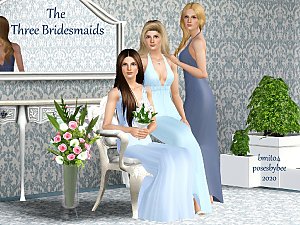
Note: The codes for this follow the codes in the The Three Bridesmaids. Also makes sure when typing the code, you type bridesmaid, not bridesmaids
Codes
a_bmit_bridesmaid4
a_bmit_bridesmaid5
a_bmit_bridesmaid6
|
Bmit_Bridesmaid_Set2_PoseList.rar
| 3 standing poses
Download
Uploaded: 7th Mar 2022, 28.8 KB.
936 downloads.
|
||||||||
| For a detailed look at individual files, see the Information tab. | ||||||||
Install Instructions
1. Click the download button, or the filename, to download the file to your computer.
2. Extract the zip, rar, or 7z file. Now you will have either a .package or a .sims3pack file.
For Package files:
1. Cut and paste the file into your Documents\Electronic Arts\The Sims 3\Mods\Packages folder. If you do not already have this folder, you should read the full guide to Package files first: Sims 3:Installing Package Fileswiki, so you can make sure your game is fully patched and you have the correct Resource.cfg file.
2. Run the game, and find your content where the creator said it would be (build mode, buy mode, Create-a-Sim, etc.).
For Sims3Pack files:
1. Cut and paste it into your Documents\Electronic Arts\The Sims 3\Downloads folder. If you do not have this folder yet, it is recommended that you open the game and then close it again so that this folder will be automatically created. Then you can place the .sims3pack into your Downloads folder.
2. Load the game's Launcher, and click on the Downloads tab. Find the item in the list and tick the box beside it. Then press the Install button below the list.
3. Wait for the installer to load, and it will install the content to the game. You will get a message letting you know when it's done.
4. Run the game, and find your content where the creator said it would be (build mode, buy mode, Create-a-Sim, etc.).
Extracting from RAR, ZIP, or 7z: You will need a special program for this. For Windows, we recommend 7-Zip and for Mac OSX, we recommend Keka. Both are free and safe to use.
Need more help?
If you need more info, see:
- For package files: Sims 3:Installing Package Fileswiki
- For Sims3pack files: Game Help:Installing TS3 Packswiki
Loading comments, please wait...

Uploaded: 7th Mar 2022 at 3:30 AM
Updated: 8th Mar 2022 at 12:19 AM
-
-
by jessesue 14th Oct 2021 at 2:01am
 1
7.7k
11
1
7.7k
11
-
The Three Bridesmaids Poses - Set 1
by jessesue 21st Mar 2022 at 1:24pm
-
-
by jessesue 4th Sep 2024 at 5:18pm
3.6k
3
-
by jessesue 10th Aug 2025 at 3:40pm
2
1.3k
1
-
by jessesue 15th Aug 2025 at 1:27pm
2
2.6k
3
-
by jessesue 7th Sep 2025 at 2:22pm
2
909
1
-
by jessesue 23rd Sep 2025 at 3:35pm
1.5k
1
-
by jessesue 7th Oct 2025 at 11:12am
2.3k
1

-
Male Emotions - Poses 32 to 45
by jessesue 14th Oct 2021 at 3:26pm
More male poses to help storytellers with those moments in the story where males need to show emotion via facial more...
3.7k
12
-
Child Bully Poses - 6 Poses For Story Telling
by jessesue 14th Mar 2017 at 5:11pm
Great poses for storytelling that depict minor child bullying. more...
4
9.7k
5
-
-

by jessesue 4th Sep 2024 at 5:18pm
3.6k
3
-

-
-
-

-

-
Mommy and Me - Toddler Play Pose Pack
by jessesue updated 18th Sep 2020 at 6:32pm
This set includes 15 poses depicting play time between a mommy and toddler in various settings. more...
8
15.4k
35
About Me
*I do not give permission for my poses to be converted to Sims 4. I will do that in time.
*Have fun with them in your personal use. I love seeing my poses in your games. Please TAG me!
*You can see more of my sets at Poses By Bee