Quick Reply
Search this Thread
Mad Poster
Original Poster
#1 Old 15th Jun 2024 at 10:25 AM
Default New reply notification will not go away

The new reply notification is stuck for me. Can this please be fixed?
Warrior Gryphon
site owner
#2 Old 15th Jun 2024 at 2:19 PM
Hi there,

Do you mean in the notifications screen? Or on a specific thread? I'm confused as to which notification you mean. A screenshot would be good!

Thanks

Story books are full of fairy tales, of Kings and Queens, and the bluest skies.
Mad Poster
Original Poster
#3 Old 15th Jun 2024 at 11:09 PM
I mean on every page of the site.
Screenshots
Warrior Gryphon
site owner
#4 Old 16th Jun 2024 at 12:03 AM
Okay so I assume you've gone into notifications and clicked "Mark all as read" or deleted them all?

Story books are full of fairy tales, of Kings and Queens, and the bluest skies.
Mad Poster
Original Poster
#5 Old 16th Jun 2024 at 12:23 AM
There weren't any new ones showing, but after clicking "mark all as read" several times, that did resolve the issue. Thanks, for some reason I didn't see that button.
Warrior Gryphon
site owner
#6 Old 16th Jun 2024 at 12:25 AM
No probs. Glad it fixed itself up!

Story books are full of fairy tales, of Kings and Queens, and the bluest skies.
Alchemist
#7 Old 27th Aug 2026 at 3:00 PM
Where is this "Mark all as read" button? Is it on my Subscription page? I'm not seeing it.
Because I'm also having an issue with two threads that keep showing as having new comments when they don't.
I've tried unsubscribing from those threads, but the issue remains after I re-subscribe.

My Lot creations (over 75 Lots): https://robsgames.freeforums.net/
doolomot
retired moderator
#8 Old 1st Sep 2026 at 11:04 AM
@ScaryRob Did you find it? Click the notifications button speech bubbles icon top right of screen, next to the Private message icon) and it's top right:

Screenshots
Alchemist
#9 Old 1st Sep 2026 at 8:31 PM
Quote: Originally posted by simsample
@ScaryRob Did you find it? Click the notifications button speech bubbles icon top right of screen, next to the Private message icon) and it's top right:

That will only clear any unread PM's, not my Subscribed Threads page.
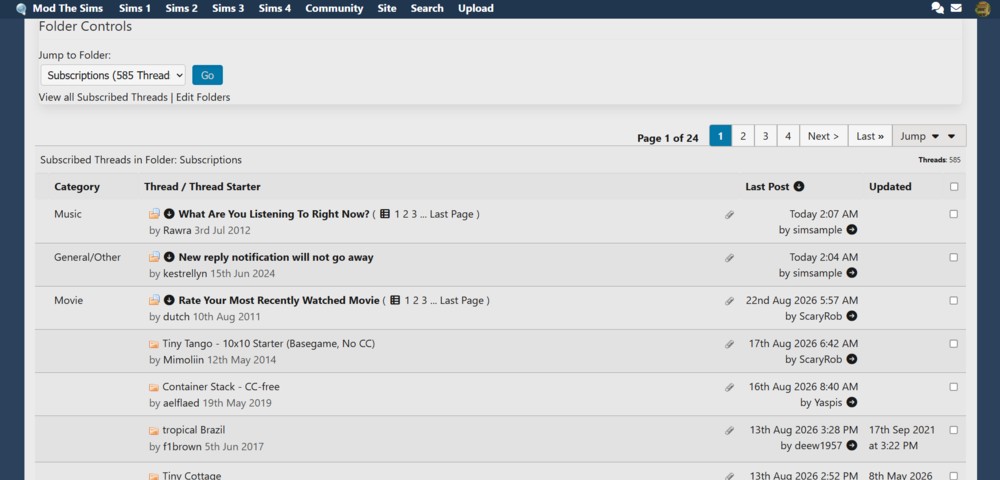
Here's what I'm seeing when I visit my Subscribed Threads page. The threads in Bold should not be in Bold because I've repeatedly read them. I've tried everything that I know to do, including logging in and out of MTS, yet they remain in Bold. In fact, this very thread did not appear in Bold until I posted to it, so it seems every thread I comment on goes Bold and remains so:


My Lot creations (over 75 Lots): https://robsgames.freeforums.net/
Me? Sarcastic? Never.
staff: administrator
Locked thread
Back to top