Sign in to Mod The Sims
 Purplepaws's Pattern Pack 1
 Purplepaws's Pattern Pack 1


patternpack1.jpg - width=800 height=477
comfycarpetpic.jpg - width=650 height=487
alohapic.jpg - width=650 height=488
polkadotpic.jpg - width=650 height=488
applespic.jpg - width=650 height=488
quiltedpic.jpg - width=650 height=488

My first pattern pack consists of five fun and useful designs (in two different sizes), all completely seamless and meticulously perfected.
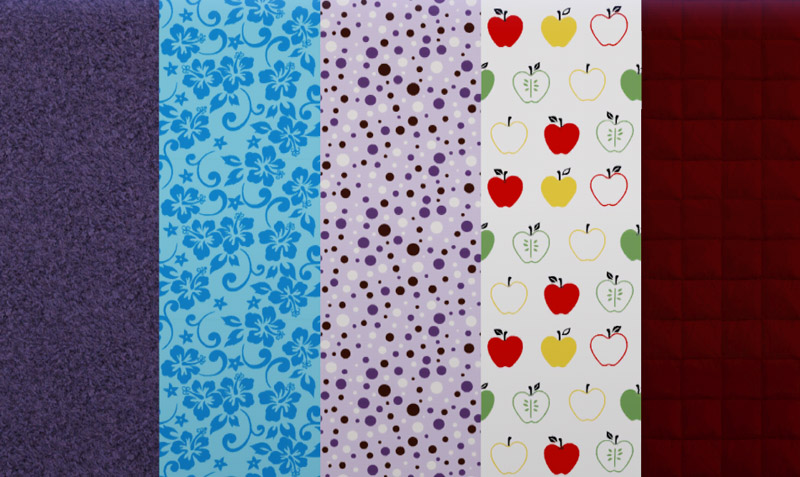
Comfy - Carpet, 1 Channel
Aloha - Theme, 2 Channels
Polkadot - Geometric, 4 Channels
Apples - Theme, 4 Channels
Quilted - Fabric, 1 Channel
You may recognize the first pattern from a carpet set I did for TS2. It's basically the same, just tweaked a little to look better with both light and dark colors using the same grayscale image. And the quilt pattern is actually an EA texture that I grabbed off a bedding from the Teen Style Stuff pack. I had used it as an overlay for all of my own beddings and I thought it would make a good TS3 pattern. The other three I had to make seamless myself and then retrace for the highest quality possible.
I hope you all enjoy these! I had a lot of fun making them. Please stay tuned for another project I have in the works (which actually should be right on the heels of this one), and do feel free to leave feedback. It really makes my day.

~Rachael
|
purplepaws_patternpack1.zip
Download
Uploaded: 21st Jul 2009, 904.2 KB.
22,103 downloads.
|
||||||||
| For a detailed look at individual files, see the Information tab. | ||||||||
Install Instructions
1. Click the download button, or the filename, to download the file to your computer.
2. Extract the zip, rar, or 7z file. Now you will have either a .package or a .sims3pack file.
For Package files:
1. Cut and paste the file into your Documents\Electronic Arts\The Sims 3\Mods\Packages folder. If you do not already have this folder, you should read the full guide to Package files first: Sims 3:Installing Package Fileswiki, so you can make sure your game is fully patched and you have the correct Resource.cfg file.
2. Run the game, and find your content where the creator said it would be (build mode, buy mode, Create-a-Sim, etc.).
For Sims3Pack files:
1. Cut and paste it into your Documents\Electronic Arts\The Sims 3\Downloads folder. If you do not have this folder yet, it is recommended that you open the game and then close it again so that this folder will be automatically created. Then you can place the .sims3pack into your Downloads folder.
2. Load the game's Launcher, and click on the Downloads tab. Find the item in the list and tick the box beside it. Then press the Install button below the list.
3. Wait for the installer to load, and it will install the content to the game. You will get a message letting you know when it's done.
4. Run the game, and find your content where the creator said it would be (build mode, buy mode, Create-a-Sim, etc.).
Extracting from RAR, ZIP, or 7z: You will need a special program for this. For Windows, we recommend 7-Zip and for Mac OSX, we recommend Keka. Both are free and safe to use.
Need more help?
If you need more info, see:
- For package files: Sims 3:Installing Package Fileswiki
- For Sims3pack files: Game Help:Installing TS3 Packswiki
Loading comments, please wait...


Uploaded: 21st Jul 2009 at 11:55 AM
Updated: 22nd Jan 2010 at 7:22 AM - Properly categorized for search function... Thanks Delphy!



-
TS2 -> TS3 - Toys, Toys, Toys!
by Purplepaws updated 21st Oct 2011 at 10:18am
15 decorative and functional toys from various Sims 2 expansion packs. more...
 215
417k
994
215
417k
994
-
Strawberry Patch Collection- Girls' Swimwear Part 1
by Purplepaws 30th Oct 2007 at 10:08pm
Since I am closing down my site, I wanted to upload all of my outfits here so people could continue more...
-
Strawberry Patch Collection- Girls' Pajamas
by Purplepaws 30th Oct 2007 at 8:42pm
Since I am closing down my site, I wanted to upload all of my outfits here so people could continue more...
-
Girls' Untuckable Sports Tees and Jeans
by Purplepaws 6th Nov 2008 at 12:08am
I was going through my bodyshop content one day when I realized just how few girls' outfits I had that more...
-
Strawberry Patch Collection- Girls' Everyday Outfits Part 4
by Purplepaws 30th Oct 2007 at 8:19pm
Since I am closing down my site, I wanted to upload all of my outfits here so people could continue more...
-
Strawberry Patch Collection- Toddler Girls' Pajamas
by Purplepaws 30th Oct 2007 at 11:03pm
Since I am closing down my site, I wanted to upload all of my outfits here so people could continue more...
-
Strawberry Patch Collection- Boys' Everyday Outfits Part 2
by Purplepaws 30th Oct 2007 at 8:31pm
Since I am closing down my site, I wanted to upload all of my outfits here so people could continue more...
-
Strawberry Patch Collection- Toddler Boys' Everyday Part 1
by Purplepaws 30th Oct 2007 at 10:50pm
Since I am closing down my site, I wanted to upload all of my outfits here so people could continue more...
-
Purplepaws's Pattern Pack 3 - For the Girls
by Purplepaws 25th Mar 2011 at 4:06pm
5 kids' patterns for clothing and decorating. more...
21
49.3k
167
-
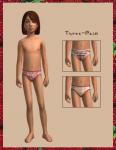
Strawberry Patch Collection- Girls' Undies
by Purplepaws 30th Oct 2007 at 10:22pm
Since I am closing down my site, I wanted to upload all of my outfits here so people could continue more...