
 Sign in to Mod The Sims
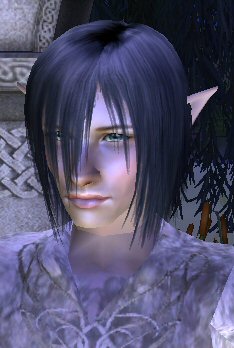
 Cathair, a male elf
 Cathair, a male elf
SCREENSHOTS


cathair 5.jpg - width=234 height=348
cathair 1.jpg - width=347 height=357
cathair 2.jpg - width=375 height=345
cathair 3.jpg - width=239 height=441
cathair 4.jpg - width=225 height=440
cathair 6.jpg - width=219 height=353
Downloaded 774 times
320 Thanks
15 Favourited
28,459 Views
Say Thanks!
Thanked!
Picked Upload!
This is a picked upload! It showcases some of the best talent and creativity available on MTS and in the community.
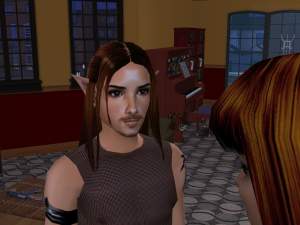
This is Cathair, the companion that I made for my Elven Bride. I made him a beautiful elven outfit, modeled after Celeborn from Lord of the Rings. (Cathair's face is actually my Orlando Bloom...) 
I would make a full Celeborn costume, but I am sans mesh. I will post it as a request in the proper section!
Custom Content Included:
Skintone, Eyes - Enayla
Hair - Sim Cribbling
Blush - Helaene
Eyebrows - Sherrie at Sims2Heaven
Ears - Sim Cribbling, recoloured by me to match Enayla's Alabastar skintone
Clothes - Penguiny7
*Mesh - Tommytiger (You'll need this for the clothes to work!)
A special thanks to everyone who made the custom content!

I would make a full Celeborn costume, but I am sans mesh. I will post it as a request in the proper section!
Custom Content Included:
Skintone, Eyes - Enayla
Hair - Sim Cribbling
Blush - Helaene
Eyebrows - Sherrie at Sims2Heaven
Ears - Sim Cribbling, recoloured by me to match Enayla's Alabastar skintone
Clothes - Penguiny7
*Mesh - Tommytiger (You'll need this for the clothes to work!)
A special thanks to everyone who made the custom content!
Advertisement:
|
Cathair.rar
Download
Uploaded: 21st Mar 2006, 4.03 MB.
7,369 downloads.
|
||||||||
| For a detailed look at individual files, see the Information tab. | ||||||||
Install Instructions
Basic Download and Install Instructions:
1. Download: Click the download link to save the .rar or .zip file(s) to your computer.
2. Extract the zip, rar, or 7z file.
3. Install: Double-click on the .sims2pack file to install its contents to your game. The files will automatically be installed to the proper location(s).
1. Download: Click the download link to save the .rar or .zip file(s) to your computer.
2. Extract the zip, rar, or 7z file.
3. Install: Double-click on the .sims2pack file to install its contents to your game. The files will automatically be installed to the proper location(s).
- You may want to use the Sims2Pack Clean Installer instead of the game's installer, which will let you install sims and pets which may otherwise give errors about needing expansion packs. It also lets you choose what included content to install. Do NOT use Clean Installer to get around this error with lots and houses as that can cause your game to crash when attempting to use that lot. Get S2PCI here: Clean Installer Official Site.
- For a full, complete guide to downloading complete with pictures and more information, see: Game Help: Downloading for Fracking Idiots.
- Custom content not showing up in the game? See: Game Help: Getting Custom Content to Show Up.
- If you get an error that says "This content requires expansion pack data that is not installed", please use Clean Installer to install this sim.
Meshes needed
This download requires one or more meshes to work properly. Please check the Description tab for information about the meshes needed, then download them below:| MTS cannot guarantee any off-site links will be available |
| louis.new21.net (non-MTS link) |
Advertisement:
Loading comments, please wait...
Author

Download Details
Packs:
None, this is Sims 2 base game compatible!
Uploaded: 21st Mar 2006 at 3:45 AM
Updated: 30th Mar 2006 at 1:47 PM by angel f
Uploaded: 21st Mar 2006 at 3:45 AM
Updated: 30th Mar 2006 at 1:47 PM by angel f
Other Download Recommendations:
-
-
by SugarandSpikes 3rd Jul 2005 at 7:58am
-
-
-
-
-
-
-
-

More downloads by penguiny7:
See more



About Me
You may include my content in your uploads, but you MUST give me credit for it! Thank you! :)