Sign in to Mod The Sims
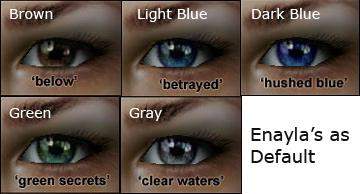
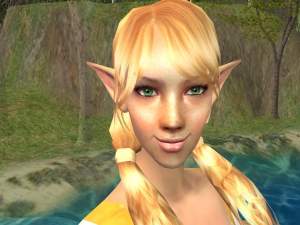
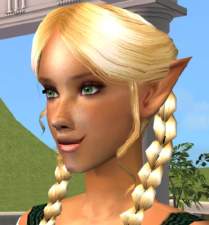
 Enayla's Eyes as Default
 Enayla's Eyes as Default


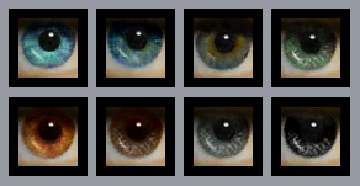
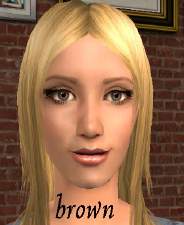
Brown.jpg - width=434 height=157
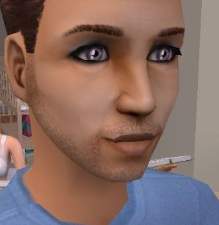
Dark Blue.jpg - width=416 height=157
Green.jpg - width=447 height=170
Grey.jpg - width=413 height=149
Light Blue.jpg - width=437 height=155
You can find the original set here:
http://www.modthesims2.com/showthread.php?t=181070
If you would prefer, there is another default set by kashinthegreen using Enayla's "Eyes for the Eyeless" set here:
http://modthesims2.com/showthread.php?t=182710
You have to choose one or the other though, you can only have one default replacement at a time.
**Remove any current eye defaults you have first before downloading these**
Unzip to your downloads folder.
CTNutmeger wrote the tutorial I used to do this. You can find it here:
http://homepage.myeastern.com/~kamaba/EyeDefault.htm
It's quite simple really, you can customize them differently if you like.
I used dark bronze for the brown, heavenly for dark blue, olive for green, mist for grey, and angel eyes for light blue.
Thanks again to Enayla.
|
Enayla Eyes as Default.zip
Download
Uploaded: 10th Aug 2006, 160.4 KB.
11,214 downloads.
|
||||||||
| For a detailed look at individual files, see the Information tab. | ||||||||
Install Instructions
1. Download: Click the download link to save the .rar or .zip file(s) to your computer.
2. Extract the zip, rar, or 7z file.
3. Place in Downloads Folder: Cut and paste the .package file(s) into your Downloads folder:
- Origin (Ultimate Collection): Users\(Current User Account)\Documents\EA Games\The Sims™ 2 Ultimate Collection\Downloads\
- Non-Origin, Windows Vista/7/8/10: Users\(Current User Account)\Documents\EA Games\The Sims 2\Downloads\
- Non-Origin, Windows XP: Documents and Settings\(Current User Account)\My Documents\EA Games\The Sims 2\Downloads\
- Mac: Users\(Current User Account)\Documents\EA Games\The Sims 2\Downloads
- Mac x64: /Library/Containers/com.aspyr.sims2.appstore/Data/Library/Application Support/Aspyr/The Sims 2/Downloads
- For a full, complete guide to downloading complete with pictures and more information, see: Game Help: Downloading for Fracking Idiots.
- Custom content not showing up in the game? See: Game Help: Getting Custom Content to Show Up.
- If you don't have a Downloads folder, just make one. See instructions at: Game Help: No Downloads Folder.
Loading comments, please wait...


Uploaded: 10th Aug 2006 at 9:09 AM
Updated: 16th Aug 2006 at 3:18 AM
-
-
-
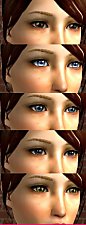
Helaene's latest eyes as Default Replacements
by NecroVonK 8th Feb 2006 at 9:37pm
-
Realistic Default Eyes Recolor
by sodiumlight 25th Apr 2006 at 10:08am
-
-
Enayla's newest eyes as default *different colours*
by kashinthegreen 13th Aug 2006 at 1:05pm
-
-
Enayla's newest skins as defaults
by MissSimGameFan 12th Nov 2006 at 2:52am
-
"Eyes for the eyeless" Enayla's Realistic eyes as * Default Replacement! *
by luluisa 28th Jan 2007 at 9:45pm
-


-
Testers Wanted: Middle Earth Neighborhoods, Part 2, Elvendom
by jmtmom 24th May 2006 at 3:04pm
The next step in bringing Middle Earth to the Sims 2 was finding neighborhoods to put everything in. more...
 +1 packs
6 11.4k 6
+1 packs
6 11.4k 6 Nightlife
-
-
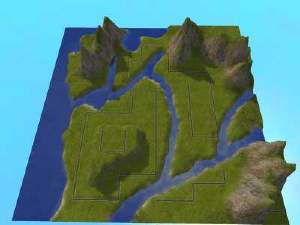
Testers Wanted: Middle Earth Neighborhoods, Part 1, The Shire
by jmtmom 24th May 2006 at 2:58pm
The next step in bringing Middle Earth to the Sims 2 was finding neighborhoods to put everything in. more...
+1 packs
3 12k 8 Nightlife
-
-
-
-
-
-
-