
 Sign in to Mod The Sims
 MilkShape Plugin : Cat's UV Data Merge
 MilkShape Plugin : Cat's UV Data Merge


web0.jpg - width=703 height=431
web1.jpg - width=886 height=577
web2.jpg - width=633 height=368
web3.jpg - width=587 height=559
MTS2_t2suggas_759318_seperatesdivideMTS2_upload.jpg - width=1024 height=1024

uvMergeAnim.gif - width=230 height=230
This MilkShape plugin is used when combining two mesh groups into one group. It adjusts the UV map where the two groups will join so that their UV texture coordinates match. It is similar to Wes Howe's Vertex Data Merge and Normal Data Merge, but whereas those plugins adjust xyz coordinates and normals, this one adjusts uv coordinates.
Installation
Download, unzip, and put the file msTS2A_UVdataMerge.dll in your MilkShape program folder. You will have a new option in the Vertex menu called Cat's UV Data Merge. It will appear just above Vertex Data Merge and Normal Data Merge.
Instructions
Given a pair of vertices from two different groups, this plugin makes the uv coordinates of a vertex from group B match the uv coordinates of a vertex from group A.
- Group A should be above group B in the MilkShape groups tab.
- Select two vertices, one from group A, one from group B.
- In the Vertex menu, select Cat's UV Data Merge.
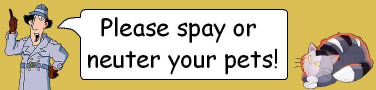
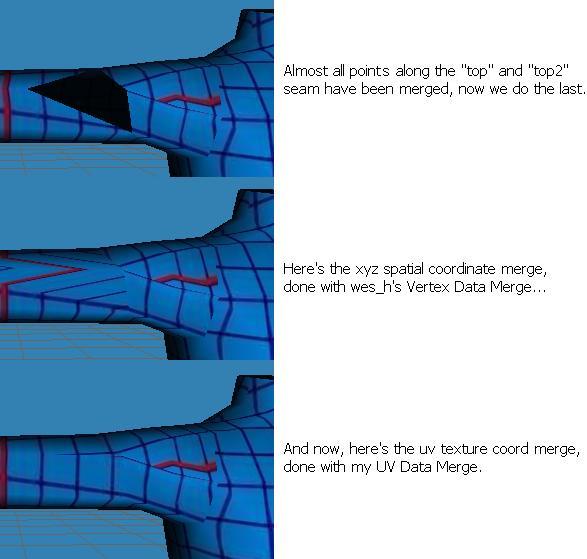
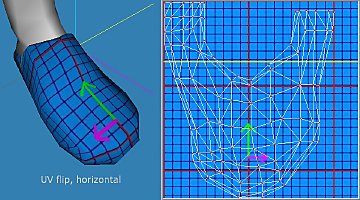
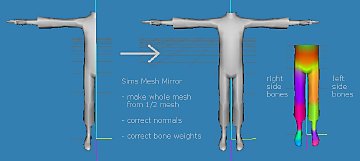
The vertex from group B now has the same uv coordinates as the vertex from group A. If you wish to combine groups A and B, you can now do so by selecting them both in the group tab and pressing Regroup. The four figures below show an example in which two groups, top and top2, are combined. The vertices of top2 have their xyz vertex coordinates, normals, and uv mapping coordinates matched to the vertices of top.
The plugin will work correctly at mesh seams if the following two conditions are met.
- There are at most two unique uv coordinates among all donor vertices.
- If the donor vertices differ in u but not v, the recipient vertices differ in u and not v. And vice versa.
If these conditions are not met, I cannot guarantee correct results. Adjust the uv there manually using demon's Extended Manual Edit. Do not adjust it manually using ctrl-t because you won't do it exactly, or if you do use ctrl-t, make it exact with Extended Manual Edit afterwards.
Figure 1
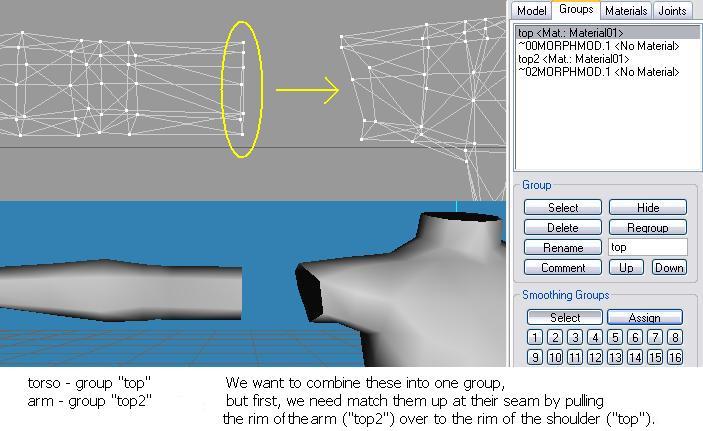
Figure 2
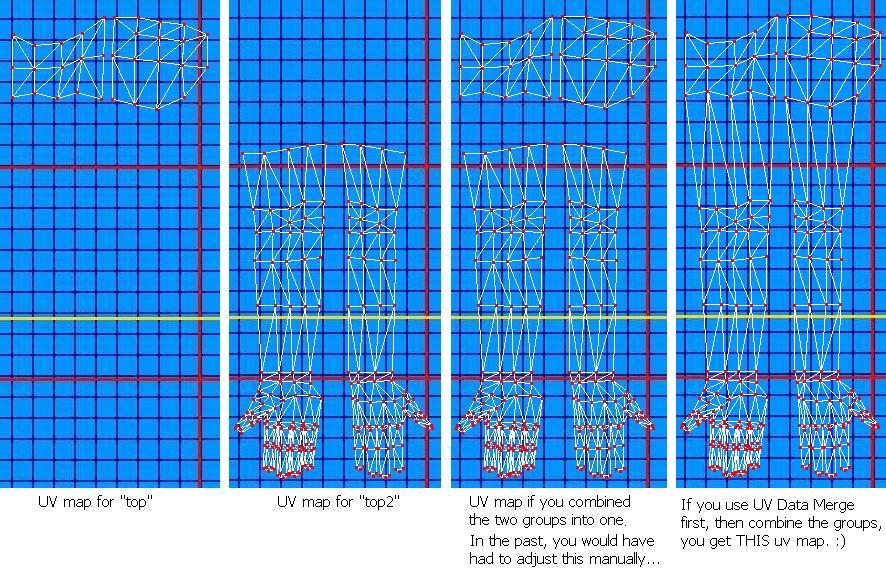
Figure 3
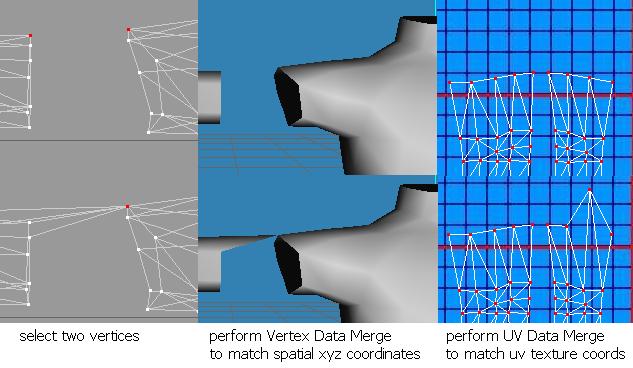
Figure 4
Thanks
Thanks to the creators of MilkShape, and to wes_h for vertex and normal data merge.
Thanks to t2suggas for the great blue grid texture I used in this example.
| Filename | Type | Size |
|---|---|---|
| msTS2A_UVdataMerge.zip | zip | |
| msTS2A_UVdataMerge.dll | dll | 14848 |
|
msTS2A_UVdataMerge.zip
Download
Uploaded: 22nd Jan 2012, 7.5 KB.
2,403 downloads.
|
||||||||
| For a detailed look at individual files, see the Information tab. | ||||||||
Install Instructions
1. Download: Click the download link to save the .rar or .zip file(s) to your computer.
2. Extract the zip, rar, or 7z file.
3. Place in Downloads Folder: Cut and paste the .package file(s) into your Downloads folder:
- Origin (Ultimate Collection): Users\(Current User Account)\Documents\EA Games\The Sims™ 2 Ultimate Collection\Downloads\
- Non-Origin, Windows Vista/7/8/10: Users\(Current User Account)\Documents\EA Games\The Sims 2\Downloads\
- Non-Origin, Windows XP: Documents and Settings\(Current User Account)\My Documents\EA Games\The Sims 2\Downloads\
- Mac: Users\(Current User Account)\Documents\EA Games\The Sims 2\Downloads
- Mac x64: /Library/Containers/com.aspyr.sims2.appstore/Data/Library/Application Support/Aspyr/The Sims 2/Downloads
- For a full, complete guide to downloading complete with pictures and more information, see: Game Help: Downloading for Fracking Idiots.
- Custom content not showing up in the game? See: Game Help: Getting Custom Content to Show Up.
- If you don't have a Downloads folder, just make one. See instructions at: Game Help: No Downloads Folder.
Loading comments, please wait...


Uploaded: 22nd Jan 2012 at 8:15 AM
Updated: 27th Nov 2013 at 2:50 PM by Nysha
-
by Tashiketh updated 14th Jan 2005 at 2:11pm
 160
418k
154
160
418k
154
-
-
-
-
MilkShape Plugin : Cat's UV Flip (horizontal, vertical)
by CatOfEvilGenius 21st Jan 2012 at 8:55am
26
38.1k
31
-
-
-
-


-
Age Transition Faces on HP's Idolatry of Flesh skins (light, tan, medium, dark) DEFAULT REPLACEMENT
by CatOfEvilGenius updated 29th Apr 2008 at 12:12pm
If you use HP's wonderful Idolatry of Flesh DEFAULT REPLACEMENT skins , but want face textures that change as sims more...
-
DEFAULT - Maxis tanks made untuckable (YF, AF, EF) + MATERNITY
by CatOfEvilGenius updated 29th Jul 2010 at 8:08pm
Maxis ladies tanktops now untuckable, and have pregnancy morph. Teen to elder. more...
-
DEFAULT - Granny Dress w/o White Bucketfill! + 3 Funky Recolors
by CatOfEvilGenius 17th Dec 2010 at 10:13pm
Granny's green and blue dresses with white bucketfill removed, replaced by nice hems and shoes. Also, 3 funky new patterned recolors. more...
-
ALPHA MESH - Simple Basics: Loose Yoke Tanks
by CatOfEvilGenius 19th Apr 2015 at 4:34am
loose yoke tanks for adults and young adults more...
-

Elegant Blouse for Granny: ALPHA MESH + 42 Recolors (UPDATED 8/6/2010)
by CatOfEvilGenius 22nd Apr 2009 at 9:06pm
UPDATE 1/10/2011 - If the *.zip files aren't working for you, please use the *.7z files in post #32 more...
-
MESH + 20 fakepeeps7 bow shirt TOP SEPARATES for girls
by CatOfEvilGenius 27th Aug 2008 at 6:16pm
Do you really like fakepeeps7's shirts with bows outfits , but want the shirts as separate tops? Now you've more...
-
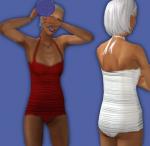
Granny's Retro Swimwear (raggedyanne562)
by CatOfEvilGenius 3rd Jan 2012 at 9:54am
Elder version of raggedyanne562's retro swimwear. more...
-
DEFAULT - Granny's Chinese Dress, Now With Sleeves
by CatOfEvilGenius updated 14th Dec 2010 at 8:55pm
Sleeves added to granny's Chinese dress from NightLife. more...
-
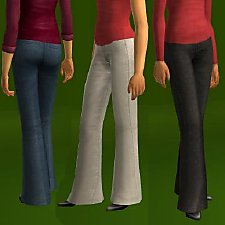

FIX / DEFAULT REPLACE af wide jeans + untuckable + maternity
by CatOfEvilGenius updated 6th Apr 2009 at 12:47am
update Apr 05 2009 - added shadows to the untucked recolors at the shirt edge, please redownload recolors ------------------------------------------------- update more...
-
MESH + 8 Ladies Shorts: jean, sporty stripe, for TF, YF/AF, EF - FIXED 8/7/2010
by CatOfEvilGenius updated 8th Aug 2010 at 12:59am
Ladies Shorts: jean and sporty stripe, for teen through elder more...

About Me
+ all my meshes in tables UPDATED 7/19/2010
------------------SOFTWARE--------------------
+ Got mystery recolors with no tooltips in BodyShop? Add filename tooltips automatically!
+ quick and easy hair binner, no SimPE needed
+ MilkShape Plugins
--- Sims Mesh Mirror
--- UV Flip
--- UV Merge