Sign in to Mod The Sims
 Universal Baby Gate: Contain your toddlers
 Universal Baby Gate: Contain your toddlers


1 - Cover.jpg - width=800 height=800
2 - Universal Baby Gate.jpg - width=1000 height=536

3 - Variety of Styles.gif - width=150 height=329
4 - Placement.jpg - width=1000 height=417
5 - Light.jpg - width=800 height=800
6 - Medium.jpg - width=800 height=800
7 - Dark.jpg - width=800 height=800
8 - Cherry.jpg - width=800 height=800
9 - White.jpg - width=800 height=800

9-6-22 Fixed a GUID conflict with The Barely There Glass Door wall mask. Thank you Corax!
 Several people have had issues with the Universal Baby Gate working for them (see comments for details). Added the HW_babyGate file with is the Kinder Keepaway Baby Gate I shared on my tumblr (which so far as I know of no one has had an issue with).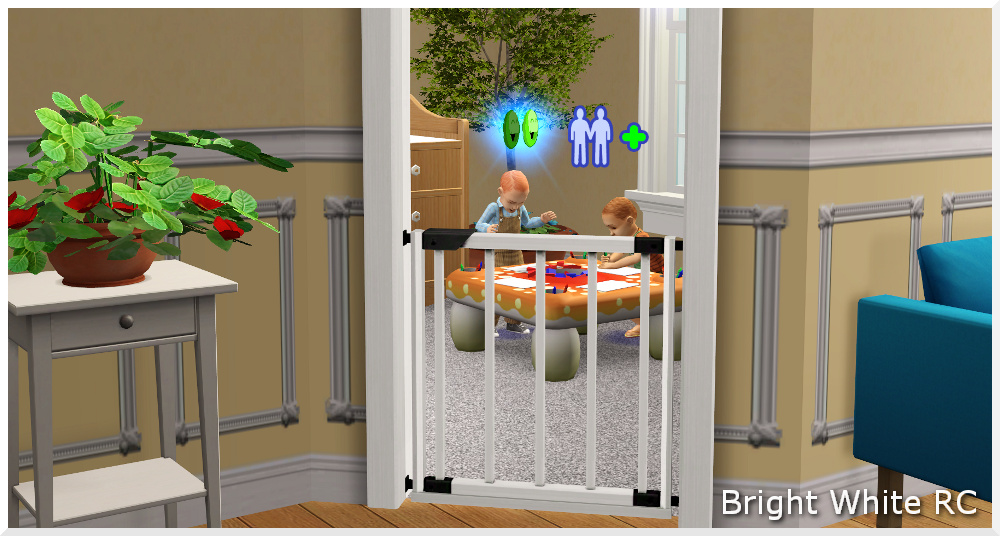
Here's a universal baby gate based on the Kinder Keep Away baby gate from the Sims 3 Store World, Aurora Skies. It's a stand alone gate that's meant to be combined with the arch of your choice which allows for a variety of looks with only one mesh.
- Fully Functional (toddlers can't go through the gate on their own, they have to be carried)
- Base Game Compatible
- Recolorable w/ 2 subsets
- 5 Maxis Match textures and 1 recolor (bright white)
Catalog Sort:
Arches / $50
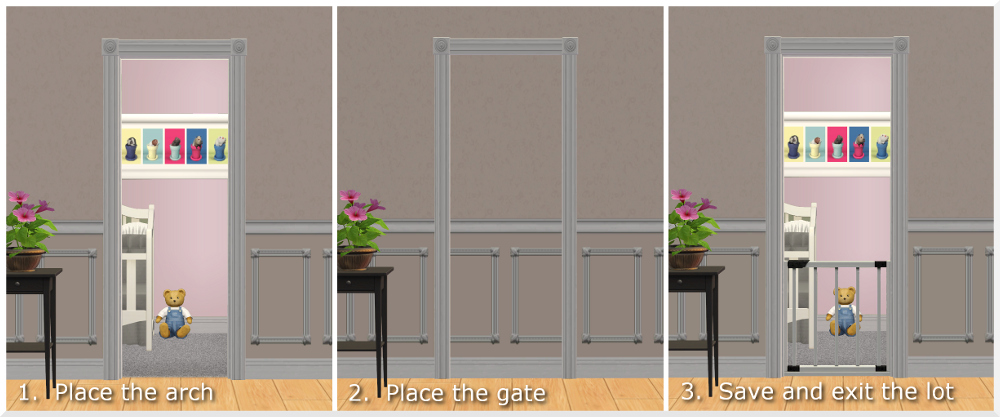
Placement:
1. Place the arch you want to use.
2. Place the baby gate over the arch.
3. Save and exit the lot.
When you re-enter the lot after saving the gate will show up properly and will work. These instructions are also included in the catalog description.
Issues:
The gate gets stuck open when used on a diagonal so there isn't a diagonal included.
Alternative:
If you place the gate first and then the arch (like in the video) the arch will work without having to save and exit but it won't work the next time you enter the lot. If your lot takes a long time to load it's a quick shortcut. Then when you're done for the day (and before you exit the game) you can follow the normal placement instructions (arch then gate) and the gate will be ready the next time you play the lot.
If that sounds like more hassle than it's worth, I shared the original Sims 3 baby gate conversion on my Tumblr. That version is just plop and go just like you would place a door or window and includes a diagonal version.
Terms Of Use:
You're welcome to use this however you'd like. If you're interested in recoloring, the PSD I made with the original textures is available HERE.
Photo Credits:
Patio and Garden Set]Patio and Garden Set
Verdant Velvet - Garden Greens
Polygon Counts:
Faces: 504
Vertices: 806
Credits:
SimPE, AGS, s3pe, s3oc, Gimp 2.8, Milkshape, and EA for the meshes and textures. And thanks to Numenor and Inge Jones as well -- I never would have been able to make this functional without looking at their bhav's.
| Filename | Type | Size |
|---|---|---|
| HW_babyGate.zip | zip | |
| HW_door_babyGate.package | package | 820468 |
| HW_door_babyGate_diagonal.package | package | 204486 |
This is a new mesh, and means that it's a brand new self contained object that usually does not require a specific Pack (although this is possible depending on the type). It may have Recolours hosted on MTS - check below for more information.
|
HW_babyGate.zip
Download
Uploaded: 8th Sep 2022, 259.2 KB.
6,307 downloads.
|
||||||||
|
HW_universalBabyGate.zip
Download
Uploaded: 6th Mar 2013, 318.0 KB.
33,267 downloads.
|
||||||||
| For a detailed look at individual files, see the Information tab. | ||||||||
Install Instructions
1. Download: Click the download link to save the .rar or .zip file(s) to your computer.
2. Extract the zip, rar, or 7z file.
3. Place in Downloads Folder: Cut and paste the .package file(s) into your Downloads folder:
- Origin (Ultimate Collection): Users\(Current User Account)\Documents\EA Games\The Sims™ 2 Ultimate Collection\Downloads\
- Non-Origin, Windows Vista/7/8/10: Users\(Current User Account)\Documents\EA Games\The Sims 2\Downloads\
- Non-Origin, Windows XP: Documents and Settings\(Current User Account)\My Documents\EA Games\The Sims 2\Downloads\
- Mac: Users\(Current User Account)\Documents\EA Games\The Sims 2\Downloads
- Mac x64: /Library/Containers/com.aspyr.sims2.appstore/Data/Library/Application Support/Aspyr/The Sims 2/Downloads
- For a full, complete guide to downloading complete with pictures and more information, see: Game Help: Downloading for Fracking Idiots.
- Custom content not showing up in the game? See: Game Help: Getting Custom Content to Show Up.
- If you don't have a Downloads folder, just make one. See instructions at: Game Help: No Downloads Folder.
Loading comments, please wait...



Uploaded: 6th Mar 2013 at 5:23 PM
Updated: 8th Sep 2022 at 10:23 PM - Added caution note & new file.
#honeywell, #baby gate, #toddler gate, #door, #gate, #arch, #maxis match, #sims 3 conversion
-
by stepehnguy 9th Apr 2006 at 4:34am
 3
11k
1
3
11k
1
-
-
-
by feeEssen 10th Jun 2007 at 8:04pm
6
6.4k
-
-
by sailfindragon updated 8th Jul 2012 at 1:44pm
26
27.7k
74
-
Nursery Add-Ons III: Giddy-Up Rocker
by Honeywell 26th Oct 2012 at 4:44pm
+1 packs
71 104.3k 350 Apartment Life
-
by Michelle 26th Aug 2016 at 9:33am
10
19.3k
68
-
-


-
Bespoke Lot Pack II - 5 Houses
by Honeywell updated 15th Nov 2020 at 2:43am
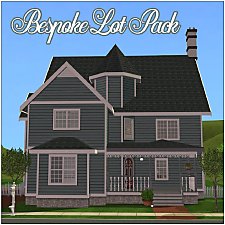
Five family houses that use the Bespoke Build set. more...
+9 packs
14 27.9k 80 University
 Nightlife
 Open for Business
 Pets
Pets
 Seasons
 Bon Voyage
 Free Time
Apartment Life
Free Time
Apartment Life
 Mansion and Garden
-
Interior Wall Collection: A catalog makeover.
by Honeywell updated 31st Dec 2018 at 1:18am
A ginormous collection of paints, paneling, tile, wallpaper, poured and brick walls. more...
87
172k
716
-
Chair Fix: Allow Use 45° Angle
by Honeywell 3rd Oct 2021 at 1:09pm
All of the chairs in game can be rotated with the 45° angle cheat (boolprop allow45degreeangleofrotation true) and most of more...
30
24k
135
-
A Little Greyer: Roof Trim Defaults
by Honeywell 15th May 2015 at 1:46am
Roof default replacements. White trim and grey under eaves. more...
11
38k
114
-
-

Neighborhood Deco: 5 New Plants
by Honeywell 20th Dec 2018 at 6:44am
Five new low poly plants to decorate your neighborhood. Includes sloped options. more...
21
23.3k
79
Miscellaneous » Neighborhoods & CAS Screens » Neighbourhood Deco
-
-

-
Tons of Telescopes: TS3 Conversions **Updated 4-11-13**
by Honeywell 13th Dec 2012 at 7:23am
Well, maybe not tons but six is a lot. more...
42
74.8k
254
-