Sign in to Mod The Sims
 More Realistic Burglar Reactions
 More Realistic Burglar Reactions
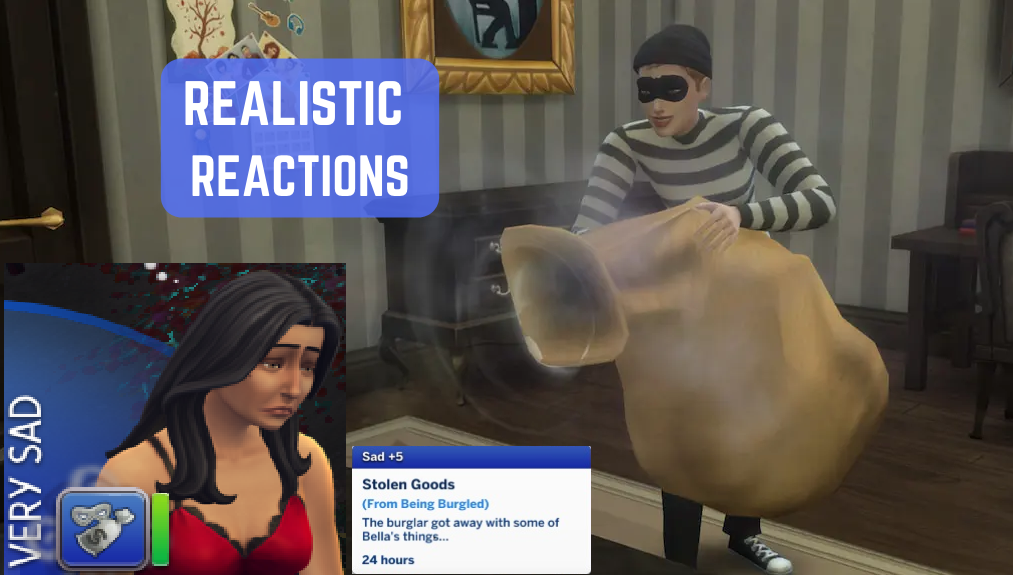
SadBurglar.png - width=1013 height=575
I know plenty of us are excited about burglars (finally!) being added to Sims 4, I know I was. Just a few sim days after downloading the latest update that sneaky sim in a striped shirt came tip-toeing into my house, nabbing my hard-earned goods, and running away scot free. My sim must be furious! Or very sad, at least! Right? Wrong. In classic EA fashion, my sim received a miniscule +1 sad moodlet after half of her hard earned furniture was stolen. She was still happy as a clam. This annoyed me so much, I finally downloaded a modding tool and figured out how to tune mood buffs.
What this mod does:
- Gives sims a +5 sadness moodlet instead of +1 after their goods are stolen. Sadness will likely become their primary emotion unless they have some other intense emotions happening.
In the future I plan to continue working on this, making different buffs/strengths of buffs appear depending on Sims traits (angry for hot-headed or mean sims, for example), and maybe even create new wishes ala Sims 2 (a wish to buy a security system, or to fight the burglar sim, etc).
Thanks for reading and I hope you find this as useful as I do!
Happy Simming!
Jaydock
| Filename | Type | Size |
|---|---|---|
| jaydock_StrongerStolenGoodsMoodlet.rar | rar | |
| jaydock_StrongerStolenGoodsMoodlet.package | package | 1084 |
|
jaydock_StrongerStolenGoodsMoodlet.rar
Download
Uploaded: 7th Mar 2025, 1.2 KB.
2,632 downloads.
|
||||||||
| For a detailed look at individual files, see the Information tab. | ||||||||
Install Instructions
1. Download: Click the File tab to see the download link. Click the link to save the .rar or .zip file(s) to your computer.
Read the upload description for installation instructions. If nothing else is specified, do the following:
2. Extract: Use WinRAR (Windows) to extract the .package file(s) (if included, ts4script as well) from the .rar or .zip file(s).
3. Cut and paste the .package file(s) (if included, ts4script as well) into your Mods folder
- Windows XP: Documents and Settings\(Current User Account)\My Documents\Electronic Arts\The Sims 4\Mods\
- Windows Vista/7/8/8.1: Users\(Current User Account)\Documents\Electronic Arts\The Sims 4\Mods\
Need more information?
- Anyone can use both .rar and .zip files easily! On Windows, use WinRAR.
- If you don't have a Mods folder, just make one.
- Mod still not working? Make sure you have script mods enabled

Loading comments, please wait...
-
by TheLittleThings updated 16th Aug 2018 at 12:16am
 33
92.5k
125
33
92.5k
125
-
-
by lemememeringue 28th Dec 2018 at 12:27am
8
24k
25
-
-
Reduced Burgliate and Klepto Swiping Cooldowns
by SweeneyTodd 16th Apr 2020 at 12:19pm
+1 packs
2 14.6k 18 Realm of Magic
-

by Enkidu updated 8th Dec 2023 at 2:19pm
19
60k
92
-

-
ArtemSims Police & Burglar Overhaul
by ArtemSims 20th Jun 2025 at 10:07pm
+3 packs
18 24.6k 56 Get to Work
 Parenthood
 Strangerville
-

by CatatonicGamer 24th Jul 2025 at 1:08pm
10
8.5k
10
-