
 Sign in to Mod The Sims
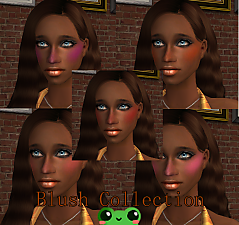
 *Natural Blushes*
 *Natural Blushes*

ewrye.JPG - width=866 height=636

Please read,before asking!!!!
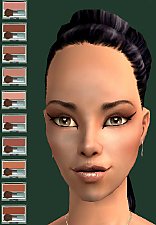
I'm working on more natural stuff and here are my "natural blushes". Only 5 colors-2 dark (look natural on dark skins),medium,rose and a light blush (perfect for goth or vamp sims). On this picture you'll see my sweet model...Maria.I really love her and I am not thinking of uploading her >:D. She's wearing natural eyeshadow and an eyeliner by me (I think that I'll upload the eyeliner soon).


Hair used: hair by Peggy,her site http://www.peggysims2.net/index.htm (payed hair :S )
If you have any more questions,AFTER you've read this you can pm me or write a comment :D
Any thanks or other comments are welcomed.
I hope you like my stuff and enjoy it as much as I do :D
Thank you
|
Natural blushes.rar
Download
Uploaded: 24th Feb 2007, 182.0 KB.
30,139 downloads.
|
||||||||
| For a detailed look at individual files, see the Information tab. | ||||||||
Install Instructions
1. Download: Click the download link to save the .rar or .zip file(s) to your computer.
2. Extract the zip, rar, or 7z file.
3. Place in Downloads Folder: Cut and paste the .package file(s) into your Downloads folder:
- Origin (Ultimate Collection): Users\(Current User Account)\Documents\EA Games\The Sims™ 2 Ultimate Collection\Downloads\
- Non-Origin, Windows Vista/7/8/10: Users\(Current User Account)\Documents\EA Games\The Sims 2\Downloads\
- Non-Origin, Windows XP: Documents and Settings\(Current User Account)\My Documents\EA Games\The Sims 2\Downloads\
- Mac: Users\(Current User Account)\Documents\EA Games\The Sims 2\Downloads
- Mac x64: /Library/Containers/com.aspyr.sims2.appstore/Data/Library/Application Support/Aspyr/The Sims 2/Downloads
- For a full, complete guide to downloading complete with pictures and more information, see: Game Help: Downloading for Fracking Idiots.
- Custom content not showing up in the game? See: Game Help: Getting Custom Content to Show Up.
- If you don't have a Downloads folder, just make one. See instructions at: Game Help: No Downloads Folder.
Loading comments, please wait...


Uploaded: 24th Feb 2007 at 9:46 PM
Updated: 19th Jan 2012 at 5:03 AM by CatOfEvilGenius
-
-
-

-
Rich Blush + Glowing Concealer
by im_a_disaster 21st May 2006 at 12:37am
-
by PinkGirl12 17th May 2007 at 1:14pm
-
-
-
by arrtisste36 3rd Oct 2008 at 2:22am
-
FinbatMilk's Collection of Blushes
by Finbatmilk 30th Jun 2025 at 1:06pm
-

FinbatMilk's Collection of Blushes #2
by Finbatmilk 2nd Jul 2025 at 11:18am


-
-


by lidiqnata 8th May 2026 at 8:40pm
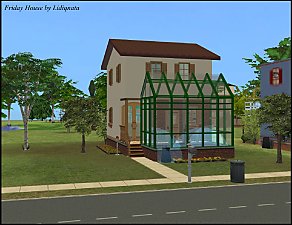
Yet another tiny house to play with! Info - No CC - Ultimate Collection is required - Has basement - Tiny lot: 2x1 Credit for the more...
 +17 packs
5 1.5k 1
+17 packs
5 1.5k 1 Happy Holiday
 Family Fun
 University
 Glamour Life
 Nightlife
 Celebration
 Open for Business
 Pets
Pets
 H&M Fashion
 Teen Style
 Seasons
 Kitchen & Bath
 Bon Voyage
 Free Time
 Ikea Home
 Apartment Life
 Mansion and Garden
-
-
-
-
-
-
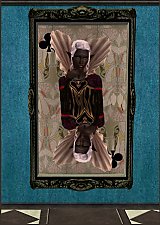
*Queen of Spades or Queen of Hearts?*
by lidiqnata 30th Dec 2012 at 4:46am
"Queen of Spades or Queen of Hearts?" Hmm...why not Queen of Clubs? Anyway,this is a project I got inspired long more...
6
15.7k
22
-
-


About Me
[size=5]Re-upload of everything created by me has started at [color=#fa2742]Lidiqnata sims 2[/color][/size]
[size=5]Visit my [color=#fa2742]Patreon[/color] if you wish to support this process.[/size]