
 Sign in to Mod The Sims
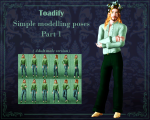
 Simple modelling poses part 1 - AF version
 Simple modelling poses part 1 - AF version


.jpg?cb=1756977856)
Simplemodellingposesdump1mainpreview.png - width=1653 height=1323
ToadifysimplemodellingposesAFPart1pose1-3.jpg - width=3264 height=1774
Poses 1 3
ToadifysimplemodellingposesAFPart1poses4-6.jpg - width=3264 height=1774
Poses 4 - 6
ToadifysimplemodellingposesAFPart1poses7-9.jpg - width=3264 height=2134
Poses 7 - 9
ToadifysimplemodellingposesAFPart1poses10-12.jpg - width=3264 height=1774
Poses 10 - 11
ToadifysimplemodellingposesAFPart1collageall(1).jpg - width=3264 height=2454
all poses

I need more modelling poses all the time, and so do others! So I made some. I also made similar ones for kids & made the same ones for male (basically, imported the animation to a male rig and fixed up some mweh bits like the hands on the hips etc) which are coming soon-ish.
In the download file you can find all this same information, but for your convenience:
Simple modelling poses 1 AF:
- a_ToadsimplemodellingposesAF-1: Standing sim, left leg outwards, looking forward
- a_ToadsimplemodellingposesAF-2: Standing sim, left leg outwards and bent, looking forward
- a_ToadsimplemodellingposesAF-3: Standing sim, right leg outwards and bent, looking forward
- a_ToadsimplemodellingposesAF-4: Standing sim, one leg in front of another, hand on right hip, looking left
- a_ToadsimplemodellingposesAF-5: Standing sim, one leg in front of another, hand on right hip, looking forward
- a_ToadsimplemodellingposesAF-6: Standing sim, one leg in front of another, arms by side, looking right
- a_ToadsimplemodellingposesAF-7: Standing sim, right leg outwards, arms crossed
- a_ToadsimplemodellingposesAF-8: Standing sim, legs pointing inwards, arms by side, looking forward
- a_ToadsimplemodellingposesAF-9: Standing sim, very simple/neutral
- a_ToadsimplemodellingposesAF-10: Standing sim, left leg outwards, more extreme version of 2
- a_ToadsimplemodellingposesAF-11: Standing sim, right leg crossing over left, hands behind back, looking right
- a_ToadsimplemodellingposesAF-12: Standing sim, right leg crossing over left, right hand on hip, left by side,

Credits & Tools used
- Cmomoney's Pose Player and Pose Pack Creator
- Sims3cliptoolrigs for the initial poselearning eons ago.
- I used Savanitas/Thesweetsimmer's Ik'ed rigs.
- Blender 2.79
Collage & thumbnails pictures use a minor reshade filter, otherwise no editing.
| Filename | Type | Size |
|---|---|---|
| ToadifysimplemodellingposesPart1-AFversion.rar | rar | |
| Toadify's simple modelling poses part 1 AF.txt | txt | 1222 |
| ToadifysimplemodellingposesAFPart1pose1-3.jpg | jpg | 2610643 |
| ToadifysimplemodellingposesAFPart1poses4-6.jpg | jpg | 2721058 |
| ToadifysimplemodellingposesAFPart1poses10-12.jpg | jpg | 2567782 |
| Toadifysimplemodellingposespart1AFNOLIST.package | package | 96447 |
| Toadifysimplemodellingposespart1AFPOSELIST.package | package | 272016 |
| ToadifysimplemodellingposesAFPart1poses7-9.jpg | jpg | 2997909 |
|
ToadifysimplemodellingposesPart1-AFversion.rar
| List compatible file, non list compatible file, codecollages & text file
Download
Uploaded: 4th Sep 2025, 10.54 MB.
193 downloads.
|
||||||||
| For a detailed look at individual files, see the Information tab. | ||||||||
Install Instructions
1. Click the download button, or the filename, to download the file to your computer.
2. Extract the zip, rar, or 7z file. Now you will have either a .package or a .sims3pack file.
For Package files:
1. Cut and paste the file into your Documents\Electronic Arts\The Sims 3\Mods\Packages folder. If you do not already have this folder, you should read the full guide to Package files first: Sims 3:Installing Package Fileswiki, so you can make sure your game is fully patched and you have the correct Resource.cfg file.
2. Run the game, and find your content where the creator said it would be (build mode, buy mode, Create-a-Sim, etc.).
For Sims3Pack files:
1. Cut and paste it into your Documents\Electronic Arts\The Sims 3\Downloads folder. If you do not have this folder yet, it is recommended that you open the game and then close it again so that this folder will be automatically created. Then you can place the .sims3pack into your Downloads folder.
2. Load the game's Launcher, and click on the Downloads tab. Find the item in the list and tick the box beside it. Then press the Install button below the list.
3. Wait for the installer to load, and it will install the content to the game. You will get a message letting you know when it's done.
4. Run the game, and find your content where the creator said it would be (build mode, buy mode, Create-a-Sim, etc.).
Extracting from RAR, ZIP, or 7z: You will need a special program for this. For Windows, we recommend 7-Zip and for Mac OSX, we recommend Keka. Both are free and safe to use.
Need more help?
If you need more info, see:
- For package files: Sims 3:Installing Package Fileswiki
- For Sims3pack files: Game Help:Installing TS3 Packswiki
Loading comments, please wait...

Uploaded: 4th Sep 2025 at 10:24 AM
-
Mix & Match: Some more Flamenco (couple) Poses, Part 2
by Franniez Sims 7th Jul 2012 at 9:06pm
 15
42.4k
66
15
42.4k
66
-
by spladoum 11th Mar 2013 at 7:27am
22
83.8k
142
-
by equiem 8th May 2014 at 11:04pm
12
31.3k
73
-

by meagansterno 8th Jul 2014 at 11:39am
19
76.1k
113
-
by k2m1too updated 16th Jan 2021 at 9:15pm
4
17.9k
34
-
by k2m1too updated 16th Jan 2021 at 9:17pm
7
15.9k
44
-

by spladoum 27th Mar 2015 at 3:08am
31
86.7k
254
-
-
by jessesue 15th Aug 2025 at 1:27pm
2
2.6k
3
-

-
by gitte2001 6th Jun 2025 at 8:41pm
6
5.4k
4
-
-
"Come on, fight me!" - Classroom argument/near-fight poseset
by gitte2001 13th Jul 2025 at 6:04pm
2
2k
1
-
by gitte2001 20th Jun 2025 at 10:06pm
1
1.6k
-
-
-
-
by gitte2001 30th Jun 2025 at 1:36pm
2
1.6k
2
-
-
Subtle full body freckles for the whole family
by gitte2001 31st May 2025 at 9:31pm
Subtle fullbody freckles for the whole family As a redhead-ish (opinions are divided) and pale person myself, it's a common theme more...
7
5.7k
19
About Me
My name is Gitte, Toadie or Toadify.
I am a storyteller and makes poses & CAS cc for my story or based on my characters. I have also been looking into default replacements and animation/modding.
I previously had another account, called GitteVdV, on which I uploaded sims and a couple of posesets in my teens. I wasn't really involved in the community for several years however and in the meantime lost access to that account (reset password and I don't get a mail on any of my normal email accounts + using one of them to make a new account worked), so this new account it is!
My earlier uploads here will be reuploads that I earlier posted on tumblr.