
 Sign in to Mod The Sims
 Hair Color Edit for "umhairmodbangs"
 Hair Color Edit for "umhairmodbangs"


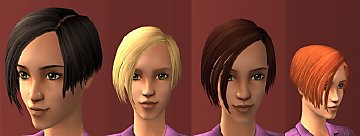
ModbangsColorEdit.jpg - width=800 height=600
1-Front.jpg - width=700 height=550
Notice the hair matching the maxis beard better.
2-Side.jpg - width=700 height=550
Notice the hair matching the maxis beard better.
3-Back.jpg - width=700 height=550
Notice the hair matching the maxis beard better.
4.jpg - width=700 height=550
Notice the hair matching the maxis beard better.
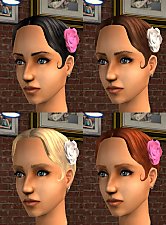
ModbangsComparison.jpg - width=815 height=1065
- I've used the original blond texture as a base.
- The colors closely match the other maxis hairs (Blond and Red are less bright, Black is slightly darker, etc.).
- Used part of Faylen's alpha that fixes some transparency lines around the hair. Link to it here.
- Requires Open for Business.
Credits:
CC used on model:
- Default Skin by IntincrMars
- Default Eyes by aledstrange
Additional Credits:
- MoogleSims - For this tutorial here
- Faylen - For hair alpha
- Photoshop
- The Compressorizer
- SimPE
| Filename | Type | Size |
|---|---|---|
| Isma27_Default_umhairmodbangs_HairColorEdit.rar | rar | |
| Isma27_Default_umhairmodbangs_HairColorEdit.package | package | 653525 |
|
Isma27_Default_umhairmodbangs_HairColorEdit.rar
Download
Uploaded: 3rd Nov 2026, 466.9 KB.
17 downloads.
|
||||||||
| For a detailed look at individual files, see the Information tab. | ||||||||
Install Instructions
1. Download: Click the download link to save the .rar or .zip file(s) to your computer.
2. Extract the zip, rar, or 7z file.
3. Place in Downloads Folder: Cut and paste the .package file(s) into your Downloads folder:
- Origin (Ultimate Collection): Users\(Current User Account)\Documents\EA Games\The Sims™ 2 Ultimate Collection\Downloads\
- Non-Origin, Windows Vista/7/8/10: Users\(Current User Account)\Documents\EA Games\The Sims 2\Downloads\
- Non-Origin, Windows XP: Documents and Settings\(Current User Account)\My Documents\EA Games\The Sims 2\Downloads\
- Mac: Users\(Current User Account)\Documents\EA Games\The Sims 2\Downloads
- Mac x64: /Library/Containers/com.aspyr.sims2.appstore/Data/Library/Application Support/Aspyr/The Sims 2/Downloads
- For a full, complete guide to downloading complete with pictures and more information, see: Game Help: Downloading for Fracking Idiots.
- Custom content not showing up in the game? See: Game Help: Getting Custom Content to Show Up.
- If you don't have a Downloads folder, just make one. See instructions at: Game Help: No Downloads Folder.
Loading comments, please wait...
 View with Names
Uploaded: 3rd Nov 2026 at 11:16 PM
-
-
-
-
Simgaroop'd Hair Default Texture Replacement
by maxboy 12th Aug 2014 at 5:46pm
 +14 packs
15 98.6k 133
 Family Fun
 University
 Glamour Life
 Nightlife
 Celebration
 Open for Business
 Pets
 Teen Style
 Seasons
 Kitchen & Bath
 Bon Voyage
 Free Time
 Apartment Life
 Mansion and Garden
-
Lidiqnata's Maxis Redo as Default
by Mia Moonstar 20th Nov 2014 at 7:55am
-

-

by IntincrMars updated 16th Jun 2026 at 9:39pm
4
7.3k
17
-

by indefinite 7th May 2026 at 8:23pm
-

by indefinite 14th May 2026 at 12:18am
-




Packs Needed
| Expansion Pack | |
|---|---|
| Open for Business |