
 Sign in to Mod The Sims
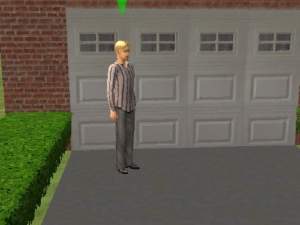
 No EPs Needed: The Sim Master Garage Door Collection
 No EPs Needed: The Sim Master Garage Door Collection


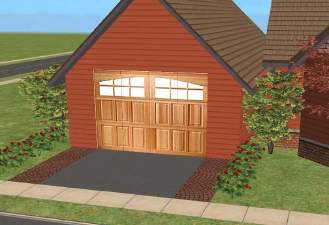
snapshot_00000001_70ed35ce.jpg - width=400 height=300
snapshot_00000001_50ed3590.jpg - width=400 height=300
snapshot_00000001_f0ed35b3.jpg - width=400 height=300
snapshot_00000001_d0ed3664.jpg - width=400 height=300
snapshot_00000001_f0ed361c.jpg - width=400 height=300
snapshot_00000001_70ed35f3.jpg - width=400 height=300
snapshot_00000001_50ed363b.jpg - width=400 height=300
snapshot_00000001_30ed368c.jpg - width=400 height=300

P.S. I origonally decided to make these because my Nightlife game wasn't working, but I then decided to share them with MTS2, as there are other people who don't have Nightlife and want a garage door! Enjoy!
Note: These wallpapers can be used in lots on MTS2 and any other free site on the Internet. Just please put a link back to this page and credit me for them. These better not appear on any pay sites. You have been warned!
|
Sim Master Garage Doors.zip
Download
Uploaded: 2nd Feb 2006, 151.4 KB.
3,338 downloads.
|
||||||||
| For a detailed look at individual files, see the Information tab. | ||||||||
Install Instructions
1. Download: Click the download link to save the .rar or .zip file(s) to your computer.
2. Extract the zip, rar, or 7z file
3. Place in Downloads Folder: Cut and paste the .package file(s) into your Downloads folder:
- Origin (Ultimate Collection): Users\(Current User Account)\Documents\EA Games\The Sims™ 2 Ultimate Collection\Downloads\
- Non-Origin, Windows Vista/7/8/10: Users\(Current User Account)\Documents\EA Games\The Sims 2\Downloads\
- Non-Origin, Windows XP: Documents and Settings\(Current User Account)\My Documents\EA Games\The Sims 2\Downloads\
- Mac: Users\(Current User Account)\Documents\EA Games\The Sims 2\Downloads
- Mac x64:
/Library/Containers/com.aspyr.sims2.appstore/Data/Library/Application Support/Aspyr/The Sims 2/Downloads
Need more information?
- For a full, complete guide to downloading complete with pictures and more information, see: Game Help: Downloading for Fracking Idiots.
- Custom content not showing up in the game? See: Game Help: Getting Custom Content to Show Up.
- If you don't have a Downloads folder, just make one. See instructions at: Game Help: No Downloads Folder.
Loading comments, please wait...

Uploaded: 2nd Feb 2006 at 1:57 AM
Updated: 2nd Feb 2006 at 3:58 AM
-
by SimLana71 29th Dec 2004 at 12:48am
 17
13.7k
5
17
13.7k
5
-
by UTCSimers 19th Jan 2005 at 6:50pm
4
4.4k
2
-

by wendra1970 19th Jul 2005 at 3:03am
2
5.8k
1
-
by Skyline-X 5th Sep 2005 at 3:16am
14
17.1k
4
-
-
by Mad Cat 20th Dec 2005 at 12:43pm
1
3.7k
1
-
by BlueBerry11 30th Dec 2005 at 5:55am
4
4.5k
1
-
by Ani81 29th Mar 2006 at 3:47pm
3
4.4k
-
by orangerevolt 28th Jun 2006 at 2:11am
13
19.2k
2
-
by lowcamifo 28th Aug 2007 at 9:42pm
6k
6


-
by Sim Master 2nd Jan 2006 at 2:59am
Okay, here is one of the houses that I created and uploaded on the exchange, only now it is completely more...
+1 packs
16 8.8k University
-
The "Dark" Collection Part 8: Plumbing
by Sim Master 20th Mar 2006 at 1:45am
Hello again, MTS2! more...
3
17.9k
11
-
-
The "Dark" Set Part 9: Lighting
by Sim Master 26th Mar 2006 at 11:01pm
Greetings, fellow members of MTS2! more...
7
19.9k
16
-
Blue, black, and green recolors of the "Matte & Glass" Double door.
by Sim Master 6th Mar 2006 at 1:50am
Hello again, MTS2! more...
6
11.4k
8
-
-
The "Dark" Collection Part 11: Electronics
by Sim Master 29th Apr 2006 at 8:48pm
Hello again, MTS2! After the popularity of the last part, I bring to you part 11, electronics! more...
6
17.2k
8
-

by Sim Master 31st Dec 2005 at 6:54pm
Here is my second lot upload, a large blue house. more...
+1 packs
12 6.2k University
-
by Sim Master 24th Jan 2006 at 1:23am
Hello everyone! Here's another of my great houses that was origonally on the exchange, now brought to you! more...
+1 packs
32 28.9k 14 University
-
The "Dark" Collection Part 2: Bed sheet recolors
by Sim Master 8th Mar 2006 at 11:17pm
Greetings! This is the second part of the Dark Collection, recolors of bed sheets! more...

About Me
2. My houses are not to be uploaded in any form onto any site.
3. You may not put any of my creations on ANY paysite or the exchange.
4. Enjoy my creations! :)