
 Sign in to Mod The Sims
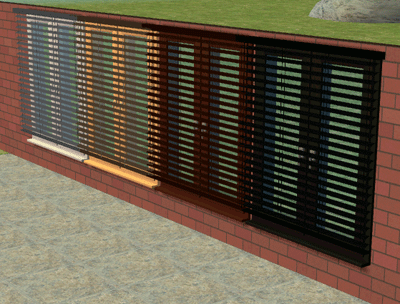
 Curvy Blinds - recolour of Functioning Blinds by Inge
 Curvy Blinds - recolour of Functioning Blinds by Inge


CurvyAutoShades_1.jpg - width=600 height=450
CurvyAutoShades_2.jpg - width=600 height=450
CurvyAutoShades_3.jpg - width=600 height=450
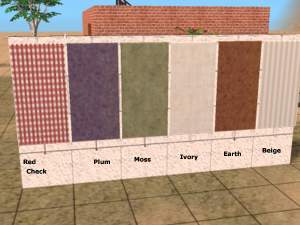
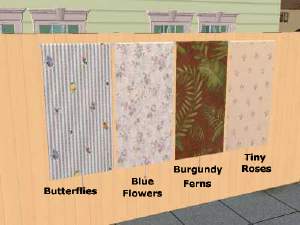
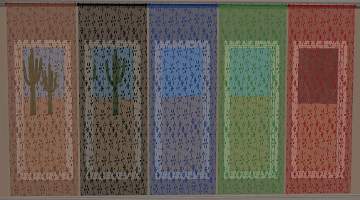
I made a Blue, Red, Yellow and Whitish one.
Long days and pleasant nights.
Atgnat
*edit* Mesh is now part of this thread: Autoshade1MMC.zip
|
Autoshade1MMC.zip
Download
Uploaded: 30th Apr 2006, 26.4 KB.
2,172 downloads.
|
||||||||
|
eXpresSims_tm_AutoShade_curvy_Red.rar
Download
Uploaded: 23rd Feb 2006, 36.5 KB.
2,828 downloads.
|
||||||||
|
eXpresSims_tm_AutoShade_curvy_Whitish.rar
Download
Uploaded: 23rd Feb 2006, 53.4 KB.
2,902 downloads.
|
||||||||
|
eXpresSims_tm_AutoShade_curvy_Yellow.rar
Download
Uploaded: 23rd Feb 2006, 56.2 KB.
2,701 downloads.
|
||||||||
|
eXpresSims_tm_AutoShade_curvy_Blue.rar
Download
Uploaded: 23rd Feb 2006, 59.9 KB.
2,893 downloads.
|
||||||||
| For a detailed look at individual files, see the Information tab. | ||||||||
Install Instructions
1. Download: Click the download link to save the .rar or .zip file(s) to your computer.
2. Extract the zip, rar, or 7z file.
3. Place in Downloads Folder: Cut and paste the .package file(s) into your Downloads folder:
- Origin (Ultimate Collection): Users\(Current User Account)\Documents\EA Games\The Sims™ 2 Ultimate Collection\Downloads\
- Non-Origin, Windows Vista/7/8/10: Users\(Current User Account)\Documents\EA Games\The Sims 2\Downloads\
- Non-Origin, Windows XP: Documents and Settings\(Current User Account)\My Documents\EA Games\The Sims 2\Downloads\
- Mac: Users\(Current User Account)\Documents\EA Games\The Sims 2\Downloads
- Mac x64: /Library/Containers/com.aspyr.sims2.appstore/Data/Library/Application Support/Aspyr/The Sims 2/Downloads
- For a full, complete guide to downloading complete with pictures and more information, see: Game Help: Downloading for Fracking Idiots.
- Custom content not showing up in the game? See: Game Help: Getting Custom Content to Show Up.
- If you don't have a Downloads folder, just make one. See instructions at: Game Help: No Downloads Folder.
Loading comments, please wait...
Uploaded: 23rd Feb 2006 at 8:21 PM
Updated: 19th Oct 2008 at 10:58 PM - *** changed outdated link ***
-
-
-
-
-
-
-
by mustluvcatz 30th Apr 2013 at 3:30pm
 23
28.9k
85
23
28.9k
85
-
Fitted Blinds One Mesh Fits in ANY window! Recolours
by Michelle 30th May 2015 at 9:09am
43
36.3k
212
-
by Michelle 12th Nov 2015 at 4:06am
16
25.4k
117
-
by Michelle 6th May 2018 at 1:30am
7
15k
60

-
-
-
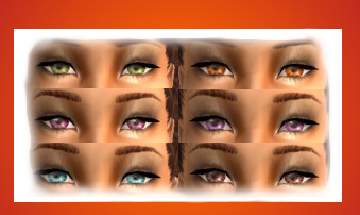
Circle Spotlight eyes - CONTACT LENSES !!
by Atgnat 14th May 2006 at 2:46pm
I made my Circle Spotlight eyes into Contact lenses. more...
1
12.6k
3
-
-
-
-
-
Bougain Villa 2 - Second in series by Atgnat
by Atgnat 21st Mar 2006 at 5:19pm
This the second of a series I'm calling Bougain Villas. more...
+2 packs
8 9.2k 2 University
 Nightlife
-
-
Bougain Villas - First in series by Atgnat
by Atgnat 18th Mar 2006 at 10:28pm
This a first of a series I'm starting called Bougain Villas. more...
+2 packs
4 7.1k 1 University
Nightlife


