
 Sign in to Mod The Sims
 Fence-Arches and Fences (Maxis-matching "Pinegultcher" set)
 Fence-Arches and Fences (Maxis-matching "Pinegultcher" set)


SetOverview.jpg - width=800 height=458
4-Colors.jpg - width=799 height=600
Garage.jpg - width=918 height=600
Garage2.jpg - width=803 height=600
Terrace1.jpg - width=800 height=600
Terrace2.jpg - width=802 height=600

AniBuild.gif - width=416 height=249
Catalog.jpg - width=418 height=450

(Maxis-matching "Pinegultcher" set)
WHAT ARE THE FENCE-ARCHES?
Have you ever noticed (or used!) the "Linking Logs Trellis Arch"? It's the very last icon in the Fences catalog. No? Me neither

But it's a pity, because that is the only example of Fence-Arch in the game. Its special feature is that it can be laid down like a fence, but can be built even over an existing fence, so to create unusual entrances and gateways. However, this fence-arch is rarely used because it comes in only one colour and only one shape: it only matches the brown "Pinegultcher" Maxis fence.
HOW TO INSTALL: IMPORTANT!
In order to use the custom Fence-Arches, you need to install the Scriptorium (v. 2.2 or later), with the option "Custom Walls-Fences-Arches" activated.
When done, install the files as follows:
- unpack the archive "FenceArches_DownloadsFolder.rar" to the Downloads folder;
- unpack the archive "Fences_DownloadsFolder.rar" to the Downloads folder, too;
- double-click on the shortcut "Scriptorium_Walls-Fences-Arches" (located in the Downlaods) and a Scriptorium window will open up: you will see the note "-- Put here all the custom scripts for Walls, Fences and FenceArches";
- unpack the archive "FenceArches_ScriptoriumFolder.rar" to the open Scriptorium window.
WHY THIS SET?
I confess: I'm posting this set because no one so far has posted custom Fence-Arches
 And I also wanted to expand the "Pinegultcher" set, so to make it actually usable. Maxis, as usual, is no good at creating matching sets: the game contains the gates in 5 colours, but the fences come only in 2 colours, and there is only 1 fence-arch... TSK! TSK!
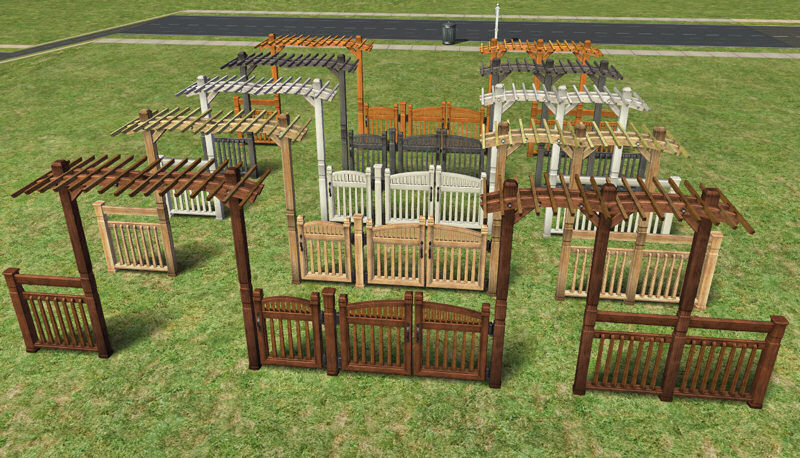
After installing these files, you will have a complete Pinegultcher set:
(NOTE: this is an edited image; in the game catalog,
you will see one icon for each fence and fencearch colour).
Apart from the well-known "brown" colour, you will have 4 more colours to choose from:
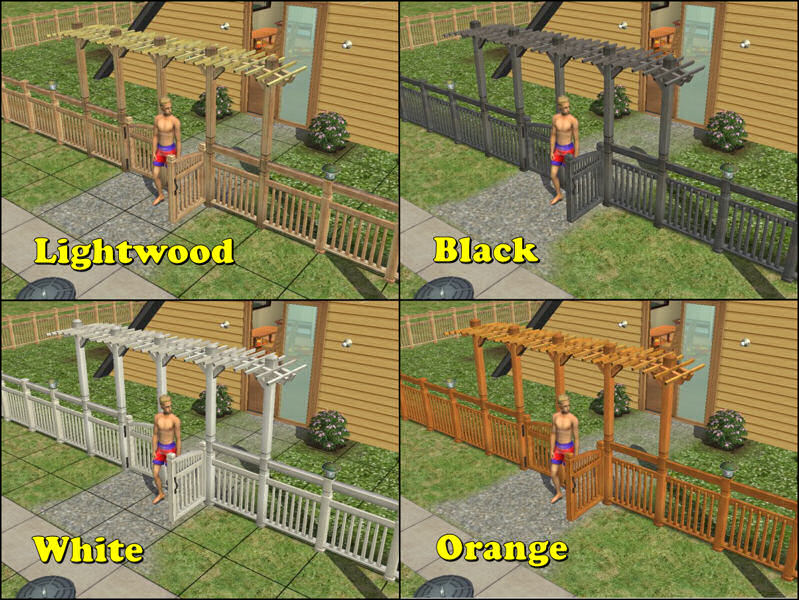
Please note that the set includes two different versions of the Fence-Arches:
- Standard Fence-Arch with posts at each tile (Maxis mesh);
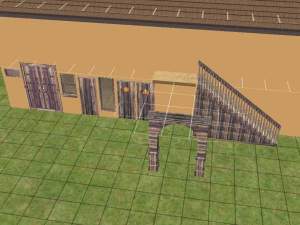
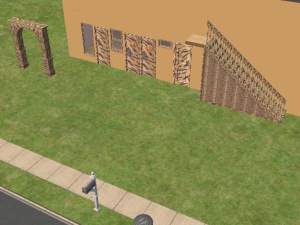
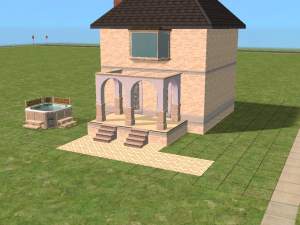
- Suspended Fence-Arch with posts only at the sides: this is useful to create covered areas, such as dining terraces, or covered driveways (see attached screenshots, below).
HOW TO USE THE FENCE-ARCHES
Very simple! They are laid down just like any fence; the mesh is updated dynamically, while you drag the fence tool:
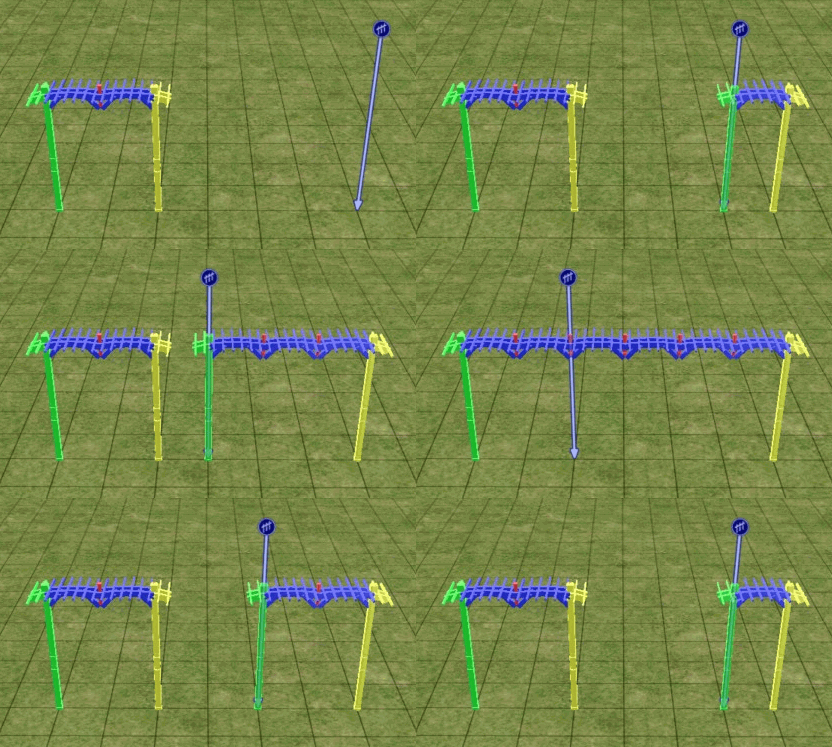
If you create a covered area, it will be normally usable (you can place objects under the arches, and the sims will be able to use them). Only the driveways require the moveObjects cheat to be placed, but then they work fine.
NOTE - The sims will walk through the posts of the suspended arch: this is not a bug, I had to do it in order to make the underneath area usable.
GAME COMPATIBILITY
All the attached fences and fence-arches are compatible with ANY game, including the base-game only.
CREDITS AND ACKNOWLEDGEMENTS
Credits to Maxis, for the original mesh of the fence-arch (the suspended version is a variation over the Maxis mesh); half of the textures used are by Maxis too (they were 'lost' in the game files).
Thanks also to Niol for discussing with me this interesting subject, in this thread.
Polygon Counts:
The fence-arches are modular: the various pieces are dynamically joined while dragging the fence tool; while it's impossible to declare a poly-count per tile (because it depends on how wide is the fence-arch), you can have an idea reading these figures:
- A 3-tile-wide "standard" fence-arche (with posts at each tile) uses:
4040 Faces / 4886 Vertices (average: 1346/1629 per tile).
The poly count is identical to the original Maxis fence-arch. - A 3-tile-wide "suspended" fence-arch (with posts at the sides only) uses:
3538 F / 6128 V (average: 1180/2042 per tile).
This is a new mesh, and means that it's a brand new self contained object that usually does not require a specific Pack (although this is possible depending on the type). It may have Recolours hosted on MTS - check below for more information.
|
Fences_DownloadsFolder.rar
Download
Uploaded: 24th Nov 2008, 145.7 KB.
17,134 downloads.
|
||||||||
|
FenceArches_ScriptoriumFolder.rar
Download
Uploaded: 24th Nov 2008, 2.2 KB.
16,538 downloads.
|
||||||||
|
FenceArches_DownloadsFolder.rar
Download
Uploaded: 24th Nov 2008, 526.9 KB.
18,199 downloads.
|
||||||||
| For a detailed look at individual files, see the Information tab. | ||||||||
Install Instructions
1. Download: Click the download link to save the .rar or .zip file(s) to your computer.
2. Extract the zip, rar, or 7z file.
3. Place in Downloads Folder: Cut and paste the .package file(s) into your Downloads folder:
- Origin (Ultimate Collection): Users\(Current User Account)\Documents\EA Games\The Sims™ 2 Ultimate Collection\Downloads\
- Non-Origin, Windows Vista/7/8/10: Users\(Current User Account)\Documents\EA Games\The Sims 2\Downloads\
- Non-Origin, Windows XP: Documents and Settings\(Current User Account)\My Documents\EA Games\The Sims 2\Downloads\
- Mac: Users\(Current User Account)\Documents\EA Games\The Sims 2\Downloads
- Mac x64: /Library/Containers/com.aspyr.sims2.appstore/Data/Library/Application Support/Aspyr/The Sims 2/Downloads
- For a full, complete guide to downloading complete with pictures and more information, see: Game Help: Downloading for Fracking Idiots.
- Custom content not showing up in the game? See: Game Help: Getting Custom Content to Show Up.
- If you don't have a Downloads folder, just make one. See instructions at: Game Help: No Downloads Folder.
Loading comments, please wait...



Uploaded: 24th Nov 2008 at 2:28 PM
Updated: 14th Mar 2009 at 7:48 PM - Restored missing attachment
#fencearch, #fence-arches, #scriptorium, #fence, #maxis match
-
-
by corapanther 10th Feb 2006 at 5:25pm
 25
34.7k
27
25
34.7k
27
-
by netseeker2 21st Feb 2006 at 7:39am
1
6.3k
1
-
-
-
by Blacky 8th Sep 2006 at 6:06pm
16
30.3k
27
-
by Blacky 8th Sep 2006 at 6:11pm
6
16.3k
14
-
by crocobaura 17th Jun 2007 at 12:47pm
18
17.6k
17
-
by ulmille 1st Sep 2007 at 10:14pm
30
52.7k
73
-
by ninipupucea 24th Sep 2008 at 9:50pm
10
21.6k
30


-

No Lightnings During Storms - Global Hack
by Numenor 14th Apr 2007 at 12:10am
NO LIGHTNINGS DURING STORMS * Global Hack - Seasons required* WARNING: This is a Global more...
+1 packs
54 35k 24 Seasons
-
"Ape Essence by Monkeyino" - Vending Rack & Perfume
by MaryLou & Numenor updated 1st Apr 2008 at 3:51am
"APE ESSENCE" BY MONKEYINO - VENDING RACK & PERFUME by MaryLou & Numenor Works with any game up to more...
56
164.5k
78
-

*Custom Tailored* Pet Pillows and Basket
by MaryLou & Numenor 22nd Dec 2006 at 3:46pm
CUSTOM TAILORED PET PILLOWS AND BASKET A bed size for each pet size! more...
+1 packs
37 68.6k 157 Pets
Pets
-
by MaryLou & Numenor 20th May 2006 at 12:38am
MODULAR ROUND FLOWERBEDS Build flowerbeds at your heart content! more...
169
204.9k
291
-

Drivable Cars without NL (Game Add-on) *UPD 28nov2008*
by Numenor updated 10th Nov 2008 at 11:49pm
DRIVABLE CARS WITHOUT NIGHTLIFE Game Add-on by Numenor (and Maxis...) 14 DEC 2009 - more...
227
381.3k
173
-
Cash Register Trainer (Global Mod version) - *UPD 07 NOV 2008*
by Numenor 14th Jan 2007 at 12:37am
CASH REGISTER TRAINER - *OFB REQUIRED* Compatible with any game up to Apartment Life :new: 07 Nov 2008 - more...
+1 packs
107 197.9k 274 Open for Business
-
Instant Stereo Op - Global Hack
by Numenor 11th Apr 2007 at 12:22am
INSTANT STEREO OP *Global Hack * Warning: this is a global hack, which means more...
34
49.2k
69
-
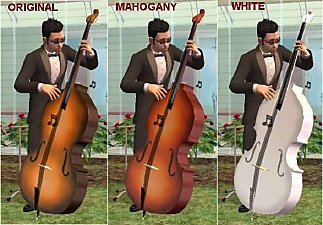
Recolours for Atavera's Contrabass
by Numenor 1st May 2005 at 1:10am
Atavera has created a wonderful Classic Contrabass (#post1530813), and I've prepared a couple of recolours for it: Mahogany and White. more...
+1 packs
25 66.9k 58 University
-
-

Sleep on Community/OFB/Vacation/Apartment/Secret lots - Global Hack
by Numenor 27th Jul 2007 at 5:46pm
SLEEP & NAP ON COMMUNITY LOTS - GLOBAL HACK Let your sims get a "second home"! more...
167
261k
628





About Me
You may contact me via personal messages here at MTS, and I will reply, but I don't grant I can help you, as a long time has gone by since I created my mods.
This following policy applies to ALL my creations, unless otherwise stated on the download thread.
It's FORBIDDEN: to repost my stuff anywhere.
It's FORBIDDEN: to clone my creations.
It's ALLOWED: to create recolours for my objects (and post them on any site, including paysites), BUT you can't include the mesh in your recolour: you must give credits to me for the mesh, and provide a link to the mesh download thread.
It's ALLOWED: to include my creations in your lots, BUT the lots must be uploaded on free sites (except the Exchange), and you must provide credits and a link to the download thread.