
 Sign in to Mod The Sims
 The White Wood House (with split level stairs, 4 levels and double garage)
 The White Wood House (with split level stairs, 4 levels and double garage)


whitewoodfront.jpg - width=1000 height=624
whitewoodfrontinslf.jpg - width=1000 height=631
whitewoodfrontinsuf.jpg - width=1000 height=631
whitewoodfrontgarden.jpg - width=1000 height=631
whitewoodplanlowupp.jpg - width=1200 height=783
whitewoodplanbasatt.jpg - width=1200 height=783
whitewoodfrontsl.jpg - width=962 height=600
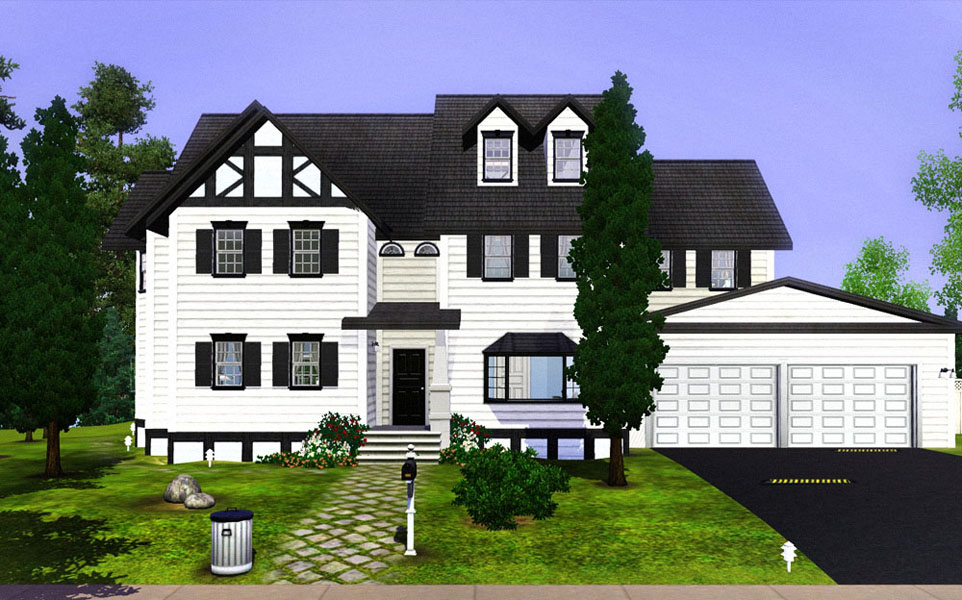
A house created for big families or some wealthy grandparents with lots and lots of grandchildren! The decoration through different levels of the house won’t match that much. Simply because I like to keep the children’s bedrooms a place for children and not some place being too much influenced by a kind of magazine design. I hope you enjoy this one

Price
Unfurnished: $ 146.815
Furnished: $ 79.230
A short description
Basement
sport/game room with plasma t.v.
Lower Floor
Living room with fireplace, kitchen & bathroom
Upper Floor
Spacious landing
4 bedrooms
2 bathrooms (master bedroom has its own ensuite bathroom)
Attic
Pretty basic, I’ll leave it all up to you
Lot Size: 3x4
Lot Price: $ 146.815
|
White Wood .zip
Download
Uploaded: 11th Aug 2009, 2.51 MB.
4,594 downloads.
|
||||||||
| For a detailed look at individual files, see the Information tab. | ||||||||
Install Instructions
1. Click the filename or the download button to download the file to your computer.
2. Extract the zip, rar, or 7z file.
2. Select the .sims3pack file you got from extracting.
3. Cut and paste it into your Documents\Electronic Arts\The Sims 3\Downloads folder. If you do not have this folder yet, it is recommended that you open the game and then close it again so that this folder will be automatically created. Then you can place the .sims3pack into your Downloads folder.
5. Load the game's Launcher, and click on the Downloads tab. Select the house icon, find the lot in the list, and tick the box next to it. Then press the Install button below the list.
6. Wait for the installer to load, and it will install the lot to the game. You will get a message letting you know when it's done.
7. Run the game, and find your lot in Edit Town, in the premade lots bin.
Extracting from RAR, ZIP, or 7z: You will need a special program for this. For Windows, we recommend 7-Zip and for Mac OSX, we recommend Keka. Both are free and safe to use.
Need more help?
If you need more info, see Game Help:Installing TS3 Packswiki for a full, detailed step-by-step guide!
Loading comments, please wait...
Uploaded: 11th Aug 2009 at 1:48 AM
-
-
-
-
Charming Georgian Tudor (with swimming pool & double garage)
by Sinead19 28th Aug 2009 at 12:04am
 12
21k
26
12
21k
26
-
by Cloudburst 26th Jan 2010 at 11:29pm
19
45.5k
66
-
-
by luvalphvle 1st Oct 2014 at 7:24pm
+12 packs
3 6.6k 30 World Adventures
 Ambitions
 Late Night
 Generations
 Town Life Stuff
 Master Suite Stuff
 Pets
Pets
 Showtime
 Supernatural
 Seasons
 University Life
 Island Paradise
-
by luvalphvle 3rd Oct 2014 at 9:06pm
+9 packs
2 8.2k 22 World Adventures
Ambitions
Late Night
Generations
Master Suite Stuff
Pets
Supernatural
Seasons
University Life
-
Mid Century Split-Level (CC Free)
by luvalphvle 20th Jan 2017 at 6:29pm
+3 packs
6 9.5k 33 Generations
Supernatural
University Life
-
70's Style Split Level 4Bed 2Bath
by PolarBearSims 12th May 2018 at 3:24am
+9 packs
4 7.5k 17 World Adventures
Late Night
Generations
Pets
Supernatural
Seasons
University Life
Island Paradise
 Into the Future


-
Old Brickwood (III), Worker's House
by nivaso 13th Jul 2010 at 5:51am
An old worker's house from the (Old) Brickwood series built on a small 10x15 lot. As always, it’s fully furnished and cozy. more...
+2 packs
26 39.5k 73 World Adventures
Ambitions
-
-
Little Red Budget Home with garage (2 bedrooms)
by nivaso 8th Aug 2009 at 9:23pm
This Little Red House is a nice little place for young families or senior couples. more...
5
10.8k
6
-
Comfortable Charming Family Home with Basement
by nivaso 25th Jul 2009 at 1:06am
Another charming family home for a reasonable price. more...
27
40k
68
-
Downtown European Corner Community Lot
by nivaso 23rd Sep 2009 at 6:29pm
I think this building fits perfect with the rest of the standard Maxis downtown community lots and decoration. more...
15
39.8k
57
-
Old Brickwood IV, Worker's House
by nivaso 14th Jul 2010 at 4:21pm
This old house is perfect for a family of 4/5. more...
+1 packs
31 31.2k 51 World Adventures
-
A charming "Welcome Home" (3 bedrooms)
by nivaso 17th Aug 2009 at 8:20pm
Welcome Home A cozy house surrounded by flowers, built with wood and stone. more...
27
29.8k
64
-
Brickwood - Fully Furnished Suburban Home (3 bedrooms)
by nivaso 20th Aug 2009 at 9:38pm
Brickwood. more...
49
52.4k
85
-
Brickwood II (with double garage & basement)
by nivaso 23rd Aug 2009 at 5:03am
Brickwood II As promised, here another classic house from the Brickwood Serie, more...
40
71.9k
148
-
Old Brickwood VI (107 Front Hill)
by nivaso 28th Jul 2010 at 3:38pm
Below 18K, fully furnished "almost" starter home, more...
+2 packs
7 16.9k 18 World Adventures
Ambitions
About Me
About me:
I got my first Sims game in 2000 and never stopped playing (building) since then.
About my style
I like all kind of styles: modern, classic, rusty, kitsch, retro etc. As long as it all fits together. In the beginning when I started constructing with the Sims 3 my style was more “polished” but with time I discovered the rusty metal, old carpets and broken wood textures, which add a certain reality to my creations.
My idea is to build enough of each style so that players can actually fill a whole street with it and hopefully once their whole town.
Creations: In some cases you will find doors with old paint, rotten wood, dirty carpets, mouldy walls and colour combinations that are not from this century. I also create houses that are not so “ghetto” like, meaning that only some details of the house look old and that the interior of the house is more up-to-date. The previous Brickwoods and other creations you could consider more “polished”.
Lightning
How come the light looks different? First of all, I love the light between 6 and 8 am.
Especially in Twinbrook the light is beautiful at this time. So I usually take pictures around this hour, making sure that the front of the house is not in the shadow. In addition I enhance the lights and shadows with an editor program. After Brickwood IV I decided only to “touch up” the first picture (eye catcher) of each upload, leaving the rest of the pictures untouched, so sim players can compare them. The light of Brickwood number V hasn’t been enhanced at all. Furthermore I have a good PC and graphic card, allowing me to enjoy the game with optimal settings.
You can link my creations, but never take credit for them.
Thanks for downloading my creations, enjoy!