
 Sign in to Mod The Sims
 2009 Bugatti Veyron
 2009 Bugatti Veyron


Screenshot-176.jpg - width=900 height=720
Screenshot-177.jpg - width=900 height=720
Screenshot-179.jpg - width=900 height=720
Screenshot-180.jpg - width=900 height=720
Screenshot-181.jpg - width=900 height=720
Screenshot-183.jpg - width=900 height=720
Screenshot-178.jpg - width=900 height=720
Screenshot-182.jpg - width=900 height=720

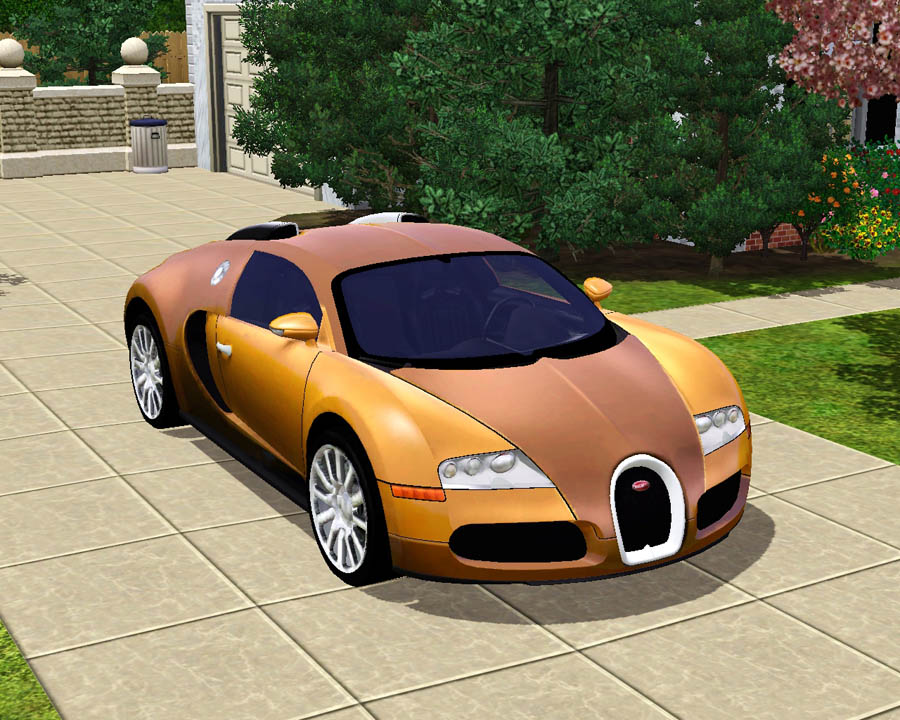
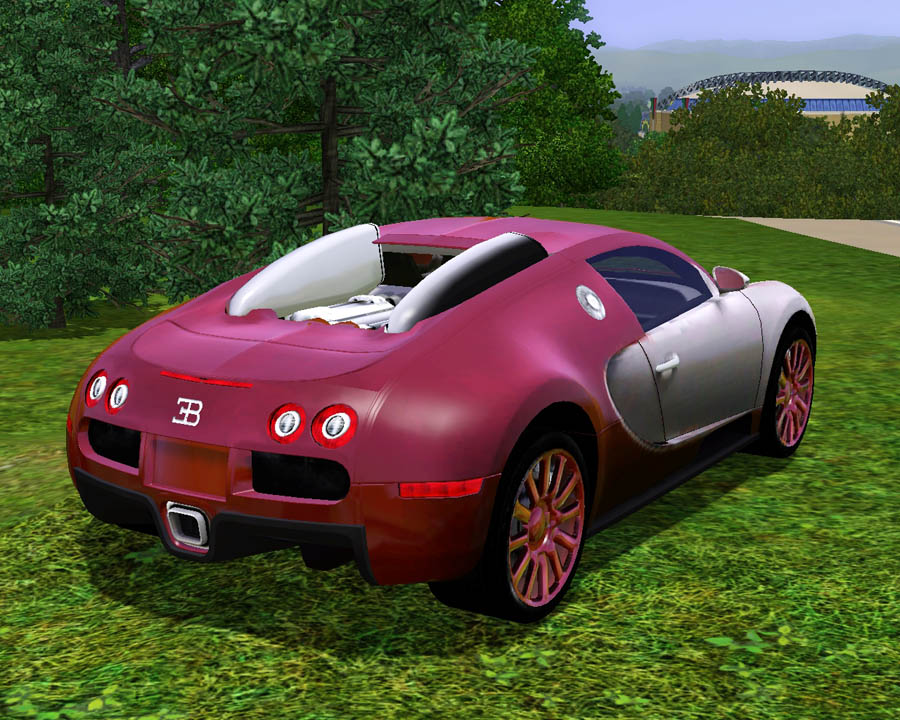
This car is spectacular! The color combinations are countless and amazing! It just amazes me so much.
 It took me a long while to get everything right, and Im proud of it. The car has 3 recolorable parts, the 2 body parts and the rims. :D
Anyway, this car has no problems. I will still have no lights on some cars in the future. It turns out the car you clone determines if the lights will work or not. This can be found in the vehicles section. It only cost $100,000 in game because the real life price of a million would be bogus to achieve in the sims. So enjoy this breath taking car! :D
Polygon Counts:
Faces: 17,825, Vertices: 23,702
Additional Credits:
DD - I love you so much man!
GoldenSimmer - Thank you for the beautiful house !
Wes, Inge, PeterJones and everyone for all of their wonderful tools and help!
www.aironeracing.com for modified model, Model converted from Need For Speed.
Have written permission from EA and Approval from Administrator HystericalParoxysm. =]
This is a new mesh, and means that it's a brand new self contained object that usually does not require a specific Pack (although this is possible depending on the type). It may have Recolours hosted on MTS - check below for more information.
|
F-P 2009 Bugatti Veyron.zip
Download
Uploaded: 23rd Aug 2009, 3.06 MB.
167,846 downloads.
|
||||||||
| For a detailed look at individual files, see the Information tab. | ||||||||
Install Instructions
1. Click the download button, or the filename, to download the file to your computer.
2. Extract the zip, rar, or 7z file. Now you will have either a .package or a .sims3pack file.
For Package files:
1. Cut and paste the file into your Documents\Electronic Arts\The Sims 3\Mods\Packages folder. If you do not already have this folder, you should read the full guide to Package files first: Sims 3:Installing Package Fileswiki, so you can make sure your game is fully patched and you have the correct Resource.cfg file.
2. Run the game, and find your content where the creator said it would be (build mode, buy mode, Create-a-Sim, etc.).
For Sims3Pack files:
1. Cut and paste it into your Documents\Electronic Arts\The Sims 3\Downloads folder. If you do not have this folder yet, it is recommended that you open the game and then close it again so that this folder will be automatically created. Then you can place the .sims3pack into your Downloads folder.
2. Load the game's Launcher, and click on the Downloads tab. Find the item in the list and tick the box beside it. Then press the Install button below the list.
3. Wait for the installer to load, and it will install the content to the game. You will get a message letting you know when it's done.
4. Run the game, and find your content where the creator said it would be (build mode, buy mode, Create-a-Sim, etc.).
Extracting from RAR, ZIP, or 7z: You will need a special program for this. For Windows, we recommend 7-Zip and for Mac OSX, we recommend Keka. Both are free and safe to use.
Need more help?
If you need more info, see:
- For package files: Sims 3:Installing Package Fileswiki
- For Sims3pack files: Game Help:Installing TS3 Packswiki
Loading comments, please wait...



Uploaded: 23rd Aug 2009 at 12:43 PM
#2009, #bugatti, #veyron, #sports car, #cars, #auto, #automobile, #vehicle, #transportation, #sims 3, #fresh, #prince
-
by Fresh-Prince 31st Aug 2009 at 10:44pm
 103
280.2k
251
103
280.2k
251
-
by Fresh-Prince 6th Sep 2009 at 12:18pm
82
148.6k
114
-
by Fresh-Prince 11th Oct 2009 at 12:41am
61
126.5k
120
-
by Fresh-Prince 14th Jan 2010 at 9:01am
56
159.5k
223
-
by Fresh-Prince 19th Jan 2010 at 6:36pm
32
122.9k
142
-
by Fresh-Prince 19th Feb 2010 at 5:31pm
49
134.5k
172
-
by Fresh-Prince 20th Feb 2010 at 8:55pm
77
176.6k
310
-
-
by Fresh-Prince 21st Apr 2010 at 8:09pm
105
234.6k
323
-
by Fresh-Prince 12th Aug 2010 at 10:56pm
96
230.2k
421

-
by Fresh-Prince 9th Nov 2006 at 5:25pm
I like this car a lot,lol! more...
 +1 packs
41 62.6k 37
+1 packs
41 62.6k 37 Nightlife
-
by Fresh-Prince 29th Dec 2008 at 5:01pm
A great SUV for off-roading in the mountains! more...
+1 packs
31 75.6k 106 Nightlife
-
by Fresh-Prince 28th Jun 2006 at 1:27am
Note: Click on back glass to select the vehicle. All comments welcome and enjoy the nissan cedric. more...
+1 packs
11 43.2k 20 Nightlife
-
by Fresh-Prince 30th Sep 2006 at 9:21pm
This bedroom set was made by request. :D It includes 5 new meshes and a invisible table. more...
-
Men's "Fierce Flow" Hair - Teen to Elder
by Fresh-Prince 19th Oct 2009 at 5:21pm
Hey guys! I actually made a hair! :) First off, I want to thank HystericalParoxysm for her outstanding tutorial! more...
-
by Fresh-Prince 12th Nov 2006 at 8:38pm
Too lazy to drive and get up off the couch? Well not anymore! more...
+1 packs
156 112.2k 119 Nightlife
-
-
by Fresh-Prince 28th Jun 2006 at 12:48am
Note: Click on front lights to select the vehicle. All comments welcome and enjoy the skoda octavia. more...
+1 packs
8 29.5k 15 Nightlife
-
by Fresh-Prince 21st Aug 2009 at 12:00am
Yay! Another car! This time it's a beautiful luxury sedan! Audi, it's my favorite! Thank you DD! more...
53
124.2k
95
-
Emachines T6532 w/ 17'' LCD Monitor
by Fresh-Prince 22nd Jun 2006 at 11:30pm
NOTE: Please click around the first cd tray to select the pc! more...
153
158.2k
160


