
 Sign in to Mod The Sims
 Clean UI Alternative Loading Screen
 Clean UI Alternative Loading Screen


TheSims2 Clean UI Loading Screen by ItsShuno 1920x1080.png - width=1932 height=1089
TheSims2 Clean UI Loading Screen by ItsShuno.png - width=2560 height=1440
Information: This mod can conflict with other loading screen mods. use only one loading screen at a time.

Update:
I have now improved the quality so that it no longer looks so pixelated. There are now 2 versions for 2 resolutions.
how do i install the loading screen?
You need to put the package file in the UI folder. folder path:
TS2 Ultimate Collection:
C:\Program Files (x86)\Origin Games\The Sims 2 Ultimate Collection\Double Deluxe\Base\TSData\Res\UI
Normal (if you don't have the Ultimate Collection):
C:\Program Files (x86)\EA GAMES\The Sims 2\TSData\Res\UI
Additional Credits: SimPE
|
ItsShuno Clean UI Loading Screen (2560x1440).zip
Download
Uploaded: 23rd Feb 2020, 104.2 KB.
587 downloads.
|
||||||||
|
ItsShuno Clean UI Loading Screen (1920x1080).zip
Download
Uploaded: 23rd Feb 2020, 144.8 KB.
1,361 downloads.
|
||||||||
| For a detailed look at individual files, see the Information tab. | ||||||||
Install Instructions
1. Download: Click the download link to save the .rar or .zip file(s) to your computer.
2. Extract the zip, rar, or 7z file.
3. Place in Downloads Folder: Cut and paste the .package file(s) into your Downloads folder:
- Origin (Ultimate Collection): Users\(Current User Account)\Documents\EA Games\The Sims™ 2 Ultimate Collection\Downloads\
- Non-Origin, Windows Vista/7/8/10: Users\(Current User Account)\Documents\EA Games\The Sims 2\Downloads\
- Non-Origin, Windows XP: Documents and Settings\(Current User Account)\My Documents\EA Games\The Sims 2\Downloads\
- Mac: Users\(Current User Account)\Documents\EA Games\The Sims 2\Downloads
- Mac x64: /Library/Containers/com.aspyr.sims2.appstore/Data/Library/Application Support/Aspyr/The Sims 2/Downloads
- For a full, complete guide to downloading complete with pictures and more information, see: Game Help: Downloading for Fracking Idiots.
- Custom content not showing up in the game? See: Game Help: Getting Custom Content to Show Up.
- If you don't have a Downloads folder, just make one. See instructions at: Game Help: No Downloads Folder.
Loading comments, please wait...

Uploaded: 22nd Feb 2020 at 4:02 PM
Updated: 23rd Feb 2020 at 9:58 PM
-
by Metroid Menace 26th Nov 2005 at 10:53am
 25
46k
21
25
46k
21
-
-
UI Recolour - Violet - Nightlife
by Patrick2.0 10th Apr 2006 at 11:36pm
+1 packs
47 32.9k 19 Nightlife
-
-
-
The Sims 2 - Pre-Release Logo Loading Screen Replacement
by userjoao 23rd Jun 2016 at 10:42pm
15
15k
29
-
Custom Loading Screen for Starship UI users — Green Plumbobs pattern
by l3lake 23rd Jul 2022 at 5:30pm
5.7k
14
-
by guirnaldas updated 15th Mar 2026 at 8:06am
+1 packs
19 5.4k 14 Mansion and Garden


-
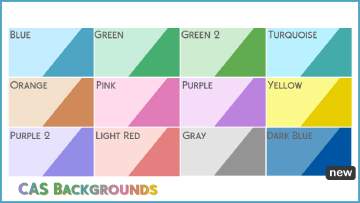
12 CAS Backgrounds in different Colors
by ItsShuno updated 16th Sep 2019 at 6:15pm
I hope you like these CAS Backgrounds. :) Update: I added a gray CAS Background! more...
 5
13.3k
17
5
13.3k
17
